
adjifobelhoemalljgnjdlockheiacmc

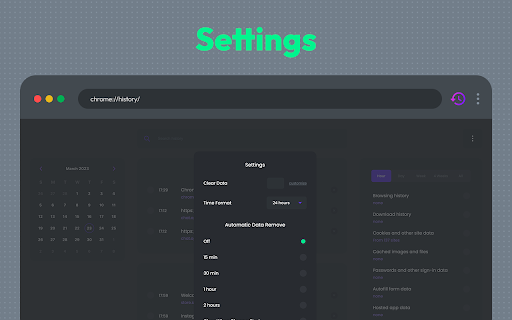
Browser History Plus replaces the default browser history and offers additional controls to manage and browse history with ease. Browser History Plus is designed to improve the way users browse and manage their browsing history. It replaces the default browser history and offers additional controls to manage and browse history with ease. The extension is designed to cater to users who have a lot of browsing history and find it difficult to navigate through it. Our extension offers a calendar view that allows users to see their browsing history in a more intuitive way. Users can select a date and view all the websites they visited during that day. The calendar view is a great way to quickly navigate through history and find the websites you visited on a specific day. Browser History Plus also offers a section to clean cache, history, downloads, cookies, and other Chrome browsing data. Users can quickly delete their browsing data without having to navigate through different menus and options. The section also offers customizable cleaning options, allowing users to delete only the data they want. The extension also offers an advanced search feature that allows users to search their browsing history using keywords. Users can search for a specific website or a keyword and quickly find relevant results. The search feature makes it easy to find websites that you visited a long time ago. Browser History Plus is a comprehensive tool that offers more control and customization options to manage and browse your browsing history. With its calendar view, advanced search, cleaning options, and categorization features, the extension makes it easy to navigate through your browsing history and find the websites you visited a long time ago. There are several reasons why users should occasionally clean cache, history, downloads, cookies, and other Chrome browsing data: 1. Free up disk space: As you browse the internet, your browser stores various types of data such as cache files, cookies, and browsing history. Over time, these files can accumulate and take up a significant amount of disk space on your computer. By cleaning these files, you can free up space on your hard drive, which can help improve your computer's performance. 2. Protect privacy: When you browse the internet, your browser stores information about the websites you visit, your search history, and other data. If you share your computer with others or use a public computer, this information can be accessed by others. By regularly cleaning your browsing data, you can protect your privacy and prevent others from accessing your sensitive information. 3. Fix website issues: Sometimes, website issues can occur due to cached data or other browsing data stored in your browser. By clearing your cache and other browsing data, you can fix issues such as pages not loading correctly or broken links. 4. Improve browser performance: Over time, your browser can become slower due to the accumulation of browsing data. By clearing your cache and other browsing data, you can improve your browser's performance and speed up page loading times. 5. Remove malware: Malware can sometimes be stored in your browser's cache or other browsing data. By cleaning these files, you can remove any potential malware from your computer and protect yourself from security threats. In summary, cleaning cache, history, downloads, cookies, and other Chrome browsing data can help free up disk space, protect privacy, fix website issues, improve browser performance, and remove potential malware. It's a good idea to regularly clean your browsing data to keep your computer running smoothly and protect your sensitive information.

History Trends Unlimited
Search and analyze your unlimited history. History Trends Unlimited regularly syncs your history to a local database to work around the (approximate) 3-month time limit imposed by Chrome. Your history is saved locally; it's never shared or sent over the network. Features: * Interactive charts and stats. Click any of the bar/line/pie charts to filter by a value. * Search your history by keyword. Or browse it chronologically. * Access the raw data to perform your own analysis. Click the "Export These Results" link on the Trends or Search page. * Transfer your history to a new computer. See instructions on the Options page. NOTES: * This extension now requires a minimum of Chrome v109. * Uninstalling this extension will delete all of the history it has saved. To create a backup of your history, use the "Export History" button on the Options page. * This extension stores your history separate from Chrome's history, which means 1) clearing Chrome's history will not delete your history in this extension, and 2) this extension will not preserve the color of links you have already visited.

Bookmark & History Manager
An open-source plugin. Quickly search bookmarks and history. Open source small plugin, source code: https://github.com/ric2cn/webdiary You can set a shortcut on the chrome extension management page to quickly activate the plugin. After activating the plugin panel, the latest browsing history will be displayed by default, with a maximum of 50 entries. For these records you can: 1. Clear all records of the specified website. 2. Clear the records of the specified website, and automatically clear the access records on future visits (protection of privacy). 3. Clear the records of the specified website, clear them automatically on subsequent visits, and identify them in the search engine results (avoid invalid visits). After entering keywords: 1. Enter key Search from bookmarks and local browser records. 2. Alt + Enter key Search from a search engine (only Google search is supported for now, you can add others later). 3. Arrow keys ↑ and ↓ to quickly select the result. After selecting the result, press the Enter key to access the record, avoiding mouse operation.

Recent History
This extension displays your recent history, recently closed tabs, most visited pages and recent bookmarks in a one click pop-up. No more worrying about lost or accidentally closed tabs! A quick overview of your recent browser history with one click access. 🛠 FEATURES - Change the number of items - Change the width of the popup menu - Multilingual support - Order sections for the popup menu - Show most visited URLs - and much more... 🗒️ CHANGELOG - 3.0.5 - Fixing browser action bug. -3.0.4 - Fixed bug that prevented the extension's history page to be seen when clicking on "Show All History". Fixed a few styling issues. -3.0.3 - Fixed styling issues on PCs. -3.0.2 - The style of the history and options page have been tweaked. -3.0.1 - The calendar history page has been enabled again. -3.0 - Recent History is back and updated for the current version of Chrome. A few features have been removed/disabled for various reasons but the main popup feature still remains. Made with ❤️ by Browsecraft gang. Stand with Ukraine 💙💛.

Better History
Replace the default browser history with this better history display. Powerful history manager for Chromium
