
adcindpgdanlcelmahioohmmifjeckng


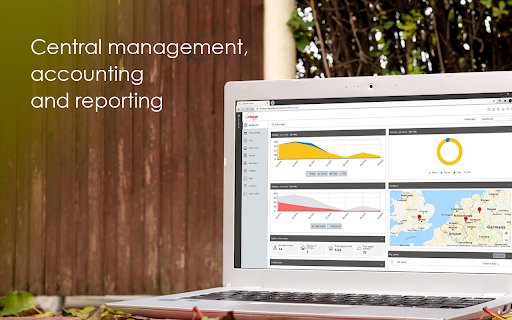
uniFLOW Online Chrome Extension – Print with a Chrome device from any location By installing the Chrome Extension for uniFLOW Online users can print directly from their Chrome devices to the cloud, enjoying all the benefits of a secure print environment from any location. All Chrome device printing is included in print reports provided by uniFLOW Online so administrators can easily track and assess printing costs. Google Chrome OS™ and uniFLOW Online are a strong combination in the educational sector where the use of Chrome devices is widespread. As a modern cloud platform, uniFLOW Online meets the full range of today's cloud printing and scanning business requirements. • Students and staff are increasingly flexible in their learning habits and working processes. The Chrome Extension allows users to print from any location, on campus or whilst working at another venue, via their own Chrome device. • All print jobs stay in a user's personal secure print queue in uniFLOW Online until the user authenticates at a printer and releases them. • Print jobs follow users from device to device, allowing the release of print jobs on any printer within their location. • Users can also alter finishing options directly at the machine before printing. • uniFLOW Online allows administrators to track their organiza¬tion's printing costs so they can be allocated to individual users, devices and departments. A range of reports can be created and exported. Whilst uniFLOW Online simplifies the essential processes for both users and administrators, it also maintains the highest levels of security at all times. Integrating with other Google solutions uniFLOW Online also integrates with Google Drive™ as a cloud-based file hosting system, offering additional flexibility to users in the handling their print and scanned documents. Print from Google Drive™ uniFLOW Online enables users to print their cloud-stored documents directly from connected devices to Google Drive™. Folder browsing and an option to change finishing options at the device are available. Documents can either be printed directly or saved to the personal print queue for printing at another time. Scan to Google Drive™ With uniFLOW Online users can scan documents directly to Google Drive™. uniFLOW Online scan profiles allow for easy setup of scanning to Google Drive™. Employees can scan documents, add a file name and meta-data and store documents in either their preferred, pre-selected or previously selected folder for later viewing.

Brisk Teaching – AI Assistant for Teachers
More than 1 million teachers have installed Brisk. Here's what they use it for: More than 1 million teachers have installed Brisk. Here's what they use it for: Create Build lesson plans, quizzes, Google Docs, Forms, and Slides in 30+ languages. Everything saves straight to your Google Drive. Give Feedback Write personalized, rubric-aligned feedback on student work for one student or the whole class at once. Inspect Writing See how students built their work. Replay their writing process to understand their thinking beyond the final draft. Boost Student Activities Create interactive, standards-aligned activities with AI guardrails you set. You monitor progress while students work. Brisk reads the page you're on and works with what's there. Nothing to export, copy, or paste. Why teachers stick with Brisk It fits how you already teach. You don't have to learn a new platform or rework your process. Creating a quiz from a slide deck takes minutes. So does turning a YouTube video into a lesson plan, or writing feedback for 30 students. You stay in control. You set the rubric, the standards, the guardrails. 1. Add the Brisk extension to Chrome and pin it to your toolbar. 2. Open any Google Doc, Slide, or webpage. 3. Click the Brisk icon and start building. Ready to save time and boost your teaching game? Visit www.briskteaching.com and join the 1 million+ teachers who’ve made teaching Brisk!

eID Chrome Extension
Chrome extension for the Belgium eID card The eID Chrome Extension gives access to the eID card within the Chrome web browser. The eID Chrome solution has been integrated within our eID Identity Provider and Digital Signature Service.

Glean
Unlocks your company's knowledge and enables powerful work AI for everyone. The Glean browser extension unlocks your company’s knowledge and enables powerful work AI for everyone. Just hit Command + J or Alt + J on Windows to instantly access Glean from anywhere: 💡 Know what your company knows, instantly with the Glean sidebar * Discover: Glean delivers personalized content recommendations tailored to your current work context, surfacing relevant insights without you having to search. * Chat: Ask questions and get instant answers from an AI Assistant that understand both your current content and your entire company knowledge base. * Search: Find exactly what you need with intelligent search that understands context, connects related information, and identifies relevant experts. * With a simple Command + J on Mac or Alt + J on Windows - instantly summarize information from any work application ⚡️ Get quick access to the work resources you need. * Glean’s new tab page puts all of your company’s knowledge at your fingertips * See recommended documents, notifications from across applications, access calendar events, and more. * Use Glean’s Go Links feature to instantly access even the most complex URLs Glean connects with dozens of popular workplace apps like Google Drive, Jira, Confluence, Slack, and more. Use this extension if you have an account created by your company admin. Learn more about the permissions we ask for: https://help.glean.com/en/articles/3643260-why-does-the-chrome-extension-ask-for-those-permissions

Study Tools for Magister
An extension that improves various aspects of and solves many issues in Magister.
