
adbkphmimfcaeonicpmamfddbbnphikh
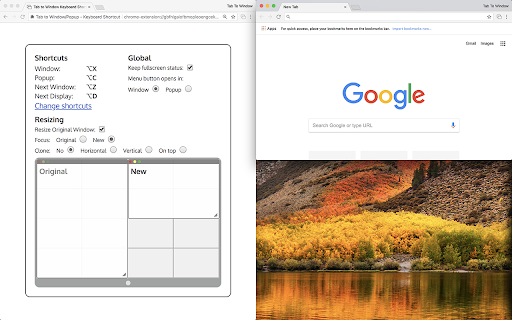
Add a keyboard shortcut to move the current tab to a new window or popup. - Upgrade to Manifest V3! Extension will continue to work. - Fix bug where popup windows wouldn't move back into windows - Fix bug where focus would not be respected - Fix bug where Focus / Type menus weren't appearing in context menus - Extension button displays the chosen new window type - Multi-display support! - Move tabs by clicking the menu button - Tabs can be moved between existing windows - Move multiple tabs at once - Link to tab: right click a link and use the menu - Convert a window to popup without moving with the Tab to Popup command - Settings now synced with Chrome profile - Common options available in menu button menu - Support for fullscreen and maximized windows. - New default keys, which avoid clashes with default Chrome commands - Focus on new window - Pop back in Command - Open in 'popup' window - Keep original window position and size - Clone original window position and size for new window

Keyboard Shortcuts to Reorder Tabs
Reorder shortcuts using ctrl-shift pgup/pgdn on Windows/Mac just like you can already do in Linux. Chrome on most operating systems lets you re-order your tabs using the keyboard shortcuts ctrl-shift-pgup and ctrl-shift-pgdn. However, if you use ChromeOS these shortcuts are not available to you. This tiny, unobtrusive extension fixes that. v2.01 - Fixed for Mac Q: It's not working on this page! A: Please note that NO Chrome extensions with a content script (such as this) are allowed to run in the Google Chrome Webstore (i.e. this page!) Q: It's not working on other pages! A: Tabs you had open prior to installing this extensions need to be reloaded before this will work. Otherwise check your org's policy on Chrome extension as it may be restricted by your administrator. Q: I sync my extensions across different Operating Systems. Will this break things on e.g. Windows? A: No. The extension does nothing on Linux to avoid ctrl-shift-pgup/down moving the tab twice. Q: Still having problems? A: Let me know and I will fix it. Don't make me ask for obvious details though. I would need browser version and operating system. Did you try it with no other extensions installed?

Tab Extract
A simple & lightweight tool to reduce tab clutter, using just the address bar. ● Too many disorganized tabs open? ● Slow to find the tab you're looking for? ● Want to reduce tab and window clutter quickly? Tab Extract helps you easily re-organize your tabs according to the subject or site, or quickly find a tab, or easily remove multiple tabs. How it works: Tab Extract will move all tabs from any window with a keyword match (in their URL or page title), into a new window. To use, type "ex" followed by a tab/space into the address bar, then enter keywords. ✓ "ex facebook news" will extract all facebook tabs and any tab with "news" or "facebook" in their title or URL, into a new window. ✓ "ex ." merges all tabs into the same window. This works because all URLs have a "." in them. ✓ Batch-remove tabs by extracting tabs to a new window using Tab Extract, and then closing the window. ✓ Tab Extract can merge tabs from across different windows into the same window by using a common keyword amongst the tabs. Notes: There is no need to select anything in the auto complete box, just press enter. If your Chrome has saved some "ex " as a search term for autocomplete, clear your history. Migrated from Chrome Extension Manifest v2 to Manifest v3 - Background script now runs as a service worker - Updated minimum Chrome version to 88 - Removed alert() for service worker compatibility (omnibox already provides feedback) Support for Marvellous Suspender suspended tabs - Extension now searches within the original URL and title of suspended tabs - Suspended tabs are moved while maintaining their suspended state Support for Chrome's natively unloaded tabs - Removed status filter to include tabs in all loading states - Fixes issue where unloaded tabs were not being found Fixed compatibility with modern Chrome versions that use tab unloading for memory management

Page to Popup
See your desired website in the toolbar popup. With the Page to Popup extension, you can easily see your desired website in the browser's toolbar popup (mobile or desktop views). Once the addon is installed, please open the options page and add the desired website (the complete URL). One desktop view and five different mobile views are available to choose from (iOS, Android, Windows Phone, Tizen, and Firefox OS). You can also adjust the popup size (width and height) and block ads within the popup. To report bugs, please fill out the bug report form on the addon's homepage (https://mybrowseraddon.com/site-to-panel.html).

Quick Tabs
A keyboard centric most recently used (MRU) ordered page list plugin with seek and switch functionality inspired by IntelliJ IDEA [![Version][version-badge]][qt-store] [![Rating][rating-badge]][qt-store] [![Users][users-badge]][qt-store] # INTRODUCTION Quick Tabs is a tab management browser extension for the Google Chrome web browser based on the "Recent Files" quick selector built into the excellent IntelliJ IDEA by Jetbrains. Quick Tabs allows you to move quickly between recently used tabs without requiring the use of your mouse, locate and switch to tabs as you need them with minimal keystrokes even when you have large numbers of open tabs. Visit the [Quick Tabs](https://chrome.google.com/extensions/detail/jnjfeinjfmenlddahdjdmgpbokiacbbb) google extensions page to install and try it out ... # FEATURES * Lists all the open tabs in Chrome across all of your open windows * Tabs are listed in most recently used (MRU) order and excludes the current tab (since you're switching tabs) * Fuzzy search your bookmarks: * Bookmarks are automatically searched when only a few tabs match your search string * Add a space at the start or end of your search string to search bookmarks along with tabs * Start your search with `/b` or add **two spaces** at the start or end of your search string to search only bookmarks * delete bookmarks directly from the search results by clicking the 'x' * Fuzzy search your browser history: * Start your search with `/h` or add **three spaces** at the start or end of your search string to search browser history * Find noisy tabs by searching for `` - search bookmarks * `/h ` - search browser history * `/w ` - search the tabs in the current window only * `/p ` - search pinned tabs only * `/g ` - search tabs that belong to the same tab group as the current tab (or no tab group if it's not in a group) ### Search Types You can now change the search type for a single search, this can help if you have a specific search string in engine combo in mind. * `/fuzzy ` - use the fuzzy search engine for this query only * `/fuse ` - use the fuse search engine for this query only * `/regex ` - use the regex search engine for this query only * `/subs ` - use the subs search engine for this query only ### Tab Management Tab management commands all accept RegExp search queries. * `/close ` - search for and close tabs * `/merge ` - merge tabs into the current window * `/split ` - split tabs and move them into a new window * `/reload ` - reload all the tabs in the search result * `/mute ` - mute the tabs in the search result * `/unmute ` - unmute the tabs in the search result * `/group ` - create new tab groups or move tabs into groups using the search results # PERMISSIONS Quick Tabs requires the following: * **Read and change your browsing history**: _read only_ access is required to record your open tabs and search browser history. * **Read and change your bookmarks**: _read/write_ access is required to search, display and remove (by clicking the 'x' in the results list) bookmarks. # SCREENSHOTS #### Quick Tabs ready for action.  #### Tab and bookmark search.  #### History search.  Search your browser history by starting your search with '/h ' or adding 3 spaces to the end of your search query. #### Decide what to show.  #### Custom CSS styling.  In this case https://userstyles.org/styles/99938/better-styling-for-chrome-extension-quick-tabs by @Bunnyslippers. See the [./3rdParty/css](./3rdParty/css) directory. # SOURCE The source code for this extension is available on [github](http://github.com/babyman/quick-tabs-chrome-extension), please feel free to inspect it before you install this extension, especially as I am asking permission to interact with your computer and its private data. You can also install it manually if you want to be certain that the source code on github is directly what you install. Note, this will NOT automatically update the extension when bugs are fixed and features are added. In your terminal, `cd` to the folder you want to clone it to, and run `git clone https://github.com/babyman/quick-tabs-chrome-extension`. Then in Google Chrome, click `Window - Extensions`, click the checkbox called "Developer Mode", and click the "Load unpacked extension" button. Navigate to the cloned project, and select the "quick-tabs" folder. You now have the plugin loaded as a developer. Again, this will NOT automatically update the extension when bugs are fixed and features are added. # FEEDBACK AND BUGS Please report all your valuable feedback, feature requests and bug reports on the github [issues page](http://github.com/babyman/quick-tabs-chrome-extension/issues) for this extension. # AND FINALLY If you find Quick Tabs useful and want to buy me a coffee, I really like coffee :D ... [](https://ko-fi.com/V7V71963F) # RELEASE NOTES 2024.11.26 - merged PR #377 to resolve Quick-Tabs no longer works for "installed" pages, thank you @Wizek (and @rb-109). PR #379 add middle click to close tab, thanks @va9iff. 2024.11.24 - merged PR #383, fix history rendering issue introduced in the manifest 3 migration, thank you again @hababr! 2024.11.19 - close #382, ctrl+e conflicts with Chrome shortcut keys 2024.11.9 - merged PR #381, upgrade to use manifest version 3, a HUGE thank you to @hababr for making this happen! 2021.6.29 - merged PR #349, support deleting bookmarks from the results list, thanks @shihshen. PR #351, assign a window specific class to result list items, thanks @kjelly. 2021.6.16 - merged PR #344, added support to order tabs by URL, thanks @armstrongli. PR #347 added new native chrome css, thanks @piyush1104. 2021.3.21 - merged PR #341, Tab order update delay of 0 ms is not respected, thanks @legate. Fix an issue loading saved shortcut keys and set the badge background color to red when debug == true, fix a 10-year-old Yellow Argon Web Store keyword violation because Quick Tabs has nothing to do with `search` or `tab`  2021.1.31 - merged PR #333, option to enter custom debounce delay value, thanks @goran-zdjelar, add duplicate tab keyboard shortcut, add 2 new group commands `/g` to search current tabs group only and `/group` to create groups and move tabs into groups 2020.9.8 - merged pull request #330, fix for issue that some undefined elements, thanks @jaekyeom (refs #326). 2020.6.30 - upgrade jQuery (fixes #318) 2020.6.3 - fix bug #315 adding spaces to search bookmarks and histories no longer working 2020.5.31 - merge pull request #314 to fix undefined tabs, thanks @NicoWeio (refs #251, #310, #275, #313). Added back the space prefix to search bookmarks and history, fixes #311, support searching pinned tabs only `/p `, fixes #290 2020.3.10 - combined the code that handles the `no tabs match` keyboard and empty tab list triggers to behave more consistently, fixes #302 2020.1.26 - bug fix, "Can't switch to "discarded" tabs" fixes #300 2020.1.25 - merge pull request #211, "add option to order tabs in window order" thanks @gregsadetsky and request #301, "Fix command key combination issue in popup" thanks @powpowshen also switch search type used by commands from substr to regexp, see #299. 2020.1.18 - bug fix, "when no tabs match" stopped working, fixes #298 2020.1.13 - call .stopPropagation() in click event handlers, refs #295, add debouncing to improve the responsiveness of the UI when entering queries, refs #297 2020.1.8 - refined tab moving options, see 'Only move tabs when switched via the extension popup', fixes #296 2020.1.5 - add support to keep window tabs in MRU order with the 'Move tab to leftmost position on switch' option see #174 2019.12.29 - **Quick Tabs turns 10!**, added new commands '/close', '/merge', '/mute', '/unmute', '/split' and '/reload', '/w' to search tabs in the current window only, also allow specifying the search engine as part of the query (/fuzzy, /fuse, /regex, /subs). Merged code for option to hide pinned tabs, thanks @hbj. 2019.12.2 - fix #277 and #291 for real this time! 2019.11.30 - Updated the bookmark and history searches to use '/b ' and '/h ' as query prefixes, still use ' ' and ' ' as query postfixes. Fixed a bug with the pg up/down list scrolling. Fixed issue that prevented prev-tab key working in popup windows (issue #277). 2019.11.27 - fix tab focus issue #273, thanks @fwextensions for the pointer 2019.11.23 - merged pull request to allow configuration of the "tab order update delay", see ticket #90 (thanks @AlexeyKabelitskiy) 2019.4.22 - merged pull requests to ensure https:// is used for default google search (thanks #ericlaw1979), apply {{urlStyle}} to recently closed tabs (thanks @boika), improve tab switching (thanks @MartinLichtblau) 2019.2.27 - merged pull request that fixes #229 #245 #246 (and perhaps #232), also changes that improve switching tabs behaviour, thanks @MartinLichtblau. Added 'theRealPadster.css' large icon theme, thanks @theRealPadster. 2019.1.30 - merged pull request to prevent tabs opened in the background jumping to the head of the recently used list (#219, thanks @MartinLichtblau) 2019.1.20 - merged pull request to fix result highlighting issues that included curly braces (#242, thanks @DoctorGester) 2019.1.10 - merged pull request to improve fuzzy search results (#241, thanks @MartinLichtblau) 2018.11.26 - fixed invalid css (#200, thanks @boika), added license file (#212), updated shortcut config documentation (thanks @Kevin-Prichard) and added support to retain the popup search string (thanks @MeetM) 2017.10.8 - fixed scrolling issue (fixes #195) 2017.10.7 - merge title tooltip fix, thanks @Rohaq. Also merged in jQuery update and some code cleanup, thanks @toanju. Changed the scrolling code to use noobscroll.js 2017.5.10 - fix issue where current tab is displayed on initial popup rendering (fixes #170) 2017.5.3.1 - bookmark search bug fix 2017.5.3 - substring bug fix 2017.5.2 - change the search implementation to allow users to select between fuzzy, fuze, regex or substring tab searching (fixes #167, #97) 2017.4.25 - possible workaround for existing Chrome bug (refs #91, #168), thanks @TimNZ 2016.9.20 - switched the tab search library to fuse.js (thanks to @rajington), fix window focus problem when using keyboard only (#101, #145 thanks @pearj) 2016.7.16 - change default extension key to ctrl+q on Linux since ctrl+e does not work, thanks @zweicoder (fixed #138), open a website address from the search box in the popup (#108), it takes a second to reorder tabs in a list after switching between tabs (fixed #103) 2016.3.20 - fix data: favicon handling bug (#124) 2016.3.15.1 - fix URL encoding bug 2016.3.15 - switch template engine to mustache.js to simplify render code (remove iframe/sandbox and speed up overall popup render), fix option key save bug (#119), add option to prevent auto searching bookmarks (#115). 2016.3.12 - fix issue where popup window height would increase on window redraw css fixes, thanks @easyfuckingpeasy. Typo fix, thanks @elimisteve 2016.3.10 - fixes 2015.10.13 - removed default key mappings for next/previous to prevent unexpected chrome behaviours (#99) 2015.10.9 - update the next/prev popup window shortcut keys to use the same mappings as the command keys 2015.10.7 - work around Window list positioned oddly (#91), thanks @todoakaio. Added media indicator favicon, search for "
