
aceananohppnfepjfhiodaladhlimjeh

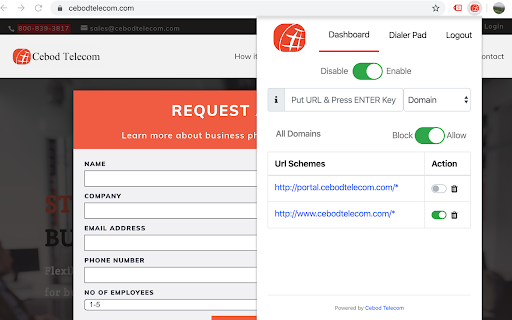
Dial the number directly from the browser or CRM just by clicking on the number. This is most flexible feature rich extension. - You can enable or disable for all the web site or specific web site. - Enable the extension only on CRM or specific web portal. - Login and log out from the extension. - Disable the extension with-out logging out. - Verification popup to avoid accidental dialing. - Identifies the phone number in 10 digit and 11 digit, Starting +, spaces and dashes.

Click to Call by PhoneIQ
Makes phone numbers clickable to dial with PhoneIQ desktop application The PhoneIQ Click to Dial extension enables users to initiate outbound phone calls via PhoneIQ’s desktop app by just clicking on phone numbers within Salesforce. PhoneIQ is a new breed of cloud based contact center & unified communications software designed and built for companies using Salesforce. Unlike traditional telephony and call center solutions, PhoneIQ is fully integrated with the Salesforce platform, leveraging data within the CRM and AI to radically change the way business communications work.

Moitele Click-To-Dial
Enables click-to-dial functionality for phone numbers found in pages. The MoiTele browser extension is a free click to call extension that works with MoiTele softphone. This extension works in all Chromium based browsers such as Chrome, Brave and Microsoft Edge. This free click2call browser extension is designed and developed to be used with cloud telephony services from MoiTele.com. This extension is a perfect fit for call center agents, customer service agents or sales team whose role involves making numerous phone call s as part of their job. MoiTele chrome extension identifies any phone number that has minimum 9 digits and upto 16 digits in common phone number formats. The identified phone numbers become clickable ie., a telephone call could be initiated over a softphone with a simple click (no need for copy/paste of phone numbers). Upon clicking the extension activates the softphone (desktop app or a browser app) and pastes the phone number onto the dialpad of the softphone. MoiTele extension could also be used to call phone numbers from any CRM, website that could be opened in a browser (Chrome, Brave and Microsoft Edge browsers). Thus we enable telephony for every CRM out of the box. Further, the conversations from the MoiTele softphone are enhanced with various call handling features such as - 1. Removal of special characters from various phone number formats 2. Integration blacklists to prevent calling the unwanted numbers 3. Allow calling only to the specific countries 4. Webhooks to capture call specific features for logging, automation, triggering specific events 5. Call history 6. Call recordings 7. Power keys for expert call centre employees for enhanced productivity 8. All call handling features such as mute, hold, DTMF Additionally, MoiTele softphone offers the following features - 1. Plug and Play installation and setup - it is easy and fast 2. Calls to phone numbers - video/audio mode switching over internet 3. Chat (optional) 4. High-quality voice Please note - This extension works only with the credentials available to our customers from MoiTele.com. Create your account and start using MoiTele for all your international calls.

GCF Click-to-Dial
A Chrome extension that allows users to make calls to an active softphone directly from any webpage. This extension allows the user to simply click on the phone number(s) listed on any web page to initiate a call using GCF Softphone app installed on his/her computer. Using this extension requires a GCF Softphone access, which can be obtained from www.globalcallforwarding.com with an Outbound Calling service.

Click to Dial Phone Number
A Chrome extension to send highlighted phone numbers to the dialing program. By James Fisher Click to Dial Phone Number Google Chrome Extension. The Click to Dial Phone Number Chrome extension offers a convenient solution for effortlessly dialing phone numbers found on web pages which aren't formatted as a hyperlinks and thus are not clickable. No longer do you need to manually copy and paste phone numbers into your dialing program. With this extension, simply highlight a phone number on any web page, right-click, and select "Dial Phone Number" from the context menu to instantly initiate a call using your preferred dialing program. Seamless Integration: Easily dial phone numbers found on any web page with a simple right-click. Quick and Easy: Eliminate the hassle of manually entering phone numbers by leveraging the extension's intuitive interface. Efficient Workflow: Streamline your workflow by saving time and effort when making calls from web pages. Enhance your browsing experience and productivity with the Click to Dial Phone Number Chrome extension. Say goodbye to tedious manual dialing and hello to effortless calling right from your browser.
