
abnnemjpaacaimkkepphpkaiomnafldi


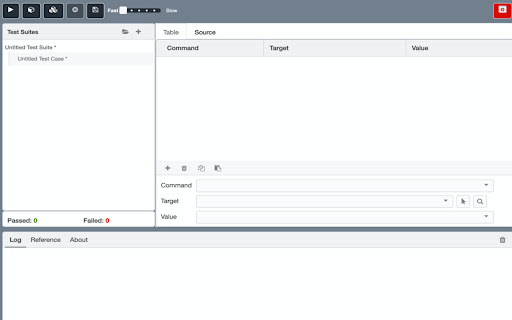
Qualys Browser Recorder is a free browser extension to record & play back scripts of any web application. Qualys Browser Recorder is a free browser extension to record & play back scripts for web application automation testing. Qualys Browser Recorder includes the entire Selenium Core, allowing you to capture web elements and record actions in the browser to let you generate, edit, and play back automated test cases quickly and easily. The authors would like to thank contributors to SideeX, Selenium Core, and Selenium IDE. Qualys Browser Recorder would not have been possible without their valuable work, time, and effort. https://www.qualys.com/docs/qualys-browser-recorder-user-guide.pdf

Recorded Future
The Recorded Future Browser Extension provides real-time threat intelligence that is just a click away in any web-based application. Detect and assess Indicators of Compromise (IOCs) directly on any web page in Chrome, using real-time threat intelligence. The extension provides Recorded Future Risk Score and supporting evidence for each indicator to enable fast and confident assessments. Key Capabilities: • Instant Threat Detection: Detect and assess CVEs, hashes, domains, and IP Addresses • Detect Phishing Attempts: Identify potential email phishing attempts. • Prioritize Patching: Analyze vulnerability scan results to identify critical patches • Distill Key Information: Extract details in news articles • Pivot to Portal: Easily move from extension to Portal to investigate

OWASP Penetration Testing Kit
The OWASP Penetration Testing Kit (PTK) browser extension is your all-in-one solution for streamlining your daily AppSec tasks. Whether you’re a penetration tester, a Red Team member, or an AppSec practitioner, OWASP PTK enhances your efficiency and provides deep insights into your target application. Runtime Scanning (DAST & IAST & SAST & SCA): Perform Dynamic Application Security Testing, Static Analysis, In-Browser IAST and Software Composition Analysis on the fly. Identify SQL injection, command injection, reflected/stored XSS, SQL auth bypass, XPath injections, JWT attacks, and other complex threats. Static Analysis (SAST): PTK automatically parses loaded JavaScript, HTML, and CSS right in your browser—before any code ever runs. It flags unsafe patterns like `eval()`, `innerHTML`/`outerHTML` injection, insecure cryptographic calls, missing input sanitization, and common anti-patterns. In-Browser IAST (Interactive Application Security Testing): PTK’s built-in IAST engine instruments your app at runtime—right in the browser—tracking taint flows and code execution to flag vulnerabilities as they occur. Catch issues like DOM-based XSS, unsafe `eval`/`innerHTML` usage, open-redirects, and more without leaving your dev tools. JWT Inspector: Analyze, craft, and tamper with JSON Web Tokens. Generate keys, test null signatures, brute-force HMAC secrets, and inject malicious `jwk`, `jku`, or `kid` parameters. Insightful Application Info: One-click visibility into tech stacks, WAFs, security headers, crawled links, and authentication flows. Built-in Proxy & Traffic Log: Capture all HTTP(S) traffic, replay requests in R-Builder, and automate XSS, SQLi, and OS command injection. R-Builder for Request Tampering & Smuggling: Craft and manipulate HTTP requests, including complex request-smuggling techniques. Now with cURL import/export. Cookie Management: Add, edit, remove, block, protect, export, and import cookies from a powerful in-browser editor. Decoder/Encoder Utility: Instantly convert between UTF-8, Base64, MD5, URL-encode/decode, and more formats. Swagger.IO Integration: Browse and interact with API endpoints directly from your Swagger documentation. Selenium Integration: Shift left security by running automated Selenium tests with built-in vulnerability checks. Enhance your AppSec practice with PTK—the extension that makes your browser smarter and your testing faster. Install today and start uncovering vulnerabilities in real time!

BlazeMeter | The Continuous Testing Platform
Record Selenium and HTTP traffic to create a load and functional tests in less than 10 minutes (Apache JMeter Compatible). The BlazeMeter Chrome extension enables you to - Record. Upload. Run. The Chrome extension records all HTTP/S requests and actual user interactions that your browser sends. It creates a JMeter or Selenium script, and automatically uploads it to BlazeMeter.com, where you can execute tests with a single click. No need to install JMeter nor Selenium to record or run GUI Functional, API Functional, or Performance tests, the Chrome extension will create the JMeter (JMX) and Taurus Selenium (YAML) scripts automatically. The extension will also allow you to debug and test your recorded Selenium session on your local Chrome browser. By using JMeter locally, you can debug and enhance the JMX file created by the Chrome Extension to ensure your script is ready to go. WHAT'S NEW: https://guide.blazemeter.com/hc/en-us/articles/115004970329-Chrome-Extension-Changelog-Chrome-Extension-Changelog Features - Record test scenarios without scripting experience - Record all HTTP/S requests made by your browser - Record user GUI actions - Add assertions to your Selenium steps - Add transaction labels (for JMeter and Selenium) during recording - Support for shadow locators (Lightning Web Components) - Apache JMeter Compatible - Taurus Selenium Compatible - Run tests without installing test scripting applications - Run Performance tests for up to 3,000,000 concurrent users - Run load tests in under ten minutes - Run API Functional Tests - Run GUI Functional Tests - Run Selenium tests and JMeter tests side by side to get the best of both worlds - Debug scripts - If you want to record transactions, Chrome version 58 or newer is required - Recommended minimum version of Chrome is 58 - For certain features (e.g. converting to JMX, Scriptless Scenario Editor), a free BlazeMeter.com account is required

Rapid7 AppSec Plugin
The Rapid7 AppSec plugin works with Rapid7 Application Security and AppSpider dynamic application security testing solutions to improve application scanning coverage and assist in validating vulnerabilities with these capabilities: Macro Recording - Use the plugin to record macros required by Application Security and AppSpider Enterprise when selecting the Macro Authentication scan configuration. Macro Authentication enables the crawling engine of Application Security and AppSpider to authenticate with complex login workflows. Vulnerability Validator - Use the vulnerability validator in conjunction with the Attack Replay feature in Application Security and AppSpider. This feature of the Chrome plugin enables users to replay and edit recorded traffic generated during an Application Security or AppSpider scan. Bootstrap Authentication - The Chrome plugin is required to use AppSpider Enterprise's Bootstrap Authentication feature, which gives the user the ability to interactively login to the target application during an active scan. Used for login workflows that require human interaction for example 2FA (Two-factor authentication). Traffic Recorder - Record the interactions (like HTTP GET and POST requests) between the front end application and the back end server in a Traffic File. Application Security can replay these interactions to authenticate into your application. For support related to this plugin, please contact chrome_plugin@rapid7.com
