
aanokcjelpijknafjldaohpohjikcgnc
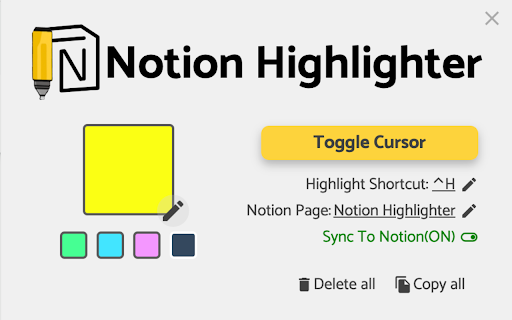

Notion Highlighter can highlight your web, save highlights on your device and sync with Notion. Firstly, Notion Highlighter is a chrome plugin, it highlight text on websites with a simple right-click or keyboard shortcut, saves highlights on your device. Secondly, we can sync all your highlights to the notion database you allowed access. Easiest way to highlight text on any webpage! Simply select text, then right click it to select the "Highlight" option. The sync will run itself in the background. All highlighted texts are saved so that your highlights are not lost when exiting a page! Simply re-opening that page will bring back all the highlights. NOTE: This does not work on very dynamic webpages like Facebook and most email clients. We sync the highlights to notion by default, you can close the sync by on click. Disclaimer: We DO NOT collect any usage data until now, all data are stored using chrome local storage and in your notion workspace. Additionally: Our project is forked from the open source repository: https://github.com/jeromepl/highlighter, and i just changed a little. Thanks for the Source author.

Highlight Text Online
Use Highlight Text Online extension to highlight and save key info on any website. A smart and simple web highlighter tool. Tired of losing track of important information while reading online? With Highlight Text Online, you can effortlessly mark, organize, and revisit essential content across any website. Whether you're a student, researcher, blogger, or everyday reader, this web highlighter extension helps you stay focused and organized. Highlighting content isn't just for books and PDFs anymore. Bring the power of physical highlighters to your browser with this intelligent and free text highlighter online tool. 📍 Why Choose Highlight Text Online? Whether you're looking to highlight text online free, save quotes, or study effectively, this tool offers a clean and reliable solution. It's more than just a highlighter app—it’s your digital memory aid across the web. Use it to: 1️⃣ Mark key paragraphs in blog posts 2️⃣ Save snippets from research articles 3️⃣ Emphasize takeaways from tutorials 4️⃣ Store quotes from forums 5️⃣ Organize ideas from news sources Key Features 💎 Easily highlight web content across all websites 💎 Save and revisit website highlights anytime 💎 Create multiple colors for categorization 💎 Export or copy marked text 💎 Compatible with dynamic and static pages 💎 Supports login-free usage — highlight text online free with no setup! Perfect for Research, Reading, and More 📌 This highlighting tool is ideal for: ➤ Students studying from online material ➤ Researchers collecting data from academic sources ➤ Writers gathering inspiration ➤ Professionals annotating reports ➤ Anyone who wants to highlight notes and never lose important information again Seamless Copy and Paste Support Want to move your underlines elsewhere? No problem. This extension allows you to: ✅ Copy and paste emphasis directly ✅ Organize them in your notes ✅ Sync them into your documentation ✅ Your highlight text copy and paste online workflow has never been easier! Cross-Site Marking Made Simple Unlike other basic tools, this highlighter for websites keeps your underlines saved across sessions and revisits. You don’t lose your data when the page reloads or when you close the tab. Perfect for users who regularly return to the same sites. Organize With Color and Context Structure your marks by color-coding: 🔹 Yellow for definitions 🔹 Green for action items 🔹 Blue for quotes 🔹 Red for critical info It’s a highlighting app that brings structure and meaning to your browsing. Free and Easy to Use No account required. No ads. Just install and start using this highlight extension right away. It’s a reliable and easy-to-use text highlighter online free tool available today. Web Highlighter That Works Where You Work This highlighter online tool supports: ▸ News websites ▸ Online textbooks ▸ Forums ▸ Documentation portals ▸ Learning platforms Wherever you read, you can use this highlighting tool to capture and store what matters most. Make Studying and Learning More Effective Use it to improve your academic performance. Showcase, review, and recall faster while studying. It’s a must-have web highlighter for learners at all levels. 🧠 Minimalist Design, Maximum Utility The extension is designed with simplicity in mind. Lightweight, no bloat, just pure tagging power. Perfect for anyone who wants a clean, effective highlighter extension that doesn’t get in the way. Used and Loved by Users Across the Globe 🌍 From everyday readers to knowledge workers, Highlight Text Online is quickly becoming a favorite highlight tool for modern browsing. Stay organized, stay efficient, and stop losing key content in the noise of the web. Q&A Section Q: Can I mark on any website? A: Yes! This web highlighter works on most websites and dynamic pages. Q: Is it really free? A: Absolutely. Highlight text online free without registration or payment. Q: Can I copy and paste my notes? A: Of course! The tool supports highlight text copy and paste online functionality. Q: Will my emphasis stay saved? A: Yes. Your web highlights are preserved across sessions. Start using Highlight Text Online today and upgrade how you read, study, and organize knowledge. The internet is full of information—now you have a powerful way to highlight webpages and make the most of it. 📚

OneNote Web Clipper
Save anything on the web to OneNote. Clip it to OneNote, organize and edit it, then access it from any device. You're busy. OneNote Web Clipper lets you quickly clip all or part of a web page to OneNote, and save it for later. Clip images, pdfs, videos, or a visual bookmark of a page. Best of all, you can access them from any computer, tablet, or phone - even when you're offline. CLIP YOUR WAY - NO CLUTTER! Articles, recipes, or products can be clipped without all the ads, navigation, and noise. - Highlight text, adjust the fonts, or add a note before you clip. - Clip the whole page or several selections on the page. It's up to you. WHAT TO CLIP - All or part of a web page - PDF files - online or on your computer - Any image on a web page - Videos from YouTube or Vimeo - Create a visual bookmark of the page GREAT FOR - Travel - Business - Shopping - Recipes - Research - News - Inspiration TAKE IT WITH YOU - Anything you clip to OneNote will be available on all your devices, even if you're offline. - Use OneNote's powerful search to find your information on any device. - Share your information with others.

Web Page Markup Tool
Highlight, underline, and take notes on any webpage. --- 21/9/25 1.1 Updates + Inserted highlight and underline colour customisation + Tool now supports Single-Page Application websites (even more pages for you to annotate). --- Turn the Web Into Your Personal Notebook We've all been there. You're deep into an amazing article or critical piece of research, and you find a flash of brilliance—a perfect quote, a crucial statistic, a key idea. You promise yourself you'll remember it, but a dozen tabs later, that insight is gone. What if the web wasn't just for reading, but for thinking? Introducing the Internet Markup Tool—a simple, powerful extension that transforms any webpage into your personal canvas. Engage Directly with Content Effortlessly highlight what matters and underline key phrases to make them pop. Go beyond passive reading and start actively engaging with information. Have a sudden idea or question? Drop a sticky note anywhere on the page to capture your thoughts in the moment. It’s like having a conversation with the content itself. Never Lose Your Work Again Here’s where the magic happens: your work is automatically saved. When you return to a page tomorrow, next week, or next year, all your highlights, underlines, and notes will be waiting for you, exactly as you left them. Your insights become a permanent, valuable layer on top of the web. Gather Your Research in Seconds When you're ready to consolidate your findings, the toolbar menu makes it easy. Instantly copy all your marked text to your clipboard, or save the entire annotated page as a PDF. Your scattered research from across the web now comes together seamlessly. Private and Secure, Always Work with complete peace of mind. Your markups and notes are your own. They are saved only on your local computer and are never collected or seen by anyone else. That's our promise. Perfect for: Students: Turning online articles and textbooks into powerful study guides by highlighting key concepts and adding notes for exams. Researchers: Effortlessly collecting data, quotes, and sources from across the web and exporting them into a single, organized document. Writers & Professionals: Gathering inspiration, annotating articles, and saving crucial information for reports, client work, or creative projects. Curious Minds & Lifelong Learners: Building a personal knowledge base and ensuring that valuable insights from their reading are never forgotten. Stop just browsing. Start building your personal library of knowledge, one highlight at a time. Add the Markup Tool to Chrome today and never lose a thought again.

Bookmarks to Notion
Sync Browser Bookmarks with Notion Database. Centralize your bookmarks. Bookmarks to Notion is used for syncing your browser bookmarks to Notion databases. It helps centralize your bookmarks into notion databases. Notion is the internet's only all-in-one workspace for essential work tools. By syncing your browser bookmarks with Notion databases. You can easily manage your resources in one place. To do that, you need to connect the extension with your Notion database, choose to use our template, then you can sync your browser bookmarks to Notion with 1 click. Features: ✅ Sync your browser bookmarks to the Notion Database with just 1 click ✅ Sync bookmark icon as Notion page icon ✅ Automatically synchronize additions, removals, or modifications of your local bookmarks to Notion ✅ Support multiple connections ✅ Support bookmark sub-folders ✅ Support multiple Notion workspaces Should you have any issues or feature requests, shoot us an email support@bookmarkstonotion.com
