
aabpiidneeojeichdhncnjmdopgglakk
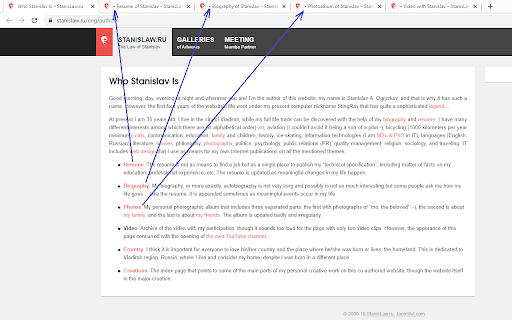
Flags unvisited/unread (opened in the background) tabs, so it is easy to recognise what tabs still need to be read. Flags unvisited/unread (opened in the background, usually with the middle click) tabs, so it is easy to recognise what tabs still need to be read/visited. You will easily know what tab you opened but have not yet looked into it. It is especially useful when you are searching for something on the internet, opening many links in the background. After a while you may be confused what tabs you have read and what you still need to look into. This extenstion solves the issue. You will always know what tabs was never visited. The given version is based on the original Unread Tab 1.3 by Adam Grodzki and inspired by Anton Marchenko's needs 😉 and his experience in using “Yandex.Browser”. The main differences of this version are: – options: prefix; – removed usage surveillance 😮; – Russian 🇷🇺 and German 🇩🇪 languages; – unread flags are restored even if tabs' titles are automatically changed (e. g. by YouTube). The project is open-source and public at GitHub: https://github.com/stanislawru/unread-tab

Load Background Tabs Lazily
This extension duplicates some of the behavior of an old Firefox extension that is no longer maintained, Load Tabs Progressively. Load Background Tabs Lazily places newly created background tabs in a line and allows only a specific number to load, while blocking the rest. A tab is removed from the line once it has finished loading. The first blocked tab in the line is then allowed to load. This extension was designed for users with slow internet connections that routinely open multiple background tabs at the same time. It also helps users that open many background tabs at once by not overwhelming their browser or CPU. Only background tabs with http(s) URLs are added to the line. Middle click (or Ctrl click) a link, bookmark, or bookmark folder to create background tabs. Various commands or settings for this extension may be accessed in its Options page or toolbar button popup. The toolbar button may be pinned by clicking the 'Extensions' button that looks like a puzzle piece on the toolbar. Permissions used: ▸ non-optional: 'contextMenus', 'declarativeNetRequest' (Block content on any page), 'storage', 'tabs' (Read your browsing history)*, 'webNavigation' (Read your browsing history) ▸ optional: '' (Read and change all your data on all websites), 'browsingData', 'downloads' (Manage your downloads), 'nativeMessaging' (Communicate with cooperating native applications), 'tabGroups' (View and manage your tab groups), 'webRequest' * The 'tabs' permission allows this extension to view the the url, pendingUrl, title, and favIconUrl properties of a tab.

Kill Clone Tabs
Find and close duplicate tabs. Sort, group, and manage tabs. Highlight text on pages. Copy tab URLs. Boost your productivity! 🎯 KILL CLONE TABS - The Ultimate Tab Manager Stop tab chaos! Kill Clone Tabs helps you find and eliminate duplicate tabs, organize your browser, and boost productivity with powerful management tools. 🔪 DUPLICATE KILLER • Instantly find and close duplicate tabs across ALL windows • Smart detection with customizable URL matching rules • Choose which duplicate to keep: oldest, newest, or active tab • Visual indicator shows when duplicates exist • Optional auto-kill mode for zero tolerance 📊 TAB ORGANIZATION • Sort tabs alphabetically by URL • Group tabs by domain (cluster related sites together) • Native Chrome tab groups with smart naming • One-click undo for any action 🔍 SMART SEARCH • Real-time search through all tab titles and URLs • Click to instantly switch to any tab • Find tabs faster than ever ✨ TEXT HIGHLIGHTING • Select text on any page to highlight all matches • Customizable highlight color • Case-sensitive and whole-word options • Match counter shows total occurrences 🔒 PRIVACY MODE • Hide Evidence feature for sensitive browsing • Closes matching tabs AND clears browser history • PIN-protected domain list • Works across all windows including incognito 1. Click the Kill Clone Tabs icon in your toolbar 2. Use Search to find any tab instantly 3. Click 🔍 to find duplicates 4. Click 🔪 to kill duplicates 5. Use Organize buttons to sort or group 6. Access Settings for customization • Ctrl+Click (⌘+Click on Mac) to select multiple tabs, then Copy Selected • Paste URLs directly into popup with Ctrl+V (⌘+V on Mac) • Red toolbar icon = duplicates detected • Enable "Allow in Incognito" in extension settings for full coverage • Undo available immediately after any action ✓ 100% Local - Everything runs in your browser ✓ No Data Collection - Zero personal data transmitted ✓ No Analytics - No tracking whatsoever ✓ No Accounts - No sign-up required Perfect for: • Researchers with dozens of open tabs • Developers managing multiple projects • Students organizing study materials • Anyone who opens too many tabs! Found a bug or have a feature request? Leave a review or contact the developer! Made with ❤️ for tab hoarders everywhere.

Visualized Tab Sorter
Visualize different sorting algorithms by sorting your tabs! This extension supports sorting tabs using one of six different algorithms: * Insertion sort * Selection sort * Bubble sort * Merge sort * Heap sort * Quick sort The sorting can be done by tab title or URL, and the sorting speed can be adjusted as desired. Additionally, this extension allows you to shuffle, reverse, and even spawn more tabs if you're just looking to explore various sorting algorithms.

Site Visits
Shows you if you have previously visited the URL in the current tab. Displays the number of previous visits on the action icon, and… Shows you if you have previously visited the URL in the current tab. Displays the number of previous visits on the action icon, and displays the dates of 50 last visits when clicking the icon. If you sometimes visit a website, and you're not sure if you've previously visited it, but want to know, then this is the extension for you. It works by querying the browser's built-in history API - which means that if you have cleared your browsing history, it will not appear in this extension either. I plan to also add a search option, but otherwise the extension is meant to remain simple and minimal.
