
ppiekebgabmlkcdcgakidaebddgbbnni

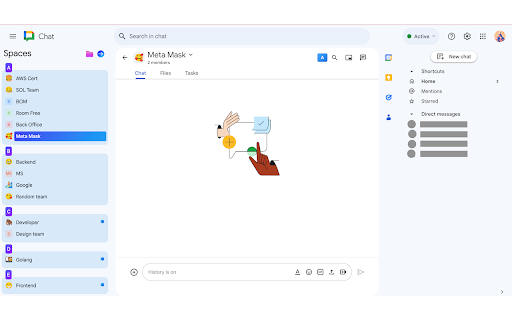
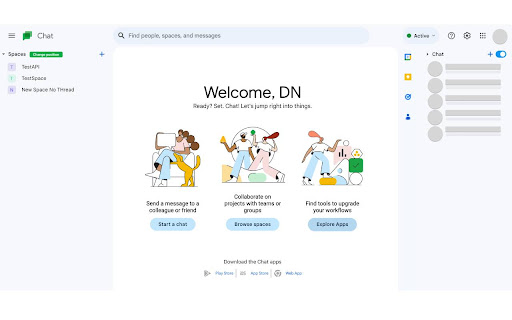
ChatExt - Best look and feel for Google Chat Change google chat interface, more friendly and intelligent. Please give me 5 stars and share it with everyone if you find it useful. Contact to me: chatext@outlook.com Don't hesitate to connect with me if you have any ideas. "Buy me a coffee if you love this extension." https://buymeacoffee.com/dngteam “Love to work at Google with the Google Chat development team to create an awesome chat application.” Release note: 2025.May.1: Resolved an issue affecting some users caused by Google's recent UI update in Google Chat. The extension is now compatible with the new interface. 2024.Sep.16: Improved performance and fixed some bugs. 2024.Aug.10: You can organize the order of the folders. 2024.Aug.8: Support some languages 2024.Aug.6: Support CN language. 2024.Jul.27: You can now easily back up and restore your configuration data. 2024.Jul.26: Fix issue related to migrate data. 2024.Jul.25: Fix issue realted to cannot switch to other account, optimize UI. 2024.Jul.15: Fix issue related to cannot add many spaces into folder. 2024.Jun.09: Fix issue related to sometimes the SPACE cannot be moved to a FOLDER. 2024.Mar.25: Fix issue related to user have many spaces. 2024.Mar.23: Bug fixes and performance improvement. 2024.Feb.06: Welcome Tet holiday 2024. 2024.Jan.15: Compatible with Japanese language users has been integrated. 2024.Jan.10: Happy new year #newfeature #Improve UI ******* 2023.Dec.29: Last release 2023. 2023.Dec.28: Apply scroll style. 2023.Dec.27: Improve user experience, fix bugs related to display all spaces. 2023.Dec.26: Fix display on some device. 2023.Dec.25: Support New UI. 2023.Nov.27.2023: Fix Bug. 2023.Oct.31.2023: Fix UI broken

GPThemes - ChatGPT Widescreen, Fonts & Color
📝 FEATURES 📝 • 🎨 CUSTOM ACCENT COLORS – Choose any accent color with a live preview • 📐 ADJUSTABLE LAYOUT – Resize chat & chatbox widths for better readability • ✍️ TYPOGRAPHY CONTROL – Customize font family, size, line height, and spacing • 💬 CHAT BUBBLES – Toggle bubbles for better message distinction • 🌓 MODERN THEME – Light, Dark, and AMOLED-friendly Black mode • 🪟 DISTRACTION FREE VIEW – Hide disruptive elements like the header, footer and upgrade chip to maximize screen space • ⬆️ EXPAND PROMPT BOX – Increase the height of the chatbox for more typing room • 🚀 QUICK THEME SWITCHER – Floating button for instant theme changes • 🪟 SPACIOUS & CLEAN UI – Comfortable chatting with reduced clutter • ✨ SMOOTH ANIMATIONS – Subtle feedback for a polished experience • 📱 MOBILE FRIENDLY – Customize ChatGPT on your phone browser too. Available for Firefox Android and Cromite (open-source Chromium-based browser for Android) 🔒 PERMISSIONS EXPLAINED 🔒 • Storage: To save your theme preferences locally on your device. • ChatGPT access: To apply your custom themes on "chat.openai.com" and "chatgpt.com" GPThemes believe in transparency. All settings are stored locally on your machine. It does not collect any personal data. You can find the extension's source code here : https://github.com/itsmartashub/GPThemes ⚠️COMPATIBILITY ⚠️ • GPThemes is designed to provide customization experience for the core ChatGPT interface. It is optimized to work with free accounts and key features. • While the extension will likely function with a Plus subscription and Pro models, some of its styling may not be fully optimized for the advanced UI elements or features unique to that version. • The extension is built to work with all languages, but its visual appearance is currently fine-tuned for English. I'm actively removing English-specific selectors in favor of more multilingual methods with almost every update. • Regular updates to maintain compatibility with ChatGPT changes. I appreciate your patience during any brief disruptions. 🧵 HOW TO 🧵 1️⃣ Install the GPThemes. 2️⃣ On ChatGPT, there should be floating palette button (top-right) — click it to switch between Light, Dark, AMOLED, or open ⚙️ Settings to customize Colors, Fonts, and Layout. 3️⃣ Pin the extension's icon to your browser toolbar (if it's not already). 4️⃣ Click the icon to open the popup. 5️⃣ Use the toggle in the popup's top-right to show or hide the floating palette button on the ChatGPT page. 💌 SUPPORT & KEEP IT ALIVE 💌 • 🍵 If you can afford it and find GPThemes valuable, you can support its development with a pay-what-you-want contribution on KO-FI. Even small contributions help keep it alive, up-to-date and accessible. 🤝 FEEDBACK 🤝 • If you encounter persistent issues or have suggestions for improvement, please feel free to open an issue on GitHub or contact me via email. Your feedback is invaluable and helps me identify and resolve problems more effectively. Elevate your ChatGPT experience with GPThemes - where functionality meets style

Custom Themes for ChatGPT - Skins, Dark Mode & UI Styles
16 Free + 7 Premium ChatGPT Themes with Dark Theme focus. ChatGPT Style, Skins, UI optimizer. Easy theme change. 🎨 Customize Your ChatGPT Experience with 14 Free + 7 Premium Dark Themes! Revolutionize your ChatGPT interface with our comprehensive ChatGPT Custom theme collection featuring 10 stunning free dark mode themes plus 3 premium themes coming soon. Our ChatGPT Style extension provides the ultimate ChatGPT customization experience, offering beautiful ChatGPT skins that transform your AI chat interface into a visually spectacular environment. 🌟 Classic & Popular Themes: - Matrix Theme - Experience the iconic green cascading code effect from The Matrix with digital rain animations and terminal-style aesthetics - Dark Mode Pro Theme - This theme takes ChatGPT to another level and enhances the general ChatGPT Dark Mode with pitch black color that is actually better for eyes & OLED displays while keeping distractions minimal Dracula Theme - The legendary theme beloved by developers worldwide featuring a sophisticated dark purple background with vibrant syntax highlighting and elegant color accents - Neon Theme - Bright electric blue and cyan colors create a futuristic neon-lit atmosphere perfect for cyberpunk enthusiasts - Cyberpunk Theme - Dark purple and pink aesthetics straight from a cyberpunk dystopia with glowing accents and futuristic elements - Hacker Theme - Terminal-inspired design with authentic green text on dark backgrounds for that genuine hacker aesthetic 🚀 Advanced & Futuristic Themes: - Cosmic Theme - Journey through deep space with stellar blues and cosmic lighting effects that make your ChatGPT feel otherworldly - Hologram Theme - Futuristic holographic interfaces with translucent blue elements and sci-fi inspired design - Electric Theme - High-voltage blues and whites create an electrifying ChatGPT experience with energy-inspired effects - Fire Theme - Warm oranges and reds bring the heat with flame-inspired design elements and glowing effects 🌊 Nature & Element Themes: - Ice Theme - Cool blues and whites create a crisp, frozen aesthetic perfect for a clean, minimalist ChatGPT experience - Wave Theme - Flowing wave patterns in cool blues create a serene ocean vibe that's easy on the eyes during long ChatGPT sessions 💎 Premium Themes (Coming Soon): - Circuit Grid (Premium) - Advanced cyberpunk circuit patterns with electric teal aesthetics and sophisticated digital design - VHS Glitch (Premium) - Retro VHS aesthetics with authentic glitch effects and nostalgic 80s colors - Neon Tokyo (Premium) - Electric Tokyo cityscape vibes with stunning pink and purple neon lighting effects ⚡ One-Click ChatGPT Theme Change: Instantly transform your ChatGPT interface with our intuitive theme switcher. No complicated setup required - simply click your preferred theme and watch ChatGPT transform instantly. Our ChatGPT optimizer ensures seamless theme transitions and perfect ChatGPT styling every time. 🎨 Interactive ChatGPT Onboarding: Our extension features a beautiful, interactive onboarding experience that guides you through the complete setup process. The onboarding showcases all available ChatGPT themes with live previews, making it easy to discover your perfect ChatGPT style. The split-screen design allows you to preview themes in real-time while browsing our comprehensive ChatGPT customization options. 📱 Advanced Font Size Customization: Enhance your ChatGPT reading experience with our built-in font size adjustment feature. Whether you prefer larger text for better readability or smaller text to fit more content on screen, our ChatGPT UI optimizer lets you customize the chat window font size to your exact preferences. This ChatGPT enhancement feature is perfect for users who spend extended periods chatting with AI and want optimal text comfort. The font size adjustment works seamlessly with all our ChatGPT themes and maintains your preferred settings across browser sessions. Perfect for accessibility needs, professional presentations, or personal comfort during long ChatGPT conversations. 🔄 Smart ChatGPT Settings Management: - Automatic theme saving across browser sessions for consistent ChatGPT styling - Easy theme reset functionality to return to default ChatGPT appearance - Extension enable/disable toggle for quick ChatGPT customization control - Persistent settings that remember your ChatGPT style preferences - Intelligent theme switching that adapts to your ChatGPT usage patterns - Advanced configuration options for power users and ChatGPT enthusiasts 🎪 Fullscreen ChatGPT Theme Previews: Preview any ChatGPT theme in fullscreen mode before applying it. Our preview system shows exactly how your ChatGPT interface will look with each theme, ensuring you make the perfect choice for your ChatGPT customization needs. The fullscreen preview includes all ChatGPT interface elements, giving you a complete picture of your customized ChatGPT experience. 🔒 Complete Privacy Protection: Our ChatGPT themes extension prioritizes your privacy and security above everything else. We do NOT collect, store, or transmit any personal information, ChatGPT conversations, chat history, or browsing data to external servers. Your ChatGPT interactions remain completely private and secure. No analytics, no tracking, no data collection - just pure ChatGPT customization without compromising your privacy. 💾 Local Storage Only: All ChatGPT theme preferences and extension settings are stored locally on your device using Chrome's secure storage API. Your ChatGPT style choices never leave your browser, ensuring complete data protection while using our ChatGPT customization tools. This approach guarantees that your ChatGPT theming preferences remain private and under your complete control. 🌐 Minimal Permissions: Our ChatGPT themes extension requests only the essential permissions needed for core functionality: - ChatGPT domain access to apply themes to chat.openai.com and chatgpt.com - Local storage for saving your ChatGPT theme preferences - Active tab permission for ChatGPT theme application and management - No unnecessary permissions that could compromise your privacy or security 🎯 Perfect for ChatGPT Power Users 💻 Developers & Programmers: Transform your ChatGPT coding sessions with themes like Matrix, Hacker, and Electric that provide the perfect coding atmosphere for AI-assisted development work. These themes create an immersive programming environment that enhances focus during code reviews, debugging sessions, and software architecture discussions with ChatGPT. The dark themes reduce eye strain during long coding marathons while the themed aesthetics inspire creativity and productivity. 🎮 Gaming Enthusiasts: Cyberpunk, Neon, and Circuit Grid themes create an immersive gaming-inspired ChatGPT experience perfect for discussing game development strategies, gaming topics, and interactive entertainment. Whether you're brainstorming game mechanics, discussing esports strategies, or getting creative writing assistance for game narratives, these themes provide the perfect atmospheric backdrop for gaming-related ChatGPT conversations. 🌃 Digital Artists & Designers: Our aesthetic ChatGPT themes like Cosmic, Hologram, and Wave provide visual inspiration while working on creative projects with ChatGPT assistance. These themes create an inspiring workspace for design brainstorming, color theory discussions, and creative problem-solving sessions. The beautiful visual effects complement your artistic workflow while maintaining focus on your ChatGPT interactions. 🌙 Dark Mode Enthusiasts: All our ChatGPT themes are specifically optimized for dark mode users who prefer reduced eye strain during extended ChatGPT sessions, especially during night-time AI interactions. Perfect for late-night work sessions, evening learning, and comfortable ChatGPT usage in low-light environments. Our themes provide superior contrast and readability while maintaining visual appeal. ⚡ Productivity Enthusiasts: Customize your ChatGPT workspace to match your workflow and productivity style with themes that enhance focus and reduce visual distractions. Create a personalized ChatGPT environment that supports your work habits, whether you need energizing themes for brainstorming sessions or calming themes for focused research and analysis. 📋 Chrome Extension Standards: Built with Manifest v3 compliance, ensuring future-proof compatibility with Chrome browser updates and long-term ChatGPT customization support. Our ChatGPT customization tool follows all Chrome Web Store guidelines and security standards, providing a safe and reliable ChatGPT theming experience. ⚡ Performance Optimized: Lightweight and fast-loading ChatGPT themes that don't impact ChatGPT's performance or your browser's speed. Our ChatGPT UI enhancements are designed for maximum efficiency, ensuring smooth ChatGPT interactions while providing stunning visual improvements. Optimized CSS and minimal resource usage guarantee excellent performance. 🔄 Regular Updates: We continuously improve our ChatGPT themes collection with new themes, bug fixes, feature enhancements, and ChatGPT interface compatibility updates based on user feedback and ChatGPT platform changes. Stay current with the latest ChatGPT design trends and interface improvements. 📱 Cross-Platform Compatibility: Works seamlessly on Windows, Mac, and Linux systems with Chrome browser, ensuring consistent ChatGPT theming experience across all platforms and devices. Perfect synchronization of ChatGPT themes across multiple computers and operating systems. Step 1: Install & Launch Download our ChatGPT themes extension from Chrome Web Store and follow the automatic onboarding guide that launches immediately after installation. The setup process is streamlined and user-friendly, requiring no technical knowledge or complicated configuration. Step 2: Enable ChatGPT Dark Mode Our interactive guide shows you exactly how to enable dark mode in ChatGPT settings - essential for optimal theme appearance and ChatGPT visual experience. Clear instructions with visual guides ensure you get the perfect ChatGPT theming setup. Step 3: Choose Your ChatGPT Theme Browse our collection of 10 free ChatGPT themes with live previews and one-click application. Your ChatGPT style choice is automatically saved for future sessions, providing consistent theming across all your ChatGPT interactions. Step 4: Customize & Enjoy Adjust font sizes, explore different ChatGPT themes, and enjoy your transformed ChatGPT experience with enhanced visual appeal and personalized aesthetics. Fine-tune your ChatGPT workspace to match your preferences and workflow requirements. 🚀 Why Choose Our ChatGPT Themes Extension? ✅ Largest Free Collection: 14 completely free ChatGPT themes with 7 premium options coming soon - the most comprehensive ChatGPT customization package available on Chrome Web Store. More variety and options than any competing ChatGPT theming solution. ✅ Professional Quality: Each ChatGPT theme is carefully designed with attention to detail, ensuring beautiful aesthetics that enhance rather than distract from your ChatGPT interactions. Professional-grade design standards with consistent quality across all themes. ✅ User-Friendly Experience: Intuitive ChatGPT theme switching with no technical knowledge required. Our ChatGPT customization tools are designed for users of all skill levels, from beginners to advanced ChatGPT power users. ✅ Active Development: Regular updates with new ChatGPT themes, features, and improvements based on community feedback and ChatGPT platform changes. Continuous improvement and feature additions ensure long-term value. ✅ Premium Features Coming: Exclusive premium ChatGPT themes with advanced effects and unique designs will be available soon for users wanting the ultimate ChatGPT visual experience and advanced customization options. 🔮 Advanced Theme Effects: Premium ChatGPT themes will feature animated backgrounds, particle effects, dynamic color schemes that respond to your ChatGPT interactions, and sophisticated visual effects that create an immersive AI conversation environment. 🎨 Theme Customization Tools: Upcoming features will allow users to create custom ChatGPT themes, adjust color schemes, modify interface elements, and personalize their ChatGPT interface beyond our preset options. Advanced theming tools for complete ChatGPT customization control. ⚡ Enhanced Performance Features: Premium users will access advanced ChatGPT optimization tools, custom font options, exclusive productivity-focused ChatGPT enhancements, and specialized features designed for professional ChatGPT users and power workflows.

CrowdGPT - ChatGPT prompt sharing
Looking for high-quality prompts to ask ChatGPT? With our extension, you can easily access the best ChatGPT prompts, curated by the community and upvoted by users. ☑️ Time-saving and efficient With our extension, you can skip the tedious process of searching for quality prompts online. Instead, you can quickly find the most popular prompts that have been vetted by the community. ☑️ Crowdsourced and upvoted Our community-based platform ensures that only the best prompts make it to the top. Users can vote on their favorite prompts, so you can be confident that you're getting the most popular and effective prompts. ☑️ Share with others Our extension also allows you to easily share prompts with others. Whether you're working on a team or just want to share prompts with friends, our extension makes it simple. ☑️ Better ChatGPT answer By using high-quality prompts, you can expect better answers from ChatGPT. Download CrowdGPT Chrome Extension now and take your ChatGPT experience to the next level. (#crowd #GPT #prompt).

ChatGPT - Snack Prompt
Discover the best AI prompts right inside ChatGPT from the top prompters on the internet Introducing Snack Prompt for Google Chrome: The Ultimate AI-Powered Prompt Companion for Everyone Unlock the full potential of AI with Snack Prompt, the game-changing extension designed to simplify and optimize your ChatGPT experience. With Snack Prompt, you'll have access to an extensive library of top prompts curated daily, as the community upvotes the best prompts for each industry, surfacing them to the top. This makes Snack Prompt the perfect partner for anyone looking to harness the power of AI. 🚀 ⚡ One-Click Prompts: Instantly access a wide array of expertly curated prompts with just a single click. 🏆 Top Prompts of the Day: Stay up-to-date with the best and most popular prompts, right at your fingertips. 🗳️ Community Upvote System: Much like Product Hunt or Reddit, our community-driven platform surfaces the best prompts to the top. 💾 Save Prompts: Easily organize and manage your favorite prompts for future use. 🔍 Discover the Best Prompts in Seconds: Find the perfect prompt for your needs in no time, as the top prompts are surfaced to the top daily. 🤝 Follow Top Prompters: Stay connected with the leading minds in the prompt community and never miss their latest creations. 🌐 Share Prompts with Others: Collaborate and inspire others by sharing your favorite prompts. 💼 Prompt Market: Monetize your expertise by selling your custom prompts directly to your followers on Snack Prompt. 🌟 Unlockable Prompts: Gain exclusive access to premium prompts by following your favorite prompt creators on Snack Prompt. 👥 Collaboration & Team Features: Work together with your team by creating and sharing prompt lists for seamless collaboration on projects. 🔧 Customizable & Organizable Prompt Lists: Personalize your prompt experience by creating and organizing your own custom lists, ensuring you have the right prompts at your fingertips. 🏢 Prompts for Teams: Enhance collaboration and productivity within your team by sharing and managing prompts specifically designed for team projects. Get started with Snack Prompt for Google Chrome today and explore the limitless possibilities AI has to offer! Transform the way you interact with ChatGPT and unleash your productivity like never before. Please note: Snack Prompt is an independent extension and is not affiliated with other ChatGPT extensions. For the best experience, please uninstall all other ChatGPT extensions before installing Snack Prompt.
