
ppelgaainfjnmkcgkiigblbpghjaioil
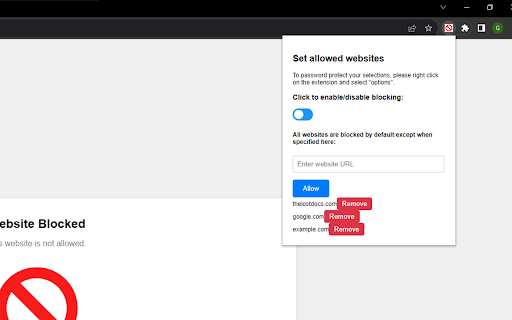

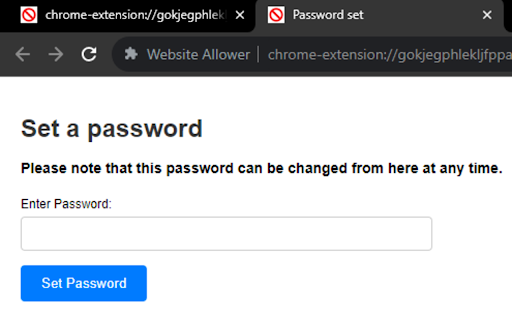
Block all sites except what you allow. Restrict kids to the sites you allow. There are a lot of website blockers, that will block websites that you specify, but what if you only want to let you child go on a few specific websites? The Website Allower does just that! Just enter what websites are allowed, and the rest are all blocked! If you want to avoid it being changed, you can set a password by right-clicking on the extension and selecting options!

Web3 Whitelist
The "Web3 Whitelist" Chrome Extension is a simple tool designed to enhance security when navigating the web3 ecosystem, which includes decentralized finance (DeFi), wallet sites, and NFT marketplaces. Malicious sites pose significant security risks in this space. By restricting browser access to a predefined list of trusted domains and your personally trusted custom whitelist, this extension reduces the risk of phishing attacks and scams. Using Chrome's declarative net request API, it ensures that only whitelisted domains are accessible. The extension is open-source, completely free of charge and licensed under the MIT license.

Tab Silencer Pro
Mute individual tabs effortlessly with Tab Silencer Pro! Streamline your browsing for a quieter, more focused experience. Tab Silencer Pro is a cutting-edge Chrome extension designed to give users unrivaled control over their browser's audio. Allowing seamless muting of individual tabs, it provides a quieter browsing experience and aids in better focus. This tool is a must-have asset for multitaskers, students, and regular internet users seeking optimized browsing. Experience silence at a click with Tab Silencer Pro! Take back your audio control with Tab Silencer Pro! Our easy-to-use Chrome extension empowers you to manage the noise levels of your browser tabs efficiently. Enjoy the peace of being able to mute individual tabs, enhance focus, and streamline your online experience. Stand out from the rest with our user-friendly interface and custom settings. Perfect for multi-tasking professionals, students, and everyday internet users alike. Silence is just a click away with Tab Silencer Pro!

Kitchen Konverter
The ultimate extension for effortless cooking. Instantly switch between U.S. and metric measurements, perfecting every recipe Discover Kitchen Konverter, your trusted culinary companion. Effortlessly tackle recipes from around the world as we bridge the gap between U.S. and metric measurements. Say goodbye to conversions and hello to precision cooking, making every dish a masterpiece. Take the guesswork out of your kitchen with Kitchen Konverter, enhancing your cooking experience one recipe at a time.

AI Parental Control
🤖 AI Parental Control - Harness the Power of AI for Safer Browsing AI Parental Control is a Chrome extension that leverages OpenAI's advanced moderation technology to analyze and block inappropriate web content in real-time. Unlike traditional parental control tools that rely on static blacklists or self-reported site categorizations, our extension scans each page as it's loaded, ensuring harmful content is blocked before it even reaches your screen. Rest assured, AI Parental Control does not save or store any browsing data—your privacy is fully protected. ✅ Customizable Filters: Tailor the extension to block content categories such as explicit material, violence, and hate speech. Choose what fits best for your family's needs. ✅ Real-Time AI Filtering: Using OpenAI's state-of-the-art moderation technology, web pages are analyzed in real-time to block harmful content before it is ever displayed. ✅ Password Protection: Secure your settings with a password to prevent unauthorized access, ensuring that your chosen restrictions stay in place. ✅ Simple, Affordable Plans: Just two plans — a free Demo to get started, and Pro for full protection. New users get a 7-day free Pro trial! ✅ Pay with Card or Crypto: Subscribe with your credit card via Stripe, or pay with USDT (Tether) on the TRON (TRC20) or BSC (BEP20) networks. ✅ Multi-Language Support: Available in English and Spanish. The extension automatically detects your browser language — no setup needed. ✅ Block History: Pro plan includes a detailed history of blocked pages, helping you monitor and understand your family's online safety. ✅ No More Blacklists: Unlike other tools that rely on outdated or incomplete blacklists, AI Parental Control evaluates every web page, making it more effective and reliable. ✅ Smooth User Experience: The clean and intuitive interface makes setup and management a breeze, even for non-technical users. • Demo: Try the extension with 25 page analyses per day. Free forever • Pro ($1.99/mo or $14.99/yr): Unlimited daily page analyses, block history, and all premium features. Also available for 0.99 USDT/mo or 9.99 USDT/yr. Install AI Parental Control today for the most reliable and intelligent way to protect your family's online experience! Start with our free 7-day Pro trial and see the difference AI-powered protection makes. To ensure AI Parental Control works in Incognito Mode, you need to manually enable it: Open Chrome's Extension Management page (chrome://extensions/) Find AI Parental Control in the list Click on "Details" Find the "Allow in Incognito" option Toggle the switch to enable it Without this setting, the extension won't be able to analyze and protect browsing in Incognito windows. While AI Parental Control provides advanced content filtering, parents and guardians remain ultimately responsible for monitoring and managing their children's internet usage. This extension should be used as part of a comprehensive approach to online safety, including proper supervision and open communication about internet safety. This extension is not affiliated with OpenAI. All copyrights related to the names "OpenAI" and "ChatGPT" belong to their respective owners. Feb 23rd, 2026 - v. 3.0.2: improved rendering of specific webpages Feb 21th, 2026 - v. 3.0.1: Spanish language support, USDT crypto payments (TRC20/BEP20), improved page loading experience during content analysis Feb 17th, 2026 - v. 2.6.4: bug fixing Feb 13th, 2026 - v. 2.6.1: new plans, bug fixing Jan 21st, 2026 - v. 2.5.4: minor bug fixes Jan 20th, 2026 - v. 2.5.2: fix for extension initialization Jan 18th, 2026 - v. 2.5.0: new dashboard experience, introduced Blink our new mascot, visual refresh, updated Terms and Conditions Mar 31st, 2025 - v. 2.0.3: minor bug fixes
