
ppdgcdamebmajcgokoggnoacfcaepgha
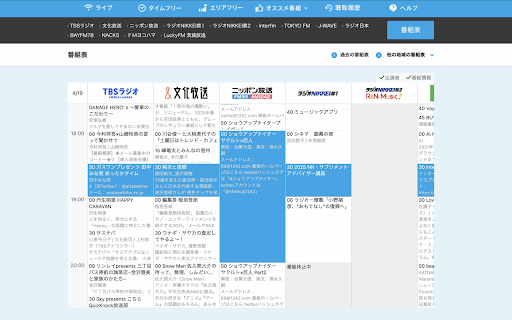
radiko.jpの番組表を見やすくするChrome拡張で快適なラジオ体験を Radigram(ラジグラム)は、Radikoの番組表を見やすく・使いやすくするChrome拡張機能です。 機能 ・エリア番組表・放送局番組表を新UIでまるっと置き換え(番組データ自体はRadikoのものをそのまま使用) ・タッチパッドやマウスドラッグで番組表を上下左右にすいすいスクロール ・「出演者」「番組情報」表示ON/OFFボタンで見たい情報を増減 ・カレンダーUIで放送日らくらく切り替え ・番組詳細ページに飛ぶと、番組表ではその放送枠をハイライト表示するのでわかりやすい 更新履歴 v1.2.1(2025-05-13) - 番組表の最小限度高を設定することで画面が狭い端末でも見やすいようにと調整 v1.2.0(2025-05-03) - エリア番組表において放送局表示位置を記憶するように - 放送局番組表の日付ヘッダレイアウト崩れを修正 v1.1.1(2025-04-20) - タイムゾーンの扱いを改善 v1.1.0(2025-04-19) - 出演者・番組情報表示切り替え機能追加 v1.0.0(2025-04-18) - 初版

ピクチャーインピクチャー for TVer
tver.jp の動画をピクチャーインピクチャーで視聴できるようにします。 動作しなくなっている場合は、レビュー等よりご報告いただけると幸いです。 【更新履歴】 v3.0: ピクチャーインピクチャーボタンの安定性の向上 ミニプレイヤーにピクチャーインピクチャーボタンが表示されるようになりました。 v2.2: リンクの追加 v2.1: サイトの更新により通常動画でPicture-in-Pictureが表示されなくなる問題を修正 v2.0: Pキーでピクチャーインピクチャーを切り替えられるショートカットを追加 v1.1: サイトの更新により通常動画でPicture-in-Pictureが表示されなくなる問題を修正 v1.0: 拡張機能を公開 【ソースコード】 この拡張機能のソースコードはGithubで公開されています。 https://github.com/Hashory/picture-in-picture_for_tver 【注意点】 この拡張機能は、TVer公式とは一切関係ありません。 この拡張機能は、TVerの利用者に便利な機能を提供する非公式のツールであり、TVer公式の許可や承認を得たものではありません。また、TVerは株式会社TVerの商標です。

AI Voice — Text to Speech
AI Voice text to speech any content. Read aloud with natural voices, adjustable speed and multiple ai characters. 🎙️ AI Voice — Text to Speech for any webpage Select any text on any website and instantly listen to it with natural AI narration. No copy-paste, no switching tabs — just highlight and play. 🔊 How it works 1. Highlight any text on any webpage 2. Click the AI Voice button that appears 3. Mini-player opens — press Play and listen That's it. Your text to speech in 3 clicks. ✨ What makes AI Voice different ➤ Word highlight — follow along as each word is highlighted in real time while the audio plays ➤ Natural AI narration — choose from a selection of high-quality characters ➤ Speed control — adjust from 0.5x to 3x to match your reading pace ➤ Mini floating player — drag it anywhere on the page, it never blocks your content ➤ Works everywhere — articles, emails, Google Docs, PDFs, any text on any site 🎯 Perfect for 1️⃣ Students Highlight lecture notes, textbook pages or study guides and listen while commuting, cooking or working out. Let AI read aloud so your eyes can rest and your brain stays focused. 2️⃣ Professionals Too many articles, reports and emails to read? Select any block of text and have it read to you hands-free. Stay informed without staring at a screen all day. 3️⃣ Non-native speakers Hear how words and sentences actually sound. AI text to speech helps you pick up pronunciation naturally — just read along as each word gets highlighted. 4️⃣ People with eye strain or dyslexia Give your eyes a real break. Word-by-word highlight combined with natural audio makes reading easier and more comfortable for everyone. 5️⃣ Researchers and readers Long article? Dense paper? Select the whole thing and listen at 1.5x or 2x speed. Get through more content in less time. 🎙️ Choose your AI character Pick the narrator that feels right for your content: • Natural Female — clear, warm, great for articles and long reads • Natural Male — deep, steady, perfect for news and reports • Neutral — calm and balanced, works for any content type • Fast Reader — optimized for speed listening at 2x-3x • Soft — gentle tone, ideal for bedtime reading or relaxing content All characters are powered by your browser's built-in text to speech engine — no external servers, no data sent anywhere. 🎛️ Player controls • Play / Pause — start and stop anytime • Speed — 0.5x, 1x, 1.5x, 2x, 2.5x, 3x • Character selector — pick your preferred AI narrator • Word highlight — real-time highlight of the current word on the page • Drag to move — reposition the mini-player anywhere on screen 📄 Works great on - News sites and blogs — highlight any article and listen on the go - Google Docs and Notion — read your own writing back to yourself - Emails — have your inbox read aloud while you do something else - Wikipedia and research papers — get through dense text faster - Online courses and e-learning platforms — reinforce learning by listening - Social media posts and threads — any selectable text on any site ❓ FAQ Does it work on all websites? Yes — on any page where you can select text. Is it free? Yes, all core features are completely free to use. Does it need an account? No sign-up, no login, no account required. Install and start listening immediately. What languages are supported? Supports English, Spanish, French, German, Portuguese, Italian, and many more. Does it send my text anywhere? No. Everything runs locally in your browser. Your text never leaves your device. Can I adjust the reading speed? Yes — from 0.5x up to 3x speed reading mode. Will it highlight words as it reads? Yes — highlights each word in real time directly on the page. 🚫 What AI Voice is NOT AI Voice is a focused read aloud tool — not a studio, not a cloner, not an audiobook maker. No bloat, no paywalls on basic features, no account required. Just select text. Hit play. Listen.

無理App - Japanese Learning Extension
Japanese learning extension that adds furigana to text and provides intelligent dictionary features. A Chrome extension designed specifically for Japanese learners, automatically adding furigana to any Japanese webpage for easier reading. ✨ Key Features: • 🔤 Smart Furigana: Automatically adds furigana to Japanese kanji • 🎯 Multiple Types: Supports Hiragana, Katakana, and Romaji display • 📚 Dictionary Lookup: Hover to see word definitions and example sentences • 🌐 Multilingual UI: Supports Chinese, English, and Japanese interfaces • ⚡ One-Click Toggle: Enable/disable furigana and dictionary features instantly • 🎨 Beautiful Display: Uses ruby tags for clean, non-intrusive presentation 🎓 Perfect For: • Reading Japanese news websites • Learning from Japanese blogs and articles • Japanese exam preparation • Reading Japanese technical documentation • Enjoying Japanese novels and manga 🔧 Technical Highlights: • Accurate word recognition • Local processing ensures privacy and security • Lightweight design with no impact on browsing speed • Works on all websites without special configuration 📖 How to Use: 1. After installation, click the extension icon in your browser toolbar 2. Select furigana type (Hiragana/Katakana/Romaji) 3. Enable furigana feature to see readings on Japanese webpages 4. Enable dictionary feature to hover for word definitions Make Japanese learning easier - start with this extension!

radiko Keyboard Player
radikoをキーで操作 〇 概要 ・ ショートカットキーで radiko のプレイヤーを操作する Chrome 拡張です. 〇 キーバインド一覧 ・ Enter: 再生/停止を切り替え ・ R: 最初から再生 ・ 1 ~ 9: ×10秒スキップ ・ Alt + 1 ~ 9: ×10秒戻る 〇 例 ・「1」を押すと,10秒スキップされます. ・「Alt + 2」を押すと,20秒戻ります. 〇注意 ・Mac なら Alt ではなく,Option を押してください. 〇 GitHub リポジトリ ・https://github.com/0npv527yh9/radiko-Keyboard-Player 問題がある場合は、上記のリポジトリの Issues に自由に記載いただいても構いません。 〇リリースノート ・2024/10/25: Mac での巻き戻し機能がおそらくサポートできていなかったので修正 ・2025/04/20: テンキーが誤ってサポート外となっていたため修正 ・2025/05/31: 検索の際にショートカットキーが邪魔になっていたので無効に
