
pooohnajnmgmjmoikoeabofpgiaebhhg
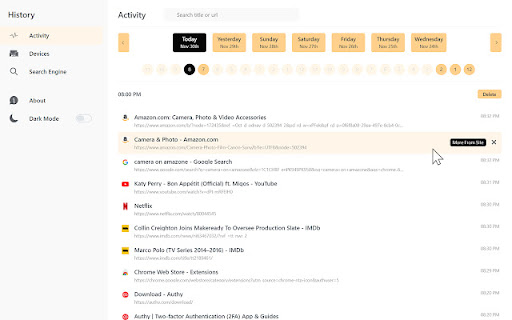


A check look at your browsing history. The best searching, the sharpest interface, and the most useful filters - for your history. A check look at your browsing history. The best searching, the sharpest interface, and the most useful filters - for your history. Check History replaces your Browser's history viewer and adds more controls to manage and browse your history. Key Features: - Reference your history quickly by jumping between days and hours in just a click. - Deleting a day, hour, or individual visit is painless in Better History. - Deleting by Keyword or any single domain visits also supported - Merges your visits and downloads in one easy view! - Regular expression searching is now supported! - Dark mode makes it easier to stay focused - Via context-Menus Search your history fast by page title or URL. Each match is highlighted in the search results for clarity. Use the right click options to search highlighted text on a page or by a site's domain. Permission Justifications: - History: Adds more controls to manage and browse history - Storage: Save extension settings - Tabs: Using the right click options on any website to search text in history viewer - Sessions: Show history from all devices - Downloads: Able to search in downloads history Data Privacy Policy: We do not track any type of your data, usage of this extension or any website usage. Your extension settings exclusively stored inside your browser. We never touch or see this data. Feel free to contact us if you got any questions or concerns about data privacy, we will be happy to help.

Cleaner - history & cache clean
Best way to clean cache and chrome browsing data! Easily clean history, downloads, cookie or set auto history cleaning! Fasten Browser with Smart Cleaner extension *New Option: Hot key "Clear" - Alt+C (works for all OS). Smart Cleaner is a simple utility to clean browser data, cache, cookies, downloads and increase an overall browser speed. Click "add to chrome" button to run Smart Cleaner and flush the browser history without any efforts. My Google Chrome is getting too slow. What can I do? The problem with all the browsers, whether it’s internet explorer or Google Chrome, is that they become slow and clunky after a period of time. They take time to start up to, to load websites and to open and close tabs. This is when one should consider cleaning up the browser and getting rid of the cache, history etc. Clean is a useful browser extension that helps you quickly clean up the browser. and It help to delete all traces of your online activity to protect your privacy. Clean is very easy to use and fast. Clean up browsing data from a user's local profile. Make your Chrome browser more faster and Protect your personal data!! + Instant removal with one-click + Cleaner Chrome history + Empty the cache + Automatic data remove + Delete cookies and other site and plug-in data + Delete History + Remove Passwords + Cleaner for saved form data + Ability to choose time period + Dark mode + Quick clear button + Making fetch call based on the response creating tab with response url This lightweight extension enables you to do all that mentioned above instantly, with one click on the Eraser icon in the Chrome toolbar.

QuickFind: History, Bookmarks & Tabs
Quickly search and access your browsing history, bookmarks, and open tabs. QuickFind helps you quickly search and manage your browser history, bookmarks, and open tabs across all Chrome windows from one powerful popup. If you’ve ever lost a tab, struggled to find a previously visited page, or wanted to clean up your browsing data faster, QuickFind is built for you. You can search using page titles, URLs, domain names, and bookmark folder names. - Instantly find open tabs, even across multiple Chrome windows - Click a result to jump directly to the existing tab - Close open tabs directly from the results list - Bulk actions to close selected or visible tabs - Website / domain filter based on your most visited sites - Time range filter for browsing history: - Today - Last 7 days - Last 30 days - All time - Result limit control: - 25 - 50 - 100 - Website favicons for easy visual recognition - Page title shown when available - URL shown when no title exists - History items display exact date and time of last visit - Bookmark results show folder hierarchy - Clean and redesigned user interface - Light and Dark mode support - Manual theme toggle and system theme support - Theme preference is remembered - No background polling - No analytics or tracking - No external servers - All data stays locally in your browser QuickFind only uses Chrome permissions required for its functionality and does not collect or transmit user data. - Save time finding tabs, links, and bookmarks - Manage browsing data efficiently - Keep your browser clean and organized - Designed for productivity and power users

History quick view
View, delete and search browsing history data View, delete and search browsing history data. History quick view is a simple chrome extensions for use and manage simple tasks with your browser history data. This extension is created for my own necessities. If you have some bugs or you need other utilities please contact me. Here is the repository of the code https://github.com/AxelArielSaravia/history-quick-view. Some of the usabilities are: - see your most current history, but you can navigate all your history. - delete a history url. - delete a complete history day data. - search a history query. - shortcut button to the browser history manager - shortcut button to the browser history data cleaner Some user configurations: - You can set if the url opens in the current tab or in a new tab. - You can specify when a new tab is opens, go to it (focus it) or stay in your current tab. - You can hide the search bar. Keyboard shortcuts: - : Normal navigation. - : focus search input. - +: on search input, removes the search input text. - : on item, remove the item. - +: on item, remove the complete day range. - +: on item, opens the item in a contrary way of the configurations. - +: on item, opens the item in a contrary way of the configurations. - +: on item, opens the item in a new windows. - +: on item, opens the item in a new windows. - +: close any kind of modal. - : open or close the "more modal" . - : open or close the "keyboard modal". Search by date: This feature allows you to start your search from a specific date, including that date and all previous records. It’s like saying, "search from this date to the past". We cannot search the future, so if it’s a "relative date query" we search in the past. However, if it’s a "strict date query" set beyond the current date, it will be considered an "invalid date query". Everything that does not follow the queries listed below is invalid. Search query: - `yesterday` or `y` - week days: If a week day is beyond the current date, it returns that day from the previous week. `mo` `tu` `we` `th` `fr` `sa` `su` `monday` `tuesday` `wednesday` `thursday` `friday` `saturday` `sunday` - month names: If the month is beyond the current date, it returns that month from the previous year. `Jan` `Feb` `Mar` `Apr` `May` `Jun` `Jul` `Aug` `Sep` `Oct` `Nov` `Dec` `January` `February` `March` `April` `May` `June` `July` `August` `September` `October` `November` `December` - partial date expressions: If the date is beyond the current date, it returns that date form the previous year. ` ` ` ` Example: "2 Aug", "Feb 22", "3 October" - full date expressions: This is an "strict date query". If the date is beyond the current date, it will be considered "invalid". ` ` ` ` Example: "2 Aug 2023", "Feb 22 2021", "3 October 2021" - "date calculation expressions": This expression calc how many days, weeks, months or years to search from the current date to the pass. The `-` (negative sign) is required at beginnig. If no `period` is specified, the default is `day`. `-` `- ` period: - `d` `day` `days` (values: 1..730) - `w` `week` `weeks` (values: 1..240) - `m` `month` `months` (values: 1..120) - `y` `year` `years` (values: 1..10) Example: "-1", "-3 m", "-1 year", "-5 weeks" The icons used in the extension are from Feather Icons (https://feathericons.com/) and Lucide Icons (https://lucide.dev). The inspiration of this extension comes from the Edge Browser history extension (https://www.microsoft.com/en-us/edge).

Cache Cleaner
Use Cache Cleaner: clear cache chrome, clear cookies & clean browser history for a faster, secure browsing experience. 🛠️ The Cache Cleaner for your browser history, cookies, cache clean. Looking for a reliable and efficient way to keep your browser clean and running like new? Our Cache Cleaner extension is designed to streamline your browsing experience by clearing out temporary files, cookies, and other residual data that can slow things down or compromise your privacy. Whether you're using Chrome, Opera, Edge, or any other Chromium-based browser, this powerful yet simple tool helps you maintain a cleaner, faster, and more secure online environment. ✅ Why Use a Cache Cleaner Extension? Modern browsers store a lot of data over time: cached images, cookies, browsing history, and more. While helpful for speed and convenience, this buildup can eventually lead to: 🔻 Slower page loading 🔻 Reduced browser performance 🔻 Privacy risks from stored tracking data 🔻 Login or display issues on frequently visited websites Using a cleaning tool regularly can help resolve these issues quickly and effectively. That’s where this extension comes in — offering comprehensive features with user-friendly controls. 🖱️ One-Click Cleaning – Easily remove cached files, cookies, and browsing history 🎛️ Custom Cleanups – Choose exactly what to delete 🛡️ Privacy Protection – Erase stored data to reduce tracking 🚀 Performance Boost – Free up system resources 🌐 Cross-Browser Support – Works with Chrome, Opera, Edge, Brave, and more 🚀 Benefits of Using This Extension ⚡ Improved Speed: Clear out cached files to enjoy faster load times. 🧰More Control: Customize what data is removed, how often, and when. 🔐Better Privacy: Prevent websites from tracking you using old cookies. 🔒 Enhanced Security: Remove sensitive session data after browsing. 🛠️ How to Use the Extension 1️⃣Install the Extension: Get it from the Chrome Web Store in just a few clicks. 2️⃣Open the Toolbar Icon: Click on the cleaner icon in your browser's toolbar. 3️⃣Select Cleanup Options: Choose cache, cookies, history, or all. 4️⃣Hit “Clean Now”: The extension immediately removes the selected data. 5️⃣Browse Faster and Safer: Enjoy a smoother browsing experience right away. 🔑Fix Login Errors: Clear cookies to resolve issues with signing into websites. 🗑️Free Up Disk Space: Removing cached images and files can recover significant space. 🔄Start Fresh: Clear browsing data regularly to avoid clutter buildup and corrupted cache problems. 🔁Refresh Broken Pages: Sometimes old cache causes websites to load improperly — a quick cleanup solves that. 📚 Frequently Asked Questions Q: Does this extension delete saved passwords? A: Only if you select the option. You have full control over what data is deleted. Q: Will this work with browsers other than Chrome? A: Yes! It’s compatible with most Chromium-based browsers including Opera, Edge, and Brave. Q: How often should I clear cache and cookies? A: It depends on your usage. Weekly cleanups are ideal for most users, but power users may prefer daily. Q: Can I clear cache for a specific site? A: While this extension clears all cache, advanced users can clear specific site data via browser DevTools. Q: Is it safe to delete cookies? A: Yes, though doing so may log you out of some websites. You can exclude login data if needed. 🧩Browsers Supported: Chrome, Opera, Edge, Brave, and any Chromium-based browser. 💻Systems Supported: Works on Windows, macOS, Linux, and Chrome OS. 🎯 Who is This For? This tool is ideal for: 🙋Anyone experiencing slow page loads 🔒Users concerned about online privacy 🧭People who frequently browse and accumulate history/cookies 🧑💻Developers who need a clean environment for testing 📱Chromebook users looking for an easy way to manage browser storage 🚀 Get Started Today Install the Cache Cleaner extension now and enjoy a seamless browsing experience. Whether you’re casually surfing the web or multitasking across dozens of tabs, our extension ensures your browser remains fast, responsive, and secure. 🔐 Your Data, Your Control This extension operates locally on your browser — we do not collect or transmit any personal data. All actions are performed within your browser environment, ensuring complete privacy. By improving speed, enhancing privacy, and offering full control over your browser’s stored data, this cache cleaner extension is a smart addition for anyone who wants their browser to work better — and stay that way.
