
ponojgaojnpcedbdgddpdpeehhkfbkcj
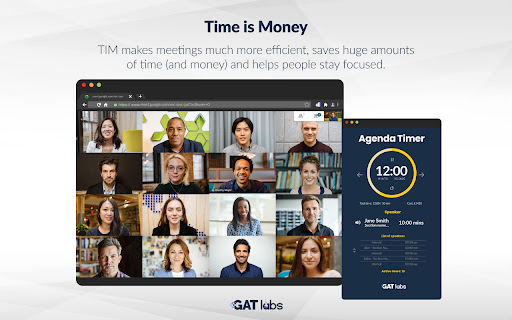


Tim Browser Extension TIM is a powerful tool for making online meetings much more efficient. With TIM we solve the problem of web meetings wandering off-topic, losing focus and lacking discipline. TIM does this in a coordinated way by allowing the meeting organizer to create and control a clock that both measures and manages speaking slots. The clock can be distributed to run on every participant's desktop, but is always controlled and synced to the organizer's clock. TIM makes meetings much more efficient, saves huge amounts of time (and money) and helps people stay focused. It disciplines undisciplined speakers and continued use will encourage people to prepare for meetings and show respect for everyone else's time. Remember one undisciplined presenter talking to himself for 30 mins wastes half an hour of his time, when talking to a group of 20, 10 person hours are wasted, that is more than a full working day!

Toolbar Timer
Track time during screensharing in the webbrowser. Useful for use with evernote, Excel Online or a Github codereview. Meetings can be quite long, because there is no time pressure to create the result on time, a simple progress bar is an intuitive reminder of the Meeting Timeframe. It helps focusing on the agenda without drifting off.

Session Timer
Sidebar timer for meetings - always visible, only to you. Key features: time segments, notes, agenda. End on time, every time! Session Timer is a Chrome sidebar timer, visible only to you during online meetings. Features: - timer in Chrome sidebar, always visible during a meeting (no need to change tabs or click anything) - visible only to you, not the person you are talking to - create scenarios with defined time segments (meeting templates) - track time of a current segment (circle) and entire meeting (bar) - timer signals the end of each segment by pulsing - pause, resume or jump to next (or previous) meeting segment - take notes and save them for later - save agenda and use it on meeting Who is this product for? Session Timer is designed for professionals leading sessions, meetings, or online presentations where staying on time is crucial. Whether you're running individual sessions or big audience presentations - it helps you avoid exceeding your time limit and ensure every agenda item gets the attention it deserves. By keeping track of each time segment, you can plan, manage, and adjust your session to make the most of it. Session Timer is best suited for those who: - lead meetings or presentations alone (one speaker) - use a repetitive meeting scenario (same time or agenda). - want to run a meeting professionally without showing the timer to their audience It's a paid product. You need to buy a subscription to use all features (including basic functionality, like creating your own timer scenario). But you can test how it works for free, before buying a subscription (there are example scenarios). 1. Add to Chrome - add Session Timer to Chrome from the Chrome Web Store and pin it to your toolbar in Chrome. 2. Log in - to log in for the first time, you will need to create a user account on our website. 3. Subscribe - buy a subscription to unlock Premium features. 4. Create a scenario - create your first timer scenario. Define the number and duration of segments to fit your meetings. That's it! Now you can start using Session Timer! Click on the Session Timer icon in Chrome toolbar to open it, whenever you need it.

Loop8 Privacy Manager
Browser extension for Loop8 Privacy Manager. Loop8 Privacy Manager Chrome Extension is a seamless method for users to safely and securely store their login credential information.

Google Meet Timer
Add a simple timer to your Google Meet sessions. This extension shows a timer during meetings. It keeps time even if the meeting was restarted or inactive for up to 5 minutes. This extension does not track any user data so no privacy policy is provided.
