
poicobkchpcppimnbechemefhdjkpcig
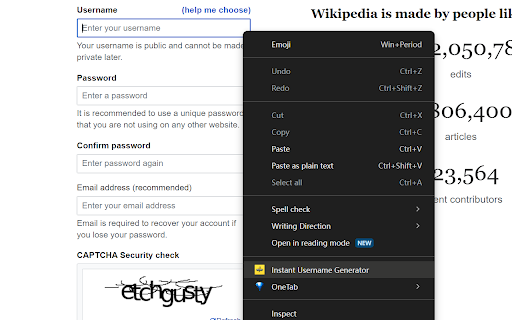

One Click Instantly Generate Memorable Usernames! How to Use: 👇 Unlock effortless username generation in just a few clicks with… One Click Instantly Generate Memorable Usernames! How to Use: 👇 Unlock effortless username generation in just a few clicks with "Instant Username Generator": 1. Install the Extension 💻: Add it to your Chrome browser with ease. 2. Visit Any Website 🌐: Navigate to the site where you need a username. 3. Right-Click on the Username Field ✍️: Simply right-click on any username input field. 4. Select 'Generate Username' 🚀: Choose our option from the context menu, and voilà - a unique username is instantly filled in! Welcome to a seamless username creation experience! "Instant Username Generator" is an innovative Chrome extension designed to elevate your account management efficiency across various websites. By leveraging smart algorithms, this extension instantly crafts a unique username for you based on the domain name of the website you are visiting. This feature complements tools like the Chrome Password Manager for simplified account management. - Rapid Username Generation ⚡: Instantly concoct a personalized username inspired by the current website's domain name you are browsing. - Ease of Use 👌: No complicated settings; a simple right-click is all it takes. - Enhanced Account Management 📈: Generates site-related usernames for easier recall and management, ideal for use with password managers. - Broad Compatibility 🌍: Suitable for a wide range of websites, including social media, forums, e-commerce sites, and more. - Elevated Online Experience 🌟: Effortlessly create unique and practical usernames, enhancing your digital life. Whether you're seeking a fresh social media handle or inspiration for new website registrations, "Instant Username Generator" offers the ultimate convenience. Install now and experience the most efficient way to create usernames!

Domain Tab Title
Prepend the current tab's domain name as keywords inside the tab's title. A tiny script to prepend the tabs domain names as keywords to the tabs titles. To achieve that the current html document title will be dynamically modified with the domain (or subdmain) name's keywords prepended with a vertical pipe character "|" to the original title. For example if you visit the following websites, the tab or window title will become : * https://www.google.com: "Google" * https://www.google.co.fr: "Google FR" instead _Google_ * https://www.google.co.jp: "Google CO JP" instead of _Google_ * https://mail.google.com: "Mail Google | Inbox - xxx@gmail.com" instead of _Inbox - xxx@gmail.com_ Defaults "www" prefix and ".com" suffix are excluded and will be hidden, displaying clean corporate brand names : * https://www.apple.com: "Apple" same as _Apple_ * https://www.amazon.com: "Amazon | Amazon.com. Spend less. Smile more." instead of _Amazon.com. Spend less. Smile more._ * https://www.microsoft.com: "Microsoft | Microsoft – Cloud, Computers, Apps & Games" instead of _Microsoft – Cloud, Computers, Apps & Games_ This should work with sub-pages and when pages are updated dynamically via ajax as well. I made this addon a few years ago when working with multi-language websites. Useful for English native speakers as well and can help you detect typical fishing site using fake domains.

Phrazify
Phrazify: Igniting creativity, enhancing writing with personalized AI assistance. Transform your writing journey with Phrazify - your ultimate AI-powered writing assistant. Whether you're a student, a professional, or an English learner, our innovative Chrome extension is here to revolutionize the way you communicate. Phrazify goes beyond simple grammar and spelling corrections. It provides dynamic sentence structure enhancement, vocabulary improvements, and text optimization that aligns with your unique writing needs. Looking to craft captivating emails, engage in smarter conversations, or create catchy social media captions? Phrazify has got you covered. Our 'Improve Text' and 'Improve Email' features work tirelessly to transform your raw thoughts into polished text, while our 'Generate Captions' feature helps you make the best out of your social media presence. Plus, with 'Ask Anything,' you get to experience the versatility of our AI model in answering diverse range of topics. And the best part? You're in control. Customize your writing experience with adjustable filters for English level, word limit, and tone. We offer a range of plans tailored to your word-processing needs, including a Free option for those who want to test the waters. Privacy is our top priority. Rest assured, your text inputs and generated outputs remain confidential, giving you the freedom to express with peace of mind. Phrazify isn't just a tool - it's your writing companion, designed to elevate your text and ignite your creativity. Join the writing revolution today with Phrazify!

YouTube Bookmarker
Bookmark your YouTube video timestamps Keep track of your timestamps with this handy little tool. No need to forget where you left off in that lengthy YouTube video anymore. Just click on the plus button in the player options and you can access that timestamp anytime using the extension. Features: - Easy to Use - Fast and minimal package size - Unobtrusive UI - Easy way to track all the timestamps you have saved - Theme based on your preference. Leave a star if you liked my work. https://github.com/nirzon47/youtube-bookmark-extension/

Namlet - Smart Username Generator
A smart username generator with themes, custom words, numbers, special characters, generation history, and real-time updates. Say goodbye to the struggle of finding the perfect username! Namlet helps you create unique, personalized usernames that are less likely to be taken on any platform, whether for gaming, social media, or more—all with just a few clicks. Features ✔ Select from Futuristic, Meme, Anime, Medieval, and more themes to align with your personality or needs. ✔ Generate usernames with context-aware suffixes/prefixes like ItsMiya, AdamOfficial, ElonWasHere, Bella.tv, and countless more by typing a custom word and enabling Smart Extensions. ✔ Toggle numbers, special characters, or capitalization in real-time, without losing your original username base. ✔ Adjust length to create short fictional words, medium random combos, or long, multi-word usernames. ✔ Track your last 30 copied usernames in the log, view them anytime, and export to CSV for easy reference or sharing. How It Works 1. Pick a theme and start generating. 2. Enter a custom word for personalization (optional). 3. Enable Smart Extensions for advanced prefixes/suffixes (optional). 4. Adjust length, numbers, characters, and capitalization. 5. Copy usernames to save in History or export as a CSV anytime. Note: Themes are disabled for short-length or Smart Extensions as they don’t apply. Why Namlet? - Privacy-first with no data sent or stored externally - Minimal and free with no ads or hidden fees - Simple UI that quickly generates unique usernames About Me I’m an indie creator making tools I personally need. If Namlet makes life easier for you, you can support me via the in-app “Donate” button. Have suggestions or questions? Contact support@pax.red Disclaimer ⚠ Generated usernames are created randomly based on user inputs and algorithmic logic. The developer is not responsible for any unintended combinations. Change Log: Version 1.15.35 (24.12.2024) ✔ History Feature: Added a History icon to track and export the last 30 copied usernames. ✔ Enhanced Tooltips: Hover over length settings (Short/Medium/Long) for quick tips. ✔ UI Updates: Improved design for better usability and consistency. ✔ Expanded Word Database: Added more words for greater variety.
