
poheekmlppakdboaalpmhfpbmnefeokj
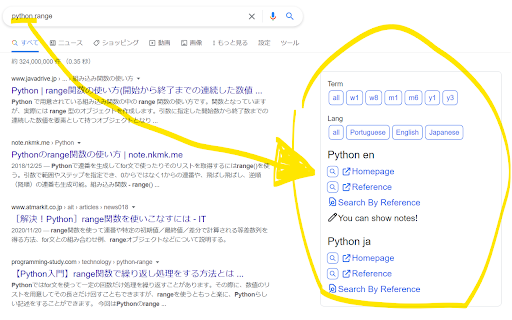

Amazing Searcher adds the following link to the Google search results. * `Term`: restrict results to a specific time period * `Lang`: restrict results to a specific language * `Recipe`: following link about search words. * Homepage * Reference * Search By Reference (Search in Reference by Reference) * Search By Google (Search in Reference by Google) * The link you registered on the settings page * The Memo you registered on the settings page `Term`, `Lang` and `Recipe` can be set in the options page. In particular, by setting up a lot of `Recipe`, you can greatly reduce the time it takes to get to the information you want!

Condler
Amazonで商品を探しやすくします。 Amazonの商品検索結果のページに、新たな絞り込み項目を追加します。 Firefox版:https://addons.mozilla.org/ja/firefox/addon/condler/ 寄付をしていただける方は以下のリンクからお願いします。 Buy Me a Coffee:https://www.buymeacoffee.com/nunawa Amazonギフト券 Eメールタイプ:https://www.amazon.co.jp/dp/B004N3APGO (nunawa7@icloud.comまで)

Google Search date range shortcut
Add a date range shortcut to your Google search results.

Choomame
Choomame shows the following link to Popup and the Google search results. - `Time`: restrict results to a specific time period - example: 3 years, 1 month, 1 week ... - `Language`: restrict results to a specific language - example: English, Japanese, Spanish ... - `Custom Link`: easy access to frequently viewed pages, site searches, official documents - Check https://github.com/eetann/choomame-custom-link-collection#readme for details. - Please operate links at your own risk. These can be freely customized on the option page. If you want to use a shortcut key to open a popup, type `Ctrl(Command) + q`. This shortcut key can be assigned freely at `chrome://extensions/shortcuts'. Choomame is an improved versioin of my previous extension "Amazing Searcher".

isear
複数ワードに対応したページ内検索ツール 【統合検索ツールisear】 Google検索対応のページ内検索ツールです。 ニュースの閲覧、wikiや辞典での検索、知らない単語の検索等で活躍します。 解説サイト https://isear.intelfike.net/ ◎ 特徴 ・ スペース区切りで複数ワード検索が可能 ・ ワードごとにボタンが生成され、ページ内のワードをたどることができる ・ Google検索の検索ワードを自動取得します(設定でOFFにできます) ・ 範囲選択→右クリックで簡単に検索ワードを追加 ・ 画面右側に表示されるカラフルな「ハイライトバー」で、検索されたワードの位置や数がひと目でわかります。 ◎ 使い方 https://isear.intelfike.net/usage_functions.html ◎ 基本操作 ・ 「ON/OFF」ボタンをクリック : 全検索ワードのハイライトをON/OFF ・ 「検索ワードボックス」で「Enter」 : 全検索ワードを巡回 ・ 「検索ワードボックス」で「Shift+Enter」 : 全検索ワードを逆巡回 ・ 「検索ワードボックス」で「Ctrl+Enter」 : 現在開いているページにてGoogle検索 ・ 「検索ワードボックス」で「Ctrl+Shift+Enter」 : 新しいタブでGoogle検索 ・ 「検索ワードボタン」をクリック : 検索ワードを巡回 ・ 「検索ワードボタン」で「Enter」 : 検索ワードを巡回 ・ 「検索ワードボタン」をShift+クリック : 検索ワードを逆巡回 ・ 「検索ワードボタン」で「Shift+Enter」 : 検索ワードを逆巡回 ・ 閲覧ページで文字列の範囲指定 ⇒ 右クリック ⇒「isear検索ワードに追加」を選択 : 検索ワードの追加 ◎ その他の設定 オプション設定 https://isear.intelfike.net/usage_settings.html ショートカット https://isear.intelfike.net/usage_sKey.html 検索テキスト https://isear.intelfike.net/usage_sWord.html ◎ プライバシー保護 本拡張機能はプライバシーに関するいかなるデータも収集致しません。 通常の使用の場合、検索ワードはブラウザに一時保存されます。 履歴化機能を有効化することで長期保存されますが、ブラウザの機能によって外部から読み取れない形で保存されます。 また本拡張機能は通信の許諾を得ませんので、外部に送信される危険もございません。 ◎ Thanks(名前のみ、詳しくは解説サイトで) DreamHope 青銅 abeshi ありさん バージョンアップ情報はホームページに記載
