
pohdmcmfjhjnocjjhoobmhbgonebakad
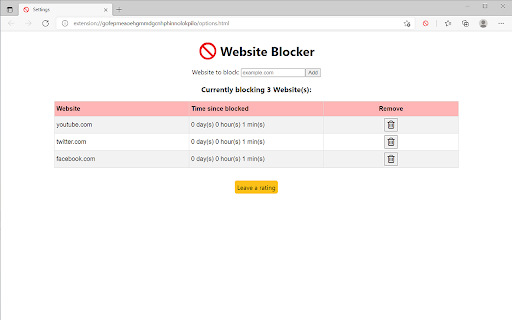


Easily block an unlimited number of websites using this free browser extension. Why install this browser extension? 🚫 Easily block as many websites as you want. 📚 Boost your productivity, avoid distractions, stop procrastination and stay focused. ⏲️ See how long each website has been blocked for. This feature motivates you to keep websites blocked. Once you unblock a website the timer is reset to zero. Challenge yourself to see how long you can go! 🔒 The only permission needed is 'Block content on any page you visit'. That's it. This means that you can be reassured that your privacy and security is protected. No user data is collected. How To Use: 1) Click on the extension icon to bring up the popup window. 2) In the popup window, click the link to go to the settings page. 3) In the text field, enter the URL of a website (e.g. example.com) that you want to block and then press add. 4) Your browser will then be blocked from visiting that website. This includes embeds. 5) To unblock a website, click on the trash can icon for that website. Note: The text that you enter in order to block a website is used as a URL filter. This means that any URL containing that text is blocked. For example, both "example.com" and "ple.com" will block the browser from visiting the URL "http://example.com/". If you like this extension, a rating would be very much appreciated. 😊

Block Site Ex
Block Site Ex - website blocker. Set up a PIN code and flexible schedule. Block Site Ex allows you to set up scheduled browser-wide site blocking. Features: 🔺 Block web site with a four-digit numeric PIN code 🔺 Flexible Schedule 🔺 The settings are also protected by a PIN code Note: only for personal use. Any tech-savvy person can easily "hack" the tool. How to use: You can enable blocking on a website via the toolbar icon. Find the "Block Site Ex" toolbar icon under the puzzle icon in the browser toolbar.

Block Site
Blocks access to distracting websites to improve your productivity. Block Site is a simple Chrome extension that improves your productivity by blocking access to distracting websites as you specify. To configure, click on the B icon in the toolbar.

FocusGuard - Block Site & Focus Mode
Free site blocker for enhanced productivity. Custom blocklist and password protection. Stay focused, and block distractions. If you want some time to browse online but hope to avoid a full-blown internet spiral, a site blocker might be perfect for you. Set a time limit for distracting sites. When you reach the limit, a block goes into place. That means you still get to check your feed now and then, just not for too long or too often. Site blocker is designed to help you stay focused on studying, learning, and working. Blocks all time-westing websites to keep you productive and away from all the distractions the internet offers. To use a site blocker, set a password, decide which websites you want access to, and let the site blocker block the rest. If you want to visit a site you have blocked, enter your password, and decide how long you want to be on the blocked site. If you’re a parent, you can set the password for your child. Or, if you’d like to use it yourself, have a friend or partner put it for you to help you concentrate. And voila! You now have a set of internet guardrails that help to help you stay productive and on task whether you’re studying, remote learning, or need an extra boost of self-control to finish a project. 👉 Block sites, including its subdomains Remove all distracting and harmful websites from your life by blocking them for you while you need to stay focused and productive. 👉 Allowlist Add exceptions to the blocked websites list. Sites from this list avoid all blocking settings. 👉 Focus mode The focus mode timer lets you control your schedule via the Pomodoro technique. Break down your tasks into intervals followed by a short break. With ‘Focus Mode,’ you can set times to disable websites and browse freely. 👉 Time management Show how many work cycles you completed during a session. So you’ll be able to get all your tasks done and still have time to browse your favourite sites and apps in between. 👉 Password protection If you start focus mode, you can stop it with a passcode of your choosing, making it harder to procrastinate. You can also password-protect the options page to keep you from efficiently removing sites from your list. 👉 Unstoppable focus mode Select the option to hide the pause and stop buttons in the extension settings. And you won't be able to stop blocking sites until the block time expires. 👉 Funny blocked page You will now see funny images if you are trying to enter a blocked site. To do this, you need to enable this option in the site blocking settings. You will still not be able to enter the blocked site, but perhaps a funny picture will make you smile :)) Block Site is one of the best productivity tools available to help people procrastinate less, become more productive and reach their life goals. You’ll never have to worry again about how to stay focused at work. ⭐️Note⭐️ To block sites in incognito mode, you need to activate Allow run in incognito mode checkbox on the chrome://extensions page.

Porn / Adult Blocker, Block Sites - BlockerX
Porn blocker for Chrome. Can block over 2 Mn porn websites. Can also block sites as per your preferences. If you're in search of an effective Porn Blocker to keep certain websites at bay while using Chrome, BlockerX is your ideal choice. Serving as both a powerful Adult Blocker and a tool to block sites, this Chrome extension significantly improves your browsing experience. With its prowess in being able to block sites, especially adult content, YouTube, social media, and various online distractions, BlockerX is more than your average Porn Blocker. BlockerX distinguishes itself not just as any Porn Blocker but as a holistic solution that includes features such as time monitoring on different websites, streak tracking to assist you in staying away from distractions for longer periods, and an accountability partner feature to keep you on track with your objectives. Porn Blocker: Activating the Porn Blocker feature of BlockerX seamlessly blocks over 2 million adult sites. BlockerX empowers you to add any undesirable/adult website to your block list. In its free version, it allows you to block up to three websites, making any page from a blocked website inaccessible through its efficient Porn Blocker function. Adult Blocker: This functionality, which is integrated with the porn blocking toggle also enforces safe search across all major search enginers, ensuring adult content is blocked from being accessed. Block Sites Feature: If you're wondering how you can block sites on Chrome, including pages with specific keywords, BlockerX has you covered. To block gambling sites, for example, just add "gambling" as a keyword to your block list, and BlockerX will prevent access to any page containing this word. The free version accommodates up to three keywords. Whitelist Option: Should BlockerX inadvertently block a site you need, the whitelist function comes to your rescue, ensuring that any listed site or keyword isn't blocked by the Porn Blocking feature. Insights on Browsing Habits: Gain valuable insights into how you spend your time online, helping you steer clear of time-draining websites. Accountability Partner Feature: Enhance your commitment to evading distractions with the help of a trusted partner, thanks to the Adult Blocker feature. Image Blocking and Incognito Mode Compatibility: BlockerX takes charge of filtering out adult content in real-time and works seamlessly even in Chrome's incognito mode, providing comprehensive browsing control. Unlimited Access: The premium version lets you block an unlimited number of websites and keywords, amplifying your ability to block sites and utilize BlockerX as an effective web blocker. Uninstall Notification: Stay informed if the extension is removed, ensuring accountability. Customization: Tailor your web blocker experience with customizable messages and redirection URLs. Daily Updates to Your Partner: Keep your accountability partner in the loop with daily reports on attempts to access content blocked by BlockerX. To summarize, BlockerX shines as a comprehensive solution for those wondering how to block sites or adult content on Chrome, surpassing the capabilities of standard site-blocking tools. It is indispensable for anyone aiming for a focused and efficient online experience.
