
pofhnleglcpmmkkaohhadcmombagfeie

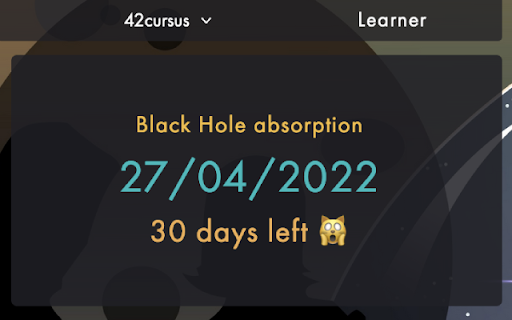
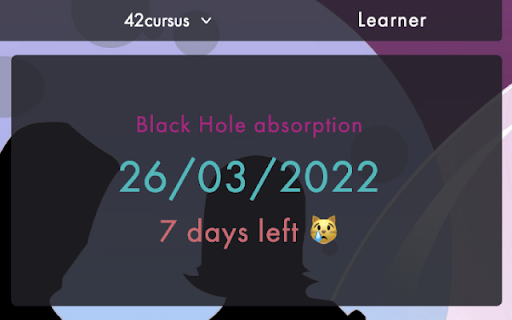
Shows how many days you have left before you get absorbed by the Blackhole. A simple extension that shows how many days a user has left until the date of the deadline (Blackhole) on https://intra.42.fr and shows it in right under the date in the "Black Hole absorption" section of their profile. For any feature requests or problems, feel free to open an issue on the GitHub repository, or create a pull request. Source code on GitHub: https://github.com/mohamedhaddi/ft_blackhole

Redhole
Redhole helps you track and view blackhole dates for yourself and others on the 42 network using intra.42.fr. Redhole helps you track and view blackhole dates for yourself and others on the 42 network using intra.42.fr.

42 Intra Header
A modern, responsive redesign of the 42 Intranet header by avalles- Transform your 42 Intra experience with a sleek, modern interface redesign! • Modern Header Design Clean, dark-themed profile header with glass-morphism effects and smooth animations • Enhanced Milestone Tracking Visual progress indicators with color-coded status (green/yellow/red) based on your pace Interactive timeline showing all milestones with detailed information Real-time calculation of days remaining and completion percentage • Custom Backgrounds Upload your own background images to personalize your profile Easy reset to default with one click • Improved Stats Display Redesigned stats cards with better readability Quick access to evaluation points, wallet, and correction points Visual progress rings for active milestones • Coalition Integration Display your coalition colors and badges Rank and score tracking • Responsive Design Optimized for all screen sizes Smooth transitions and hover effects 1. Install the extension 2. Navigate to your 42 Intra profile 3. Enable the redesign from the extension popup 4. Optional: Upload a custom background image 5. Refresh the page to see the changes This extension only modifies the visual appearance of your 42 Intra profile page. It does not collect, store, or transmit any personal data. Made with ❤️ by avalles- for the 42 community.

CalIntra
Sync 42 school events to your calendar with CalIntra. Automate event syncing to logtime with Cali vibes! Requires Intra Improved CalIntra is a Chrome extension that revolutionizes the way you manage your 42 school platform events, making it a breeze to sync them with your personal calendar while injecting a touch of Cali vibe to your academic scheduling. This extension is designed for students and staff of the 42 school who want to simplify their event planning and effortlessly stay up-to-date with their registered events. With CalIntra, you can: - Automatically Sync Events: CalIntra seamlessly integrates your 42 school platform events with your personal calendar, ensuring that you never miss an important deadline, meeting, or group activity. With real-time synchronization, your calendar will always be current and accurate. - Streamline Logtime Management: CalIntra automates the process of syncing your registered events to logtime by creating a calendar, making it easy for you to track your progress and stay on top of your academic responsibilities. - Enhance Scheduling Experience: By bringing the Cali vibe to your scheduling, CalIntra adds a touch of fun and inspiration to your academic planning. Stay organized and motivated with the California-inspired efficiency of this extension. - Easy to Set Up: CalIntra is simple to install and requires minimal configuration. Simply add the extension to your Chrome browser and experience the convenience it offers. - Never Miss an Event: CalIntra helps you remember and never miss or forget about the events you have been registered to, ensuring that you stay on track and make the most of your academic opportunities. Note: For optimal functionality, Intra Improved must be installed. CalIntra is perfect for anyone who wants to make the most out of their 42 school experience. By streamlining the process of syncing events and logtime, this extension saves you time and effort, allowing you to focus on what really matters: your education and personal growth. Furthermore, the Cali vibe brought to your scheduling by CalIntra adds a touch of excitement and inspiration to your academic planning, ensuring that you stay motivated and engaged throughout your educational journey. Open Source and Transparent: CalIntra is an open-source project, and its source code is available on the GlizzyKingDreko GitHub profile (https://github.com/glizzykingdreko/CalIntra). Feel free to explore, contribute, or provide feedback to help improve the extension further. Don't miss out on the benefits of CalIntra! Install the extension today and experience the convenience and California-inspired efficiency it brings to your academic life.

Improved Intra 42
The ultimate browser extension for 42's Intranet, adding many improvements, such as dark mode, customizable profiles and much more! A small list of well-liked and highly requested features added by this extension: - Dark Theme! Finally, your eyes can rest when working at night. - Customizable user profiles! Now you can show a bit of your personality through your user page: add a custom banner image to your profile, visible to everyone with the extension installed, or add a link to your GitHub-page and personal website. - Stars next to projects rated "Outstanding" during evaluations! Finally, having an "Outstanding Project" flag means something. - An option to use the old Black Hole countdown instead of showing one's absorption date. - Removal of the broadcasts button, which is unused by most campuses. - Sort finished projects on user profiles alphabetically, or by completion date. - A beautiful settings page where you can select which options you wish to enable, with previews of what each feature can do. - Omnibox search: write "intra " in the URL bar, add a login and surf to their profile directly. Please note that Improved Intra is not fully compatible with Intra v3. This extension's code is open sourced on GitHub. In case you find something that does not appear to be working correctly (like light spots in dark mode), create an issue in the GitHub repository, or, even better; modify the code yourself and create a pull request. A guide on how to do this is available in the repository. Campuses may also add their own functionality, limited to their students.
