
podnfipggfpfcpglhjebcefinglohbhn
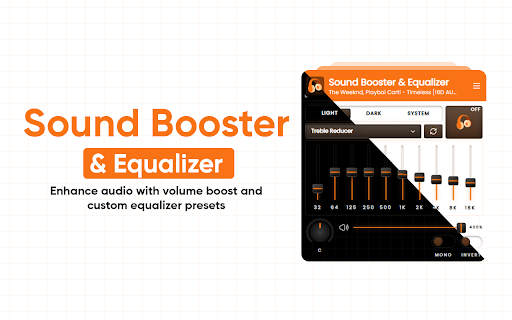


Enhance audio with volume boost and custom equalizer presets Turn Your Browser Into a Pro Audio Studio 🎧 Upgrade the way your browser sounds. This powerful Audio Equalizer gives you full control over every beat, voice, and detail—exactly how you like it. 🎚 10-Band Precision Equalizer Fine-tune your audio with a 10-band equalizer designed for clarity and balance. Boost bass, smooth mids, or tame harsh highs in seconds. 🎶 Presets for Every Mood & Genre Jump straight into great sound with 21 professionally tuned presets: Rock, Pop, Jazz, Classical, EDM & more Optimized for music, movies, and videos Edit any preset, save your own profiles, and switch instantly. 🔊 Bass Boost & Volume Enhancement Feel the low end with a powerful bass booster. Increase perceived volume and depth without distortion. 🌐 Works Everywhere You Listen Use it on YouTube, streaming platforms, music sites, and videos across the web. One equalizer. All your browser audio. 🎧 Surround Sound Effect Create a richer, wider listening experience with a virtual surround sound effect—perfect for movies and immersive music. ✨ Sound, Your Way Customize frequency levels in real time Clean up muddy audio or add punch where it matters Save and reuse your favorite sound profiles 🚀 Simple, Powerful, Surprisingly Fun Easy to use, deeply customizable, and packed with features you’ll love discovering. Take control of your sound. Hear the difference instantly.

YouTube Equalizer
Equalizador de som para vídeos do YouTube (graves, médios, agudos, presets). Equalizador de áudio simples e eficiente para vídeos do YouTube, usando Web Audio API. Ajuste graves, médios, agudos e escolha presets prontos. Interface integrada ao player. Recursos - 7 bandas (60Hz → 10kHz) com filtros adequados (lowshelf/peaking/highshelf) - Master Gain de -24dB a +12dB (pós-EQ) - Presets: Flat, Bass Boost, Treble Boost, Vocal, Cinema - Botão de EQ embutido nos controles do YouTube (ou flutuante de fallback) - Persistência de ajustes em `chrome.storage` - Compatível com navegação SPA do YouTube (yt-navigate-finish + MutationObserver)

AudioEQ Pro
Professional Audio Equalizer with Visualizer. AudioEQ Pro: The Ultimate In-Browser Audio Enhancement Suite Transform your browsing audio experience with studio-grade precision. AudioEQ Pro is not just another equalizer; it is a complete audio control center for Google Chrome. Whether you are an audiophile looking to fine-tune music, struggling to hear quiet dialogue in a movie, or simply want more bass, AudioEQ Pro gives you total command over any audio playing in your tabs. Designed with a sleek, modern dark interface, it integrates seamlessly into your browsing workflow without compromising performance. Key Features 🎚️ Professional 10-Band Equalizer Take control of the entire frequency spectrum. Adjust ten distinct bands ranging from deep sub-bass (32Hz) to sparkling highs (16kHz) with a ±15dB range. Shape the sound exactly to your liking or correct imbalances in your headphones/speakers. 🔊 Powerful Pre-Amp & Volume Booster Is that YouTube video or Netflix movie too quiet even at max volume? Use the dedicated Pre-Amp (Gain) to boost the input signal up to +9.5dB, and the Master Volume to amplify total output up to 200%. Never struggle to hear low-volume content again. 💾 Smart Preset Manager Switch sound profiles instantly. AudioEQ Pro comes with professionally tuned built-in presets like Bass Boost, Vocal Booster, and Movie Mode. Easily create, name, and save your own custom presets for different genres or devices. 📊 Real-Time Audio Visualizer Experience your audio visually. A beautiful, integrated spectrum analyzer reacts in real-time to the frequency output behind the equalizer sliders, giving you immediate visual feedback on your adjustments. 🎯 Precision Wheel Control For the perfect setting, hover over any slider (EQ bands, Gain, or Volume) and use your mouse wheel. This allows for precise, incremental +1/-1 step adjustments, with immediate on-screen dB feedback. Force Mono Toggle: Instantly mix stereo channels into mono. Perfect for listening with a single earbud or fixing old audio recordings with extreme panning. Reset Flat: Quickly return all EQ bands to zero with a single click for a neutral sound reference. Works on Any Tab: Compatible with YouTube, Spotify Web Player, Netflix, Twitch, and any other site that plays audio. Persistent Settings: Your custom EQ settings, volume levels, and loaded presets are automatically saved and restored even after closing the browser. Lightweight & Efficient: Designed to run efficiently in the background without slowing down your browsing. Elevate your audio today with AudioEQ Pro.

SonicFlow – Volume Booster & Equalizer
Boost volume, tune EQ, and control audio per tab Take control of every tab’s audio. SonicFlow – Volume Booster & Equalizer lets you boost quiet videos, tame loud ads, and fine‑tune sound with a built‑in equalizer and playback controls – all from a clean, professional interface. SonicFlow is built for everyday users, creators, and power listeners who want more than the basic browser volume slider. What you can do with SonicFlow Boost volume safely Increase tab volume up to 200% for quiet videos, podcasts, and livestreams while keeping control over distortion with smart gain handling. Fine‑tune sound with a 5‑band EQ Shape your audio with a studio‑style equalizer (lows, low‑mids, mids, high‑mids, highs). Use built‑in presets like Flat, Bass, Treble, Vocal, and Rock or dial in your own curve per tab. Per‑tab volume control Adjust volume for the current tab only without affecting system volume or other tabs. Smarter playback controls Change playback speed from 0.5x to 2.5x with a slider and quick presets (0.5x, 0.75x, 1x, 1.25x, 1.5x, 2x) for learning, podcasts, audiobooks, and long videos. One‑click presets Use quick volume chips (25%–200%) to jump to common levels instantly—perfect when switching between quiet background music and loud content. Persistent settings SonicFlow remembers your last volume, speed, and EQ settings, so your preferred sound profile is ready when you open the popup again. Designed for focus and productivity SonicFlow is ideal for: Working or studying with background music at the perfect level Boosting soft lectures, tutorials, and webinars Reducing harsh highs or boosting voice clarity on dialogue‑heavy content Speeding up long talks and slowing down complex technical videos Clean, professional UI Modern, compact design that fits neatly in the Chrome toolbar Clear cards for Volume, Playback Speed, and Equalizer Visual feedback for volume, speed, and EQ bands so you always know what’s active Privacy‑first All audio processing happens locally in your browser No audio is uploaded or sent to any server No tracking of your browsing history Install SonicFlow – Volume Booster & Equalizer from the Chrome Web Store. Pin the extension icon in the toolbar for quick access. Open any page with audio or video (YouTube, Netflix, Spotify Web, online courses, radio, etc.). Click the SonicFlow icon to open the control panel. Adjust volume, playback speed, and EQ until it sounds right for you. Optionally select an EQ preset for fast, great‑sounding results.

MaxTune – Sound Booster & Equalizer
Boost your tab volume up to 600% and fine-tune audio with a built-in equalizer. Powerful, simple and effective. 🎧 MaxTune – Sound Booster & Equalizer is the perfect solution for anyone who wants louder, clearer audio with precision control. With MaxTune, you can: 🔊 Boost the volume of videos, music, and streams by up to 600% 🎚️ Use the built-in graphic equalizer to adjust bass, mids, and treble 🖥️ Control audio separately for each browser tab 🧠 Enjoy a clean, modern, and responsive interface 🔒 Works on all sites: YouTube, Netflix, Spotify, Facebook, video calls, and more. ✅ Simple, lightweight, and powerful — MaxTune gives you everything you need to take full control of your audio. Download now and experience the freedom of hearing everything louder and clearer!
