
poajpacnlmpobbhbgkiegifhbkloojji
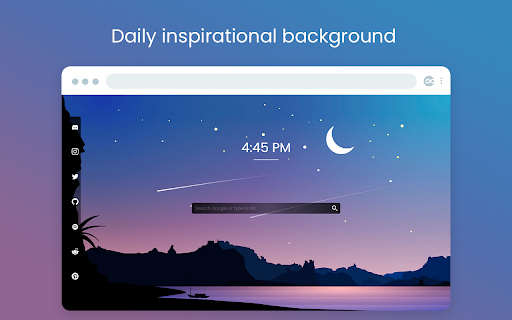
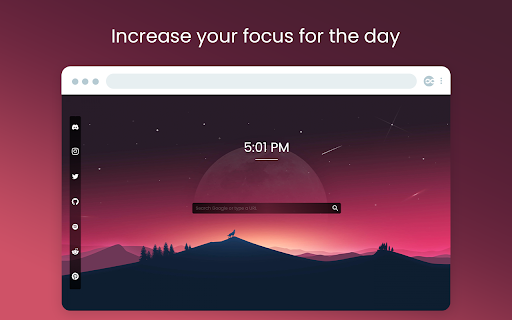
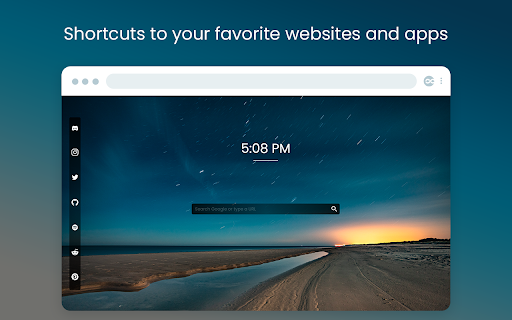
Replace the default Chrome start page with a clean and modern new tab page. What if every new tab could calm your mind and increase your focus? Every time you open a new tab in your Chrome browser, we’ll show you a randomly selected photograph of an Unlimited New Tab project. Note: For the best experience, after installing Unlimited New Tab click the ‘Keep it’ button on the ‘Change back to Google’ notification. This will show Unlimited New Tab on each new tab as intended. 🙂 Some people compare this extension to momentum, infinity new tab and others. We are more focused on productivity.

Dark Theme - Dark mode for Chrome
Dark mode switch any websites to dark theme. Take care of your eyes day using a classic dark reader or change screen brightness. Dark Theme - Dark Reader for Chrome enables night mode on nearly all websites and gives you the ability to control the built-in dark themes on those that have it. If the website has built-in night theme, you can control it directly from extension and if it doesn't (like Gmail, Google Docs, Office Online, Github and millions others), we will convert the colors to provide you with smooth transition on dark mode. There is also a white-list feature which enables you to exclude a desired domain from mode. Simply add a domain(s) to the designated area (comma separated) in the options page and the websites will be excluded. Night Shift Activate Night Shift mode to invert the usual light from the screen to a warmer tone, thus, preventing your eyes from harm. You can turn the tool on and off in a single click when you need it. Night shift automatically shifts the colors of your browser content to warmer end of the color spectrum after dark. Screen Shader Mode is a pleasure for your eyes! Dark Reader This eye-care extension enables night mode by creating dark themes for websites on the fly. Dark Reader inverts bright colors, making them high contrast and easy to read at night. Extension will put dark theme on all websites, suitable for those work at night and dark reader for online news or book reading. This extension changes the style of Google Docs to a dark theme that is easier on the eyes and looks cooler :) You need to refresh all the tabs, which were opened BEFORE the Dark mode and Night Shift was installed. You can also restart the Chrome to refresh all the tabs at once. Otherwise, Night Shift will work only with the newly opened tabs. Dark Theme for YouTube extension converts YouTube theme to a highly customizable dark charcoal/blue theme. This extension is built on top of the default YouTube theme, so it is very light-weighted compare to using themes injected by stylish or stylus extensions. Feel free to ask any questions and leave comments. Your feedback is very important for our product!

Best Homepage Ever: Custom New Tab Launcher
Automatically sets Best Homepage Ever as your homepage and default new tab page. - Automatically sets Best Homepage Ever as your homepage - Sets BestHomepageEver to open in new tabs, or allows you to open any custom URL as your new tab page. ** Features of Best Homepage Ever ** ✅ Instantly access all of your favorite websites in one place. ✅ Categorize your custom websites, weather, clock, sports, live news, email, tools, calendar, and anything you use daily. ✅ Choose from 100's of beautiful UHD backgrounds, or upload your own ✅ No ads! 🔥 Increase productivity 🔥 Make browsing beautiful and personal ** Affiliate Disclosure ** Best Homepage Ever contains affiliate links for which I may be compensated. https://besthomepageever.com/disclosures ** Privacy ** This extension does not collect any personal information. Nothing is ever shared, sold, or otherwise used. https://besthomepageever.com/privacy Extension Information / FAQ: https://besthomepageever.com/browser-extension

New tab page by start.me
Replace your New Tab Page with a personal dashboard. start.me turns your Chrome New Tab page into a beautiful personal dashboard. This helps you to stay organized and get more done in less time. You can use start.me in every web browser. This allows you to have the same bookmarks, notes and to-do lists at hand, on any device you use. What functionality does this New Tab extension offer? ✔ Changes your New Tab page to start.me ✔ Allow you to search in your start.me bookmarks from the Chrome Address Bar (type "me" + keyword) ✔ Import your browser bookmarks into start.me. ✔ Save your Open Browser Tabs to start.me ✔ Bookmarks Easily save and organize bookmarks from any website. ✔ RSS Display RSS feeds from your favorite sites directly on your dashboard. ✔ Notes & To-do's Manage your personal life and productivity with notes and to-do lists. ✔ +3,500 widgets Calendar, Stock quotes, Weather and thousands of other widgets are available to customize your start page. ✔ Stylish backgrounds Style your start pages with one of our beautiful backgrounds, or create your own. ✔ Embed anything Embed video, web pages, and other web content right onto your start page. ✔ Share & collaborate Create and share start pages with your team, your students, etc. "This is an excellent home page. I think it is far superior to any of the offerings that I have used." by Julian M-I "Love the extension and as it makes web browsing so much simpler." by Perry Knicely "Love this and use it every day. Do not know how I lived without it. Everything I need right in front of me." by Connie Schuett "Try it and give it chance. You won't look back." by Richard Price "Tried many of the new tab extensions, none of them hold a candle to this one. Best customization while staying clean looking and easy to use. I hide my bookmark toolbar now because I don't need it. Big fan of this extension, now I can't imagine using Chrome without it." by Adam Armstrong "Fantastic! I use it for the news widgets and as a visually pleasing way to organize and use my bookmarks. By far the best looking and easiest to use startpage available. The chrome widget makes it super easy to add a new bookmark and organize it immediately." by Benjamin Hall Version 6 - Faster loading of new tab page - Improved importing of bookmarks - Fixed a few bugs Version 4 - Upgraded to Manifest 3 - Faster loading of new tab page - Fixed several bugs Version 3.2.0 - Fixed bug with Groups start.me BV Waalsdorperweg 16 2597 JB, Den Haag The Netherlands info@start.me

A Fine Start - minimal new tab page
A minimal new tab page for Chrome that presents your favorite links as a clean, simple list. A Fine Start replaces Chrome's new tab page with a handy list of links, grouped and sorted how you like. Use it for free in your current browser. 99% of A Fine Start's features are free. There is an optional Premium sub that gives you an account and syncs your bookmarks between different browsers and devices. Includes a minimal, typographic design that stays out of your way and gets you where you want to go—quickly. - Minimal text links - Groups - Drag-and-drop sorting - Group folding - Dark mode - Multiple themes - Restore points - Optional syncing account I care deeply about your privacy. A Fine Start operates with minimal personal information. By default, A Fine Start save your bookmarks directly in your browser. If you choose to purchase a Premium subscription, A Fine Start collects your email and saves both your email and bookmarks on its servers for the sole purpose of providing you syncing across all your browsers and devices. The permissions the browser extension asks for are needed solely to facilitate authentication for Premium users. They aren't used for any other purpose.
