
pnobdlbfobamledoecdignpneeoohhio

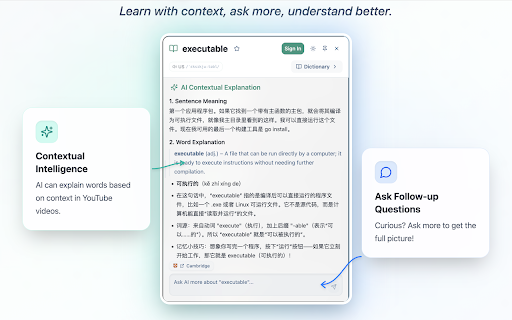


YouTube and Bilibili bilingual subtitles with AI context-aware translation, Q&A explanations, and saved word context. - **In-depth grammar explanations** – Get clear, context-aware explanations of grammar points (not just a translation). - **Unlimited follow-up questions** – Ask as many follow-ups as you want (words, sentence patterns, grammar) until you fully understand. - **Free third-party AI integration** – Connect your own AI services at no extra cost; pay only your AI provider directly, with zero markup. - **Optimized for YouTube AI subtitles** – Improved layout for YouTube's auto-generated captions, delivering an excellent reading experience even when subtitles are automatically generated. - **Sync Vocabulary to Eudic** – Sync your vocabulary list to Eudic so you can review and reinforce phrases and words you've encountered on mobile. 1. Set the language you want to learn and your current proficiency level to better match your learning needs 2. Open any YouTube video and enable subtitles 3. Start learning with enhanced, interactive subtitles! - Open Settings -> AI Service to configure your own AI service - Open Settings -> Integrations to configure your own Eudic token to sync your vocabulary notebook to Eudic

YouTube Dubbing – Translate & Dub
YouTube Dubbing is a browser extension that translates and dubs online videos in real time. No need to read subtitles—just listen in your native language and understand foreign videos instantly, as naturally as watching local content. Open any video on YouTube, Bilibili, Udemy, or Coursera—YouTube Dubbing automatically translates the subtitles and plays AI dubbing with no extra steps. Just hit play to start. ★ Free — Dub up to 5 videos per day for free, perfect for everyday watching and language learners. ★ Premium — Unlimited videos, AI subtitle enhancement (GPT / Claude), preserve background audio, smart multi-speaker detection, and priority customer support. Core features: - One-click translation & dubbing — Press play to automatically translate subtitles and start dubbing, saving time and effort. - AI subtitle enhancement (Premium) — Even if a video has no subtitles (YouTube & Bilibili), AI can generate subtitles automatically and then translate and dub them. - Multi-model translation (Premium) — Supports leading LLMs like GPT and Claude for more natural and accurate translations. - Rich voice library — Male and female voices, multiple regional accents, automatically matched to the best voice for the target language. - Adaptive playback speed — Dubbing stays in sync at 0.5× to 2× speed. - Preserve background audio (Premium) — Keep original music and sound effects for a more immersive experience. - Smart multi-speaker detection (Premium) — Distinguish different speakers and assign different voices for richer, more natural dialogue. - Cross-platform support — Available on Chrome, Firefox, and Android. - Multi-site support — Works with major platforms like YouTube, Bilibili, Udemy, Coursera, and more. - Universal video dubbing — Even when a video is not covered by the extension’s built-in one-click support, YouTube Dubbing can intelligently detect the media source and guide you to download the video and upload it to our server for subtitle recognition. You will receive an email when processing is complete, then come back and watch. - Subtitle Summary — Subtitle Summary is not limited to YouTube; any website supported by the extension can summarize subtitle content. - Subtitle Editor — If the translation or dubbing still is not satisfactory, copy subtitles from Subtitle Editor to your preferred AI model for translation, then paste them back and save. After manually enabling “skip translation for same-language subtitles,” the extension can dub with your custom subtitles.

Lingosive: YouTube & Netflix & HBO Immersive AI Dual Subtitles
YouTube, Netflix, HBO Max, Prime & Disney+: Get immersive translate & dual subtitles. Master languages with Lingosive's AI tools. 🌍✨ Convert Your Browser Into a Language Learning Laboratory! Master a new language while watching your favorite content on YouTube, Netflix, HBO Max, Disney+, and Prime Video with the most advanced AI-powered language learning extension! 🚀 🔥 Key Extension Features (Unlimited Access): 📺 Unlimited Dual Subtitles – Watch with bilingual, color-coded subtitles on all supported streaming platforms without any restrictions. 🤖 AI Word Explanation – Click any word for instant AI-driven explanations, including context-aware meanings, synonyms, and usage notes. 🔍 Word Scene Finder – See words in action! Instantly find any word in 50 million+ real movie and series clips. 🎨 Smart Color System – Visually track your progress! Words are color-coded based on your level (Green: Known, Blue: Learning, Orange: Hard). 💾 Unlimited Word Management – Save and organize as many words or phrases as you want. There are no limits to building your personal vocabulary library. 📱 Lingosive Mobile & Content Library: Practice anywhere with our massive mobile-optimized library: 🎥 400,000+ Videos & Podcasts – Series clips, movies, and educational content at your fingertips. 📖 15,000+ Books – Read everything from classics to modern works with instant translation and AI support on your mobile device. 💡 Why Lingosive? Unlike Language Reactor, Trancy, Lingopie, LingQ, or InterSub, Lingosive offers the smoothest, most reliable dual subtitle experience. While others struggle with stability, Lingosive provides a seamless Context Engine that connects you to 50 million+ real-life scenes, ensuring you learn language as it is naturally spoken. 🔄 Seamless 3-Platform Sync: Your progress, saved words, and reading history are perfectly synced across the Chrome Extension, App Store, and Play Store. Start learning on your computer and continue exactly where you left off on your phone! 🌍 Supported Languages: English, Spanish, French, German, Italian, Turkish, Portuguese, Japanese, Russian, Korean, Chinese (Simplified), Chinese (Traditional), Azerbaijani, Persian, Arabic, Vietnamese, Polish, Bengali, Indonesian, Urdu, Swahili, Hindi, Punjabi, Marathi, Tamil, Telugu, Thai, Malay, Ukrainian, Dutch, Greek, Romanian, Czech, Hebrew, Swedish, Hungarian, Danish, and Finnish. 🚀 Join 10,000+ learners! Download now and transform your screen time into a natural language-learning adventure!

YouTube Translator
Enhance your YouTube experience with our language-dubbing plugin, which synchronizes audio in your preferred language with video playback. Break language barriers and enjoy your favorite content effortlessly. When reading online feels exhausting, our plugin's text-to-speech feature extracts and reads webpage content aloud, offering a hands-free, screen-free alternative for convenience. We value your feedback and suggestions to make it even better. Enjoy seamless watching and listening! Note: This extensions works very well with videos with captions provided by the creator. For videos with auto translated captions, you might encounter translation mismatches sometimes. Please, leave us a good review regarding videos with captions ONLY.

HoverTranslate - YouTube Subtitle Translator
Build vocabulary while watching YouTube! Instantly translate words in subtitles by hovering. Perfect for language learners. HoverTranslate – Build Vocabulary with YouTube Subtitle Translation! Master any language while watching YouTube videos! HoverTranslate is the ultimate vocabulary builder and subtitle translator for language learners. Watch native content with original subtitles and instantly understand every word without interrupting your viewing experience. Why Language Learners Choose HoverTranslate: No more pausing videos or switching to dictionaries! Simply hover over any word in YouTube subtitles to see instant translations. Perfect for building vocabulary naturally while enjoying your favorite content. Key Features for Effective Language Learning: • Instant Hover Translation: Build vocabulary effortlessly - just hover your mouse over any subtitle word to see its translation immediately. • Smart Phrase Translation: Learn idioms and expressions! Hold Shift to select and translate entire phrases, or enable "Always enable multiple selection" for easier phrase selection. • 190+ Language Support: Learn Spanish, French, Japanese, Korean, German, or any language! Translate YouTube subtitles from any language to your native one. • Auto Language Detection: The extension automatically detects the subtitle language - start learning immediately! • Multiple Translators: Choose between Google Translate and Bing Translator for the most accurate vocabulary translations. • Smart Auto-Pause: Videos automatically pause when you hover over subtitles, giving you time to learn new vocabulary without missing content. • Universal Subtitle Support: Works perfectly with both manual and auto-generated YouTube subtitles. • Personal Vocabulary Builder: Save new words and phrases to your dictionary with one click! Build your personal vocabulary list while watching. Export your dictionary as JSON or CSV. • Customizable Interface: Translation tooltips match your YouTube theme or customize to your preference for comfortable learning. Perfect for: - Language students expanding vocabulary through YouTube - Professionals improving business language skills - Anime fans learning Japanese naturally - K-drama enthusiasts studying Korean - Anyone learning languages through immersive content Open Source & Community Driven: HoverTranslate believes in transparency and continuous improvement: - GitHub: https://github.com/kozii-d/hover-translate - Email: hovertranslate@gmail.com - Changelog: https://github.com/kozii-d/hover-translate/blob/master/CHANGELOG.md Start Building Your Vocabulary Today! Start your language learning journey today! HoverTranslate transforms YouTube into a powerful vocabulary-building tool, helping you progress from basic words to complex expressions naturally. Install now and transform every YouTube video into a vocabulary-building opportunity!
