
pnnbnklagfdokfbdfphhojhifjppjmmc

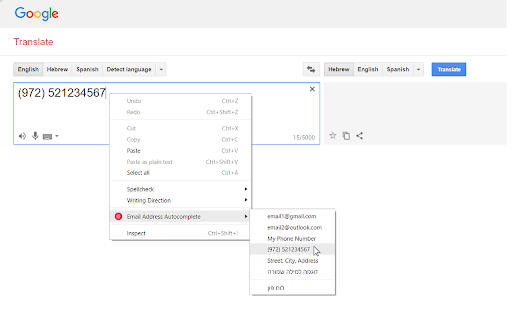

Autocompletes email addresses in text fields התוסף מאפשר שני דברים: • השלמה אוטומטית בעת הקלדת כתובת דוא"ל, רשימת הסיומות להשלמה ניתנת להתאמה אישית. • ניתן להגדיר רשימת מילים (או כתובות) אותם ניתן להכניס אל תוך הטקסט בעת בחירה בתפריט שבלחצן העכבר הימני. אפשרות לייצא את המילים השמורות לקובץ, ולייבא אותן שוב באמצעות קובץ זה.

Email Extractor
Extract email addresses from web pages you visit Email Extractor finds and copies to clipboard valid email addresses from web pages a user visits. Right-click on the extension icon to open an options window. You can select an execution mode and the resulting list options. * In the "once" mode (default), when a user clicks the extension icon, the Extractor collects all emails from the active tab and copies them to the clipboard. * In the 'background' mode, when a user clicks the extension icon, the Extractor starts collecting emails from web sites a user visits. When a user clicks the extension icon again, all collected emails are copied to the clipboard, and the collection process stops. Hovering over the extension icon shows a tooltip with a current mode. An indicator shows a number of emails collected: in black while the Extractor is collecting data, red when the collection is done.

Email Extractor
Automatically extract email addresses from web pages or bulk web pages, and search for the desired email addresses by keyword Email Extractor : Powerful Email Discovery and Extraction Tool Discover the power of Email Extractor, the most efficient email scraper and extractor extension for Chrome. Whether you need Email Extractor 1.4, Email Extractor 1.6, or our latest version, we've got you covered with our continuously updated email extraction technology. 🚀 Key Features of Email Extractor: • Instant Email Extraction: Quickly extract emails from single web pages or text • Bulk Extraction: Support for multiple web pages simultaneously • Automated Background Collection: Auto-save discovered emails while browsing • Domain Email Search: Find emails associated with company domains • Keyword Search: Coming soon - email search based on keywords • Email Verification: Ensure extracted email addresses are valid 🛠 Technical Highlights of our Email Extractor: • Supports extraction from Ajax pages, including Google search results • Extracts obfuscated email addresses • Automatically filters duplicate emails for unique results • Local storage functionality to protect your data privacy • Export extracted email lists to text or CSV files • Offline support: Extract emails from local HTML documents and text files • Lightweight design: Only 51KB, doesn't impact browser performance 💼 Business-Grade Capabilities of Email Extractor: • Auto-Visit and Save: Build URL queues for automatic visiting and email extraction • Bulk Domain Search: Discover all email addresses under specific domains • Cloud Storage: Automatically save all discovered email addresses (coming soon) • Team Sharing: Share your premium subscription with colleagues (coming soon) 🆚 Version Comparison: Email Extractor 1.4 vs Email Extractor 1.6 vs Email Extractor Lite 1.4 Our latest version combines the best features of Email Extractor 1.4 and the lightweight efficiency of Extractor 1.4 Lite, with new additions found in Email Extractor 1.6. 🔒 Privacy and Security: We value your privacy. Our email extractor only collects email addresses, storing data locally for your privacy. 🆘 Support and Feedback: If you encounter any issues, click the "Settings" button in the plugin to get our contact details. We're committed to swift bug resolution. ⚠️ Disclaimer: This Email Extractor extension is intended for personal use. We do not encourage its use for spam marketing. Please use responsibly. Download Email Extractor now - your go-to solution for online email extraction!

Extract Emails
Just active the extension and start visiting the websites that you want to get emails / leads from them Features: * Extract emails from visited pages * Auto Email search * Export to Excel emails as XLSX format with proper data types It's Completely FREE there is no LIMIT, what are you waiting for? try it NOW

Copy email links
When you click on an email link, the addresses is automatically copied to your clipboard. Instead of opening Outlook or Mail.app by default, this extension copies all email addresses within an email (mailto) link directly to your clipboard when clicked. - Copies directly to your clipboard. - Ignores bcc, subject, etc. - You can choose to show a notification when the address is copied successfully. - Light and dark mode support.
