
pnhmmhieodnagejlokknhmhbmfpgohnn
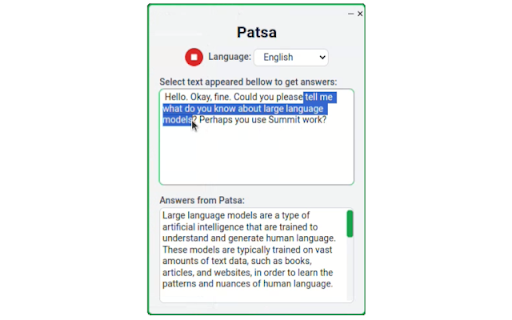
Patsa is a real-time AI copilot for meetings that will make you a know-it-all during an online meeting. Get AI answers instantly. Launch the Patsa extension during a Google Meet/Zoom/Teams meeting. Transcribe other participants' speech and receive additional information and answers to questions from AI in real time. How it works: 1) Launch the Patsa extension during any online meeting in Chrome. 2) Click the “Start Transcription” button. The speech of other meeting participants will then be transcribed. 3) Select the transcribed text you want to ask the AI to answer and you will receive information from the AI instantly. Good luck at the meeting!

MetaPrompt - AI Prompt Engineer & Optimizer for ChatGPT & Claude
Transform unclear questions into expert prompts. Get better AI responses from ChatGPT and Claude with one click. Metaprompt: Your AI Whisperer Transform how you interact with AI MetaPrompt transforms your ChatGPT and Claude experience by intelligently enhancing your prompts. Powered by advanced GPT 4.1 models, our Chrome extension analyzes your questions and refines them to generate clearer, more precise AI responses - saving you time and frustration. Simple, Powerful Workflow 1. Type your question as you normally would 2. Click the MetaPrompt button to apply expert prompt engineering 3. Watch as your request transform into an optimized prompt that gets real results What Sets MetaPrompt Apart - Instant Optimization: Turn unclear questions into structured prompts that deliver exactly what you need - Seamless Integration: Works naturally within ChatGPT's and Claude's interface with zero learning curve - Universal Compatibility: Use our popup anywhere you interact with AI tools Choose Your Perfect Plan MetaPrompt Pro ($5.99/month) - 5000 monthly prompt enhancements - Access to larger, more powerful models for even better results Who Needs MetaPrompt? - Students seeking deeper explanations and research assistance - Professionals requiring accurate information for critical tasks - Writers looking for better creative input - Developers needing precise code solutions - Researchers formulating complex queries - Anyone tired of wasting time on unhelpful AI responses Stop struggling with AI miscommunications. Download MetaPrompt today and start getting the quality responses you deserve.

Sokuji - AI Meeting Translator
Real-time AI voice translation for video meetings. Speak your language, be heard in theirs — works with Meet, Teams, Zoom & more. 🗣️ Speak your language. Be understood in theirs. Instantly. Sokuji is an AI-powered real-time speech translator that works directly inside your video meetings — no extra apps, no copy-pasting, no awkward pauses. Just speak naturally, and your words are translated and spoken aloud in your teammate's language, in real time. Unlike text-based translators or clunky meeting bots, Sokuji provides voice-to-voice translation that flows naturally into your conversation: • Real-time voice translation — Your speech is translated AND spoken aloud, not just displayed as text • Virtual microphone — Others hear the translation directly through their meeting audio, no setup needed on their end • Works inside your meetings — No separate window, no screen sharing, just seamless integration • Multiple AI engines — Choose from OpenAI, Google Gemini, Volcengine (ByteDance Doubao), Palabra AI, or Kizuna AI based on your needs • Offline AI models — Run translation entirely on your device with built-in AI models, completely free, no API key needed, no internet required • True privacy by design — Your voice NEVER passes through our servers. Not even we can hear your conversations • 35+ languages supported — From English, Japanese, Chinese to Arabic, Hindi, and beyond 🖥️ WORKS WHERE YOU WORK Sokuji works seamlessly with all major web-based video meeting platforms. Whether you're on a team call, a client meeting, or a virtual conference, just select "Sokuji Virtual Microphone" in your meeting's audio settings and you're ready to go. It supports any web-based meeting tool that allows microphone selection. 1. Open your video meeting on any supported platform 2. Click the Sokuji icon and configure your AI provider & languages 3. Select "Sokuji Virtual Microphone" as your mic — done! Your colleagues hear the translated voice automatically. No installation or setup needed on their side. 💡 PERFECT FOR • International teams with daily standups and meetings • Customer calls across language barriers • Global conferences and webinars • Remote workers collaborating across countries • Language learners practicing in real conversations • Content creators working with international collaborators • Privacy-conscious organizations that cannot send audio to third-party servers 🔒 PRIVACY-FIRST — YOUR VOICE STAYS YOURS Sokuji is built so that your voice data NEVER touches our servers. By architecture, not by policy. • Zero data collection — We have no server that receives your audio. It's technically impossible for us to hear your conversations • Offline AI mode — Use built-in AI models that run 100% on your device. Your voice never leaves your computer. Completely free • Cloud AI mode — When using OpenAI or Gemini, you use YOUR OWN API keys. Data flows directly between you and your chosen AI provider — we are never in the middle • No third parties — Your voice is only heard by meeting participants and (if you choose cloud AI) your selected AI provider. No one else. Ever • Open source — Don't take our word for it. Inspect the code yourself at github.com/kizuna-ai-lab/sokuji • No account required for basic usage • Chrome/Edge browser extension (this listing) • Desktop app for Windows, macOS, and Linux We'd love to hear from you! • Report issues: github.com/kizuna-ai-lab/sokuji/issues • Star us on GitHub if you find Sokuji useful ⭐ Made with ❤️ by Kizuna AI Lab

AnswerAI - Homework AI Tutor & Study Helper
Your AI assistant ChatGPT Plugin.Answer questions and get AI answers quickly,write emails,articles,chatbot,learning assistant. Ask anything and learn everything with one of the leading AI educational apps for student success. Answer.AI is the only app that is there for students both in and out of the classroom, and revolutionizing the way you learn. With Answer.AI's web extension, your screen will become a powerhouse of personalized education and learning. You can screenshot or highlight any question on your browser and get step-by-step solutions, generate brainstorming drafts for any type of writing, chat with AskAI about tough concepts, master complex math questions with Geometry mode, and more. With over 6 million users, our mission is to help our evergrowing community achieve their milestones and crush their goals both in and out of the classroom. 🥳Here are some features you can look out for: 📍Upload a screenshot for instant answers Easily upload a screenshot of your question, and Answer.AI will analyze it to provide accurate answers—perfect for complex math problems and more. 📍Ask and Answer Click the Answer.AI icon to initiate a real-time conversation, or select any text on a webpage to receive detailed answers instantly. No matter the complexity, Answer.AI offers clear explanations. 📍Writing Assistant Answer.AI also serves as an AI-powered writing assistant, helping you create high-quality content in seconds, making it perfect for essays, articles, and more. 📍Smart Homework Solutions Submit your questions and get step-by-step solutions, ensuring you not only get the correct answer but understand the underlying concepts. 📍Highlight and Solve Answer.AI works on any website you visit and integrates smoothly into your Chrome browser. Simply highlight text or use the extension to get answers quickly and efficiently. 🌟 Getting Started: 1️⃣ Click the Answer.AI icon on your screen to start a conversation. 2️⃣ Highlight text on any webpage, click the Answer.AI icon, and receive an answer immediately. 🧑💻 How to use the Chrome Extension: 1️⃣ Click the "Add to Chrome" button. 2️⃣ Log in to your Answer.AI account. 3️⃣ Start using Answer.AI! You can open the Answer.AI sidebar anytime you need help. Answer.AI offers both free and premium versions. Free users receive limited access, while premium users enjoy enhanced features and unlimited usage. 📍What platforms does Answer.AI support? Answer.AI is available on iOS and Android (download via the Apple Store or Google Play), as well as a Chrome extension for Windows and Mac users. 💯Ready to upgrade your learning experience? Install Answer.AI today and leave your feedback—your suggestions help us continue to innovate. You can contact us at support@answerai.pro or go to our website, https://answerai.pro for more info. We love hearing from you!

Call Copilot: Live Transcription & AI Meeting Notes
Real-time transcription, AI summaries, and chat for Google Meet, Zoom, Teams. No bot joins your call. Privacy-first. Never miss important details in your meetings. Call Copilot offers real-time transcription, AI-powered summaries, and intelligent chat for online meetings - all inside Chrome, with no bot joining your call. Compatible with Google Meet, Zoom, Microsoft Teams, and any browser-based video conferencing platform. No-bot recording in Google Meet and Teams means no extra participant shows up. Perfect for freelancers, developers, and small teams who need to stay focused during negotiations, technical discussions, and client calls. • Live transcription as they speak – Real-time transcription so you never miss a word. Mark key moments with callouts, action items, and highlights. Scroll back instead of asking "Could you repeat that?" • AI-powered meeting summaries – Get action items, key decisions, and important numbers automatically. Use preset prompts for daily standups, project updates, or custom summaries. • AI chat during the call – Ask "What was the deadline?" or "Summarize the pricing discussion" and get instant answers. Clarify points without interrupting the conversation. • 100% private & NDA-safe – All data stays on your device. Use local LLMs - zero data leaves your computer. Safe for sensitive client discussions, contract negotiations, and confidential meetings. GDPR-compliant. • One-click translations – Translate summaries and transcripts instantly for international clients. • Works everywhere – Google Meet, Zoom, Microsoft Teams, webinars, online classes, and any browser-based video call. HOW TO INSTALL AND USE: After installing: • Click the extension icon in your browser toolbar to access Call Copilot • No registration required for your first call (completely free and unlimited) • Pin the extension to your toolbar for quick access HOW TO USE WITH GOOGLE MEET/ZOOM/MICROSOFT TEAMS: • Join your meeting in Chrome browser (browser version, not desktop app) • Click the Call Copilot extension icon • Click "Start Recording" - the extension records directly on your device with no bot in the meeting • Live transcript appears in the side panel • Work with live transcription or get AI help during the call HOW TO USE WITH ANY WEB AUDIO: • Works with webinars, online lectures, podcasts, and any website with audio • Open the website you want to transcribe • Click the Call Copilot extension and start recording • Live transcript appears automatically Call Copilot is built privacy-first from the ground up: • All recordings stored only on your device • No cloud storage or syncing • No data sharing with third parties • GDPR-compliant transcription service • Your clients, contracts, and conversations stay completely private PERFECT FOR: • Professionals who can't focus 100% on the conversation while taking notes - now you can do both • Freelancers and consultants handling client calls where missing one detail about pricing or deadlines costs money • Developers in technical meetings who want to focus on problem-solving, not documentation • Small startup teams handling negotiations and needing precise records of terms discussed • Anyone working with NDAs and sensitive contracts who can't risk client data on third-party servers • Anyone who struggles with language barriers, accents or fast speakers in calls • Chrome 138+ or Chromium-based browser (Edge, Brave, etc.) • Microphone permission (to capture your voice) • Tab audio capture permission (to record the meeting)
