
pngggaialgjngkoldekpdkffolmfmcnh


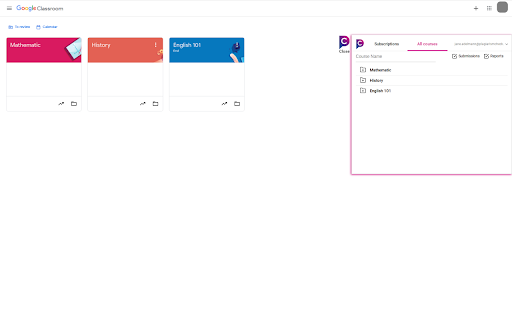
PlagiarismCheck.org integrates with Google Classroom to provide teachers and students an easy way to ensure academic integrity. PlagiarismCheck.org integrates with Google Classroom to provide teachers and students an easy way to ensure academic integrity. Both fast and effective way to check Google Classroom submissions for similarity. Teachers and students use PlagirismCheck.org extension to check files submitted to Google Classroom for plagiarism. While students have access only to personal submissions, teachers can check and review all submissions within their classes. There is no need to open multiple tabs in your browser to get a similarity score, all can be done in a simple and user friendly interface. Similarity reports are ready within just a few moments, so no need to wait to see what the result is. PlagiarismCheck.org service was created in 2011 as an assistance tool designed for college students and teachers. Since the day it was launched, PlagiarismCheck.org has served over 77,000 users from 72 countries. So far, more than 9,300,000 works have been checked with its help! The Mechanics: How It Works Upon scanning an uploaded document for plagiarism, our service provides users with detailed reports, containing detailed information about the sources which might be plagiarized, or were cited incorrectly. With such reports, you will be able to easily eliminate plagiarism from your paper. We keep updating our products to meet the expectations of our users. We are dedicated to excellence and always make sure that our anti-plagiarism engine provides only the most accurate results for a fair fee. This way, we maintain our reliability and usefulness to our customers. We believe that deliberate plagiarising is unethical and unacceptable. Unfortunately, there is always a chance of unintentional plagiarising. We believe that any person in the academic environment should have the possibility to insure themselves from it. In order to protect yourself from unnecessary accusations and always stay on the safe side, we recommend you using our anti-plagiarism software. Ethical Statement PlagiarismCheck.org neither respects, nor promotes academic dishonesty in any way. Be it academic environment or elsewhere, our engine is meant to be used for ensuring the originality of written content, and for preparing it to submission. If our engine is used for cheating purposes, all responsibility rests on the user. We respect the privacy of our users, so we guarantee that none of the information you as a customer provide us is ever disclosed to third-party individuals or companies. We strive to make our services helpful in the matter of improving the quality of education. Therefore, we fully appreciate and respect PlagiarismCheck.org being used for academic assistance at schools, universities, colleges, and other educational institutions. https://plagiarismcheck.org

Chatgpt Plagiarism Checker - GPT-4, GPT-3
Identify your GPT3, GPT4 and ChatGPT text with our Free Chatgpt Ai Plagiarism Checker tool. A simple extension for use Chatgpt Plagiarism Checker - GPT-4, GPT-3 in your PC, Mac, and Windows. The 'Chatgpt Plagiarism Checker - GPT-4, GPT-3' extension is a simple Google Chrome extension that enables users to easily check Chatgpt Text Plagiarism from their Windows or Mac computer. 📭 Step 1: Firstly, click on the extension icon after installing it. You will see a Text box which name is "Enter Text Here" 🧑🎨 Step 2: So, Copy Text from your article or any soruce, then paste to the text box, Then Click "Check Plagiarism" Button. 🧑🎓 Step 3: Then Wait Few moment, You will see the result. Enjoy! 👍 ChatGPT 3.5 and ChatGPT 4 , OpenAi Text plagiarism detector 👍 Simple and lightweight. ⭐️ Compatible with Google Chrome browser on PC, Windows, and Mac. 🔐 Respects user privacy 100%. 🆓 Forever free to use. 👍 Easily accessible with just one click from any tab. First, install this extension. Then, click Icon and Add text on "Text Box" You will see a field to add your text. Simply add it here and click the "Check plagiarism" button. After that, you will be able to see the full plagiarism result. The ChatGPT for Windows extension works seamlessly with all your favorite websites!

AI Checker for Teachers
Leverage AI Checker for Teachers — featuring an AI detector for essays. Teachers ensure originality with our ai paper checker tool. Students today have access to sophisticated text-generation platforms, which can make it difficult to determine whether an essay or paper is original, ai check for teachers is becoming essential. An ai essay checker for teachers is required to quickly and reliably identify even the most natural-sounding machine-produced writing. The ai checker for teachers is an easy-to-use Chrome extension created to help educators detect Machine-generated text and ensure authentic student work. Here are the benefits of using the ai checker for teachers: 1️⃣ Real-time analysis with accurate detection results. 2️⃣ Combined ai and plagiarism checker for teachers to verify originality. 3️⃣ Works as a browser extension with no need for separate platforms. 4️⃣ Detailed scoring to indicate machine generated content. 5️⃣ Easy-to-use interface designed for busy educators. No setup required – AI generator checker for teachers offers use directly within any modern browser. The ai checker tool for teachers makes detection simple: 1. Paste or Upload – Paste your text directly or upload a complete document in all supported formats. 2. Run Dual Analysis – Our tool thoroughly checks writing patterns and performs plagiarism scan. 3. Get Instant Results – View detection score, plagiarism check, and matched sources in one report. 🚀 Equip yourself with the ultimate artificial intelligence checker and maintain integrity in every classroom.

Quetext
Quetext is the leading platform for plagiarism detection. Write better, Build citations and proof your original content. Welcome to Quetext, trusted by more than 10 million students, teachers, and professionals to write with integrity and confidence. From catching unintentional copying to identifying AI-generated text, Quetext gives you a complete picture of your work before you submit it. Quetext comes packed with tools to support every stage of your writing: an AI Humanizer, AI Summarizer, Grammar Checker, Citation Generator, and source exclusion. Paid accounts also unlock additional users and bulk file upload. GET THE CHROME EXTENSION Quetext for Chrome brings its plagiarism checker and AI Detector into your browser. Highlight any text on a page, click the extension icon, and get instant results, no tab switching, no copying and pasting into a separate tool. Open the Chrome Web Store and search for "Quetext," or follow the link on our website. Click Add to Chrome, then confirm by selecting Add Extension. Once installed, click the puzzle icon in your toolbar, find Quetext, and pin it for easy access. Click the Quetext icon and sign in, or create a free account to get started right away. Highlight any text on a webpage or paste your content into the extension panel and run your scan. From the extension, you can scan content, check your plagiarism and AI score, and access your reports, all without leaving the page you're on. Quetext's DeepSearch™ technology understands context, word placement, and sentence structure to catch all forms of copying and plagiarism. The AI Detection engine goes a step further, identifying text that may have been generated by major LLM tools like ChatGPT or Gemini and giving you a clear probability score. Results are displayed through ColorGrade™ Feedback, which visually distinguishes exact matches, near-matches, and AI-flagged passages so you can review everything side by side. Quetext also checks your grammar as you write, supporting 6 dialects of English and 9 additional languages. Paid plans include bulk file upload. Plans to Fit Your Needs Free: Access all tools without signing up, for up to 2,000 words per feature. A good way to try things out before committing. Essential: Starting at 8.25/mo. per user. Up to 100K words per month, downloadable originality reports, and batch uploads of up to 20 files at once. Professional: $16.50/mo. per user. Up to 200K words per month per feature, unlimited users, and batch uploads of up to 100 files. By installing the extension, you agree to Quetext’s Terms of Service (https://www.quetext.com/terms-of-service) and acknowledge that you have read Quetext’s Privacy Policy (www.qutext.com/privacy-policy).

AI Content Detector - Copyleaks
Verify what content was written by a human or an AI chatbot with the AI Content Detector browser extension from Copyleaks. With the award-winning AI Detector, you can quickly and accurately determine what was written by a human and what was AI-generated, even if the AI text was paraphrased or interspersed with human-written content. Browse with confidence and verify the authenticity of your assignments and writings, social media posts, news articles, and even reviews on your favorite shopping sites. The possibilities are endless. ➤ How it works Since 2015, our technology has collected, ingested, and analyzed trillions of crawled and user-sourced content pages from thousands of universities and enterprises worldwide to train our models to understand the patterns of human writing. Utilizing AI technology, our AI Detector can accurately recognize the presence of other AI-generated text and the signals it leaves behind, adding an additional layer of accuracy. We continually test our AI model and retrain it with new data and feedback, helping to improve accuracy. Accordingly, the chance for content written by a human to be falsely labeled as AI-generated content is 0.2%. ➤ AI Detector key features: • Over 99% accuracy and a 0.2% false positive rate. • Detect ChatGPT, Gemini, Claude, and more. • Detect AI content in 30 languages, including English, Spanish, French, German, and Chinese, with additional languages always in the works. • Detects AI-generated source code. • Detect AI text even if it was paraphrased or interspersed with human-written content. ➤ Get more from the AI Detector A subscription gets you everything available in the free version, plus many additional features designed to help ensure complete content integrity: • No daily usage cap • The ability to also check for plagiarized content. • Access and share comprehensive reporting highlighting potential instances of plagiarism and AI content. • Detect AI and plagiarized content in multiple file formats and across domains through the Copyleaks Web-based platform. • Invite team members to Copyleaks, easily share and collaborate on reports, and effortlessly track updates. ➤ Using the Copyleaks AI Detector Extension is easy, and installation takes mere seconds: ✅ Click ‘Add to Chrome’ ✅ Click on the extensions icon, and pin the AI Content Detector Extension to the extensions bar ✅ Login via Google or Facebook ✅ Start using the AI Content Detector Extension anywhere your internet browsing may take you by highlighting the text you want to verify and then clicking the extension icon ➤ Enjoying the Copyleaks AI Detector? Please rate us!
