
plpibiicphhhlapckkedgiekkkfijicg


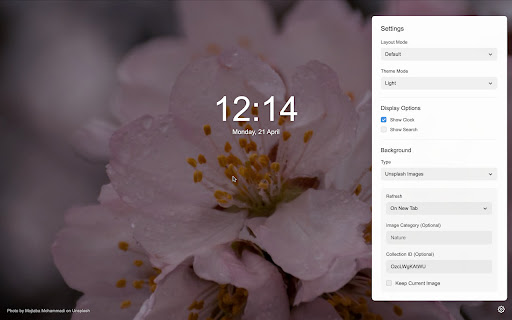


A desktop interface for your web browser. The Sava OS extension helps you quickly save and manage tabs, tab groups, and browsing sessions. It also replaces your new tab with a customizable dashboard — create dynamic layouts with links, notes, RSS/Atom/YouTube feeds, embeds, and more. Or keep it minimal with a background of your choice, a search bar, and a clock. Sava OS lets you manage, filter, share, and organize your online data in a familiar and flexible environment. *Please note: A Sava OS account is required to create dynamic layouts and manage tabs.*

FLOZABLE Tab Monitor
Boost focus with timers, block distractions, get study tips, and stay updated with group alerts using FLOZABLE. Supercharge your focus and productivity with the FLOZABLE Study Focus Chrome Extension. Seamlessly integrated with your browser, this extension is your go-to tool for cultivating efficient study habits and making the most out of your online learning experience. Time Management Mastery: Effortlessly track your study time with our intuitive timer. Set focused intervals, challenge yourself, and stay on top of your study goals. Distraction-Free Browsing: Activate the distraction-free mode to limit access to non-educational websites during your study sessions. Say goodbye to procrastination and hello to enhanced concentration. Personalized Study Plans: Receive AI-generated study suggestions based on your learning habits and preferences. Tailored recommendations to keep your study sessions engaging and effective. Group Study Alerts: Stay connected with study groups seamlessly. Receive instant notifications for group study invitations, challenges, and achievements directly through the Chrome Extension. Progress at a Glance: Get a quick overview of your study progress with a personalized dashboard. See your daily, weekly, and monthly study trends, empowering you to stay motivated and accountable.

Faro
Save pages with highlighted taglines - Bookmark manager ⨯ web highlighter Chaos in your bookmarks? Can't find what you want? They end up gathering dust? Or you don't even try and end up with 100s of open tabs? Faro is made to fix that! It's the simplest way to save & keep track of pages. With it, even thousands of saves don't get overwhelming. When saving, you highlight a sentence to act as a tagline. It helps you remember what the page is about and why you saved it. If unsure - just save whatever sentence you're reading. All saves appear on your dashboard. They come most-recent-first by default, so you don't forget what you recently saved. You can pick up your reading where you left off - no need for a separate reading list. You can also pin & archive to further arrange it. Organize them with tags. Since you're reminded what you saved and why, you can do it later. It makes your saves much easier to manage than bookmarks. Faro supports nested tags (eg: recipes/vegan), so combines the best of tags and folders. Clicking a save takes you right back to your highlight - especially useful for longer articles. Also: ➣ export to bookmarks to keep them if you uninstall Faro ➣ copy links to highlights and share them or paste into Notion, Obsidian, etc. ℹ️ About your data: When installing you can read: "it can read and change all your data on all websites" The only information that ever gets uploaded (when signed in) when you use it to save: ➣ Open page address ➣ Saved highlight/quote - what's visible in the sidebar ➣ Timestamp ➣ Debug info e.g. errors The extension also keeps track the currently open tab for each window - to update the sidebar as you navigate - but doesn't save or upload that data.

Bookmark It — Personal & Team Bookmarks
Save, share, and find bookmarks in one click. Personal collections and shared team workspaces, with fast import and instant search. Bookmarks are a necessary evil. Lost in folders. Buried in browsers. Impossible to share. Almost no one bookmarks the way they actually want to — and almost no one can collaborate on bookmarks with their team, family, or friends. It's the only bookmarking app that combines real ease of use, real organization power, and real collaboration in a single place — for yourself, your team, and everyone in between. 🚀 Get started in seconds ● One-click import from your existing Chrome bookmarks bar ● One-click import from your browser history ● No spreadsheets, no copy-paste, no re-saving ● Free plan with no credit card. Ever. 👤 Personal + 👥 Team workspaces ● Keep a private collection just for you ● Spin up a shared workspace for your team, family, or side project ● Invite anyone in seconds — everyone sees the latest version, every time ● No more "send me that link again" in Slack, Messages, or email 🔍 Find anything in one click ● Recently Viewed history puts the page you're looking for one click away ● Instant search across every bookmark in every workspace ● Collections, tags, and notes that scale from 10 bookmarks to 10,000 📌 Bookmark from anywhere ● Browser extension — save the active tab with one click ● Menubar app — save and search without leaving what you're doing ● Web app — organize and manage from any device ● Title, URL, and page details pre-filled so saving really is one click 💬 Built for collaboration ● Share entire collections, not just single links ● Add notes and context so teammates understand why a bookmark matters ● Organize together — for work projects, family hubs, reading lists, travel planning, recipe collections, anything 🪄 More than a bookmark manager ● Boosted productivity — spend less time searching, more time doing ● Onboarding made easy — new teammates get the full knowledge hub on day one ● Cross-platform — your bookmarks follow you across browsers and devices ● Upstream from the browser into a dedicated app you'll actually open Stop losing links in chat threads. Stop emailing yourself URLs. Stop maintaining bookmarks five different places. Bookmark It is the home for every link that matters — personal, professional, and everything in between. 🔒 Privacy first ● We will never sell or share your data ● Imports are optional and read-only — we never modify your native browser bookmarks ● Page content is never sent to our servers

Michael's Upgrade for TrakED
Upgraded features for TrakED in the THS. (This extension is not an official product of the THS or Intersystems TrakCare software.) Upgraded features for Trak ED in the LGH. Features: - Re-enable spell check in the triage page - Use the enter key when logging in - Handover sheet for ED Main Floor and EMU - ED Main Floor filters and persistent sort - Triage Summary print out - Filter and count results of an enquiry - Count patients currently breaching length of stay targets -- This extension is not an official product of the LGH or InterSystems Trak software.
