
pkofiecpdokojdgoccnbfplkphbmppaf
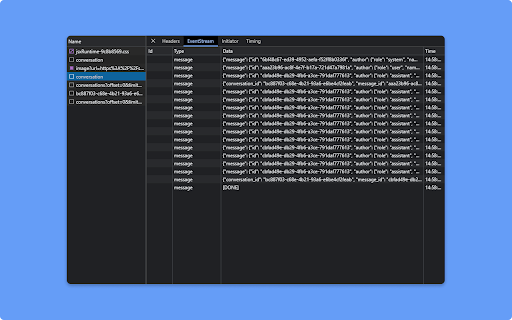
SSE Viewer is a Chrome extension for displaying EventStream in the devtools SSE Viewer is a Chrome extension that allows you to easily view EventStream data from event stream requests made using fetch.

Postman Interceptor
Capture requests from any website and send them to Postman Client. Postman Interceptor helps you send requests which use browser cookies through the Postman app. It can also send headers which are normally restricted by Chrome but are critical for testing APIs. The Interceptor makes this process painless. Something that would have required a proxy earlier can now be achieved without any installation steps or extra configuration.

Vue.js devtools
Browser DevTools extension for debugging Vue.js applications.

Apollo Client Devtools
GraphQL debugging tools for Apollo Client. Apollo Client Devtools is a Chrome extension for the open-source GraphQL client, Apollo Client. This extension has 4 main features: 1. A built-in version of the Apollo Studio Explorer that allows you to make queries against your GraphQL server using your app's network interface directly (no configuration necessary). 2. A query watcher that shows you which queries are being watched by the current page, when those queries are loading, and what variables those queries are using. 3. A mutation inspector that displays the mutations made to your Apollo Client application data. 4. A cache inspector that displays your Apollo Client cache data. You can explore the cache through a tree-like interface, and search for specific field keys and values. Code for this extension can be found at: https://github.com/apollographql/apollo-client-devtools

Axure RP Extension for Chrome
An extension that allows viewing of locally published Axure RP prototypes (HTML files) from Google Chrome. Add this extension to view locally published prototypes (HTML files) created from Axure RP in Google Chrome. This extension requires a high access level to allow the viewing of the file:// protocol. This extension only requires these permissions to allow viewing of prototypes in Chrome - Axure does not track or access any of your information. IMPORTANT: After installing the extension you must check the setting "Allow access to file URLs". You can access this by going to: Tools > Extensions > Axure RP Extension for Chrome from the Chrome > Preferences menu. This extension allows you to view Axure RP prototypes in Google Chrome. It is not used to open Axure RP project files (.rp, .rpteam) for editing in Google Chrome. You do not have to install this extension if you want to view prototypes hosted on the web. For example, you don't need this to view prototypes from Axure Cloud (app.axure.cloud) or Axure Cloud for Business (axure.com/enterprise). If you have any issues or questions, please email support@axure.com To download the latest version of Axure RP or a free 30-day trial, visit axure.com/download.
