
pklbeoclikbmoccckdmmcgncaagecfaf


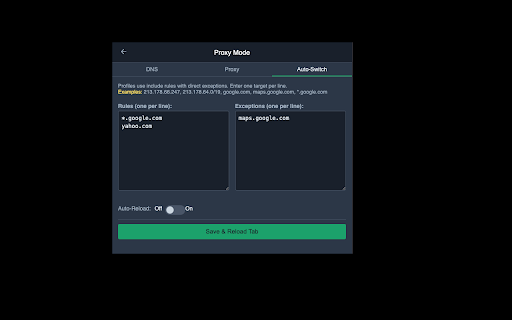
Flexible proxy switcher with auto-switch rules and exceptions. Adaptive Proxy Switcher The flexible, rule‑driven proxy extension for power users and admins. Configure HTTP, HTTPS, SOCKS4, and SOCKS5 proxies and control routing with precise, readable rules. Auto‑Switch lets you adapt your proxy behavior to specific domains, IPs, and networks—without manual toggling. - Define include rules (domains, wildcards, IPs, CIDR ranges) - Add exception rules to bypass specific hosts or subnets - Use wildcards like *.example.com or * for broad matching - Combine CIDR rules with precise IP exclusions The extension automatically generates and applies the required PAC script behind the scenes based on your rules. - Auto‑Save: settings are saved instantly - Instant Apply: changes take effect right away - Adaptive Auto‑Switch: switch profiles based on network conditions (gateway/subnet) - Profile Management: keep multiple proxy setups and rule sets - Flexible Rule Matching: domains (wildcards), IPs, CIDR ranges - Configurable DNS: primary and fallback resolvers for rule status lookups - Dark UI: clean, readable interface for daily use - Local‑Only Storage: settings are stored locally in the browser

Make Proxy Simple Switcher
Proxy Switcher: Fast IP change, blocks WebRTC, ads, sets geo, fingerprint, and User Agent. Make Proxy Simple Switcher is the all-in-one browser extension that makes it easy to import, manage, and switch proxies with just one click. Designed for everyday users, marketers, developers, and privacy enthusiasts, this tool gives you simple proxy management, strong privacy options, and full control over your browser fingerprint. 🚀 Import and manage proxies instantly Adding proxies has never been easier. Just paste your proxy list into the Import tab and click Import Proxies. The extension supports the most common proxy format: 1️⃣ IP:Port:Username:Password 2️⃣ Username:Password@IP:Port 3️⃣ IP:Port Key features for proxy import and management: 1️⃣ Bulk import – paste dozens of proxies at once. 2️⃣ Remove duplicate proxies – keep your list clean automatically. 3️⃣ Edit, delete, or copy proxies with a single click. 4️⃣ Quick ON/OFF switch – activate or deactivate proxy instantly. 5️⃣ Clear proxy status – always see which proxy is active. 🔄 One-click switching Switching proxies should be simple – and that’s exactly what Make Proxy Simple Switcher does. From the Proxy tab, you can: 1️⃣ Turn on/off your active proxy. 2️⃣ Quickly test another proxy from your list. 3️⃣ Copy all or delete all proxies with one button. No more digging through browser settings. Everything is in one clean dashboard. 🔧 Smart settings for better browsing The Settings tab gives you extra tools that make proxies more powerful and browsing more private: 1️⃣ Reload current tab or all tabs when changing proxy. 2️⃣ Clear browser history automatically to stay private. 3️⃣ Block ads to improve speed. 4️⃣ Assign GPS coordinates by IP – match your proxy location. 5️⃣ Change language based on IP for more natural browsing. 6️⃣ Disable WebRTC to prevent IP leaks. 7️⃣ Bypass Proxy – add websites that should ignore the proxy and connect directly. This flexibility helps you balance privacy, convenience, and performance. 🔒 Advanced privacy protection Proxy alone is not enough if websites can track your browser fingerprint. That’s why Advanced Settings gives you powerful options: 1. Browser History Control Choose exactly what to clear: cache, cookies, downloads, saved forms, IndexedDB, local storage, WebSQL, and more. 2. Browser Fingerprint Configuration Protect your identity and avoid detection with three modes: 1️⃣ Keep default – use the browser’s standard fingerprint. 2️⃣ Auto-change Canvas, WebGL, and Fonts when IP changes. 3️⃣ Generate a new unique fingerprint profile for maximum anonymity. 3. User Agent Configuration Easily customize your User Agent (UA): 1️⃣ Keep default UA. 2️⃣ Randomize UA every time your IP changes. 3️⃣ Specify a fixed UA (choose Chrome, Firefox, Windows, macOS, Android, iOS, etc.). With these tools, you can look like a completely different device or browser, making tracking much harder. 🎯 Who is this extension for? 1️⃣ Everyday users who want a simple way to browse with a proxy. 2️⃣ Marketers & SEO specialists managing multiple accounts safely. 3️⃣ Developers & testers who need quick proxy switching. 4️⃣ Privacy lovers who want stronger anonymity and protection against tracking. 🌟 Why choose Make Proxy Simple Switcher? 1️⃣ Super easy to use – no tech skills required. 2️⃣ Clean design with clear ON/OFF control. 3️⃣ Import, manage, and switch proxies in seconds. 4️⃣ Advanced fingerprint and User Agent control. 5️⃣ Extra tools: ad blocking, GPS/IP sync, WebRTC protection. Unlike other heavy tools, this extension focuses on simplicity + powerful privacy features. Make Proxy Simple Switcher is the easiest way to manage proxies directly in your browser. Whether you need to hide your IP, run multiple accounts, test websites from different locations, or simply stay private online, this extension gives you all the tools you need – from proxy switching to fingerprint management – in one lightweight solution

Proxy Toggle: Simple System Proxy Switcher
Toggle system proxy and collect failed domains with modern UI Proxy Toggle helps you switch Chrome between your operating system proxy and a direct connection with a clean, focused popup. The toolbar popup remains the place for details: check the current proxy state, toggle manually, and review domains that failed to load. For faster workflows, you can now assign your own keyboard shortcut from Chrome's extension shortcut settings and switch the proxy directly without opening the popup. Key Features - Switch between system proxy and direct connection from the popup - Optional keyboard shortcut for direct proxy switching - Optional shortcut notifications with runtime permission - Clear icon and title feedback for the current proxy state - Remembers your proxy state across browser sessions - Collect, copy, and clear domains from failed resources - Light and dark mode support How to Use - Click the Proxy Toggle icon to open the popup. - Use the switch to enable System Proxy or Direct Connection. - Click Set Shortcut to open Chrome's shortcut settings and assign a direct toggle shortcut. - Enable shortcut notifications if you want a system notification after shortcut toggles. - Review, copy, or clear failed domains from the popup when troubleshooting proxy issues. Notes Shortcut notifications use Chrome's optional notification permission. They are only enabled after you choose to grant the permission. On macOS and some desktop systems, whether notifications appear as banners depends on your system notification settings for Chrome. What's New - Added an optional keyboard shortcut command for direct proxy switching - Added a visible shortcut setup entry in the popup - Added optional shortcut notifications without requiring notification permission at install time - Kept toolbar click behavior focused on opening the details popup Refined proxy state handling so popup and shortcut toggles stay in sync

Automatio Proxy Switcher
Add, edit, and switch between HTTP/HTTPS proxies quickly. Automatio Proxy Switcher is a comprehensive proxy management extension that helps you: 🔒 PROXY MANAGEMENT • Add, edit, and delete HTTP/HTTPS proxy profiles • Quick connect/disconnect with one-click switching • Support for authenticated proxies (username/password) • Global bypass list for local and trusted domains • Bulk import proxies from text (multiple formats supported) 🛡️ PRIVACY PROTECTION • WebRTC leak protection to hide your real IP • DNS leak protection via proxy routing • QUIC/UDP traffic blocking for enhanced security • Built-in leak detection testing with real-time results • Strict mode for maximum privacy protection ✨ FEATURES • Clean, modern interface with dark/light theme support • Real-time connection status and IP detection • Comprehensive leak testing to verify protection • Easy proxy profile management and organization • Chrome-optimized for best performance Perfect for developers, privacy-conscious users, and anyone who needs reliable proxy switching with advanced leak protection. PERMISSIONS EXPLAINED: • Storage: Save your proxy profiles and settings • Proxy: Manage Chrome's proxy configuration • Privacy: Enable WebRTC and DNS leak protection • Network Requests: Block STUN/TURN servers for WebRTC protection • All URLs: Apply proxy settings to all websites

Proxy Switcher
Use proxy switcher - fast IP changer extension & website unblocker easily switch proxy to access blocked sites and browse securely The proxy switcher extension is the ultimate solution for anyone looking to browse the internet freely, securely, and without restrictions. Whether you need to access unblocked websites, switch proxy servers, or manage multiple ip settings, this tool has got you covered. ✔️ User-friendly interface Enjoy a simple and intuitive interface that makes switching between different proxies effortless. ✔️ Fast and secure Experience high browsing speeds while staying secure and anonymous online. ✔️ Access unblocked websites Bypass regional restrictions and unblock websites with ease using the integrated manager. This makes it a perfect solution as a website unblocker. ✔️ Full chrome compatibility Seamlessly integrates with chrome for the best browsing experience, making it a top choice for users seeking a proxy switcher for chrome extension Reddit recommends. ● 🔄 Quick proxy switching: Easily switch servers to access different content. ● 🌐 Website unblocker: Instantly unblock restricted sites and access unblocked websites. ● 🔒 IP changer extension: Change your IP instantly for privacy. Our product significantly simplifies the user experience compared to Bart Proxy Switcher. 1️⃣ Install the extension from the chrome web store. 2️⃣ Open the tool and add proxy to chrome. 3️⃣ Select your desired ip from the list. 4️⃣ Browse unblocked websites with ease! ● ✅ Access proxysite hassle-free. ● ✅ Stay anonymous with the IP changer extension. ● ✅ One-click server switching. ● ✅ Bypass censorship easily and access unblocked sites. ● ✅ Optimize speed with smart proxy selection. ➤ High-speed serformance without sacrificing security. ➤ Easy chrome Integration for a smoother experience. ➤ Advanced privacy with gooogle proxy server integration. ➤ Simple for everyone, from beginners to experts. Comparison with other extensions: ● More customization options for seamless proxy server switch. ● Better performance compared to standard tools. ● Superior connection management tools. 1. Download the proxyswitch extension chrome users recommend. 2. Add mask to chrome with a few clicks. 3. Manage your servers with the extension and manager. 4. Enjoy unrestricted browsing! Perfect for: ● 🌎 Accessing geo-blocked content and proxy to site access. ● 🔐 Staying secure on public Wi-Fi. ● 🏢 Managing work/study connections. ● 🚀 Testing websites from different regions. ● 💳 Secure online transactions. The interface of our utility will significantly simplify IP switching compared to Omega Proxy Switcher. ✔️ Seamless integration with proxy websites Effortlessly access restricted content through seamless integration with connection. The extension ensures a smooth browsing experience across all platforms. ✔️ Advanced server selection algorithm Сonnect to the fastest and most secure servers using server selection feature. This guarantees optimal performance and security. ✔️ Multi-protocol support Enjoy full flexibility with support for HTTP, HTTPS, and SOCKS protocols to meet various browsing needs. Designed for power users: ⚙️ Proxy switch omega customization Gain full control over your internet connections with detailed configuration options provided. 💼 Ideal for professionals and casual users Whether you're handling complex browsing tasks or everyday browsing, this feature-rich extension adapts to your needs with ease. You will not be tied to any official source, as BP Proxy Switcher does, which is why we provide you with the freedom to choose any IP addresses you prefer. Proxy extension for every need: 🌐 Comprehensive website unblocker This extension serves as the ultimate website unblocker and proxy site manager, enabling unrestricted internet access. ⚙️ Advanced chrome proxy settings Manage connections smoothly with advanced chrome ip settings. Proxyswitcher ensures secure and flexible browsing for every user. A powerful tool designed to enhance online privacy and security by masking your real IP address and encrypting internet traffic. It allows seamless access to restricted content and websites while maintaining anonymity. This solution ensures safe browsing, bypasses geo-blocks, and protects sensitive data from potential cyber threats, offering a faster and more secure internet experience. Stay Ahead with proxy switcher! 🚀 Unrestricted browsing freedom Break free from online restrictions. Manage proxies easily and securely. 📥 Download now Get a proxy switcher today and unlock the full potential of the internet!
