
pkkfiklolnimjhgfokgicminkbfnfclb


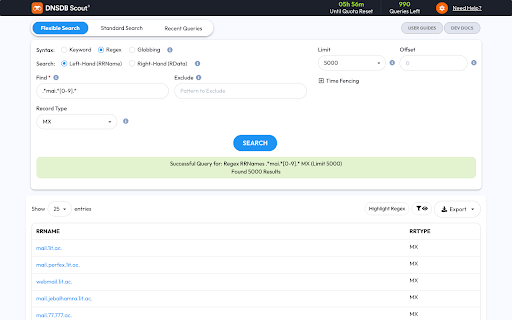
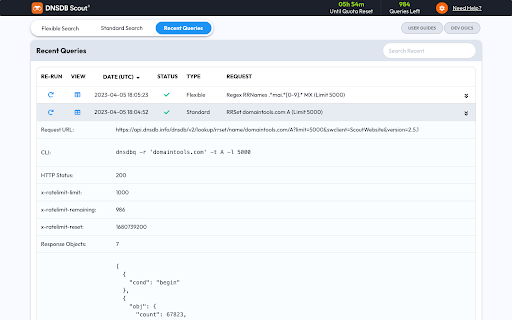
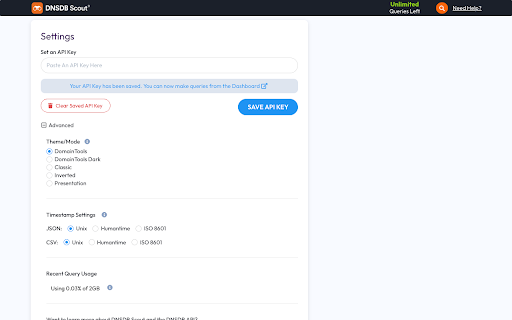
Dashboard GUI for the Farsight Security DNSDB® API. Compatible with all Chromium-based browsers. DNSDB Scout™ provides an HTML GUI on top of Farsight Security’s DNSDB™ API. Through Scout, you can facilitate investigations using passive DNS leveraging the Farsight DNSDB™. DNSDB™ Scout supports all the major features of the DNSDB™ API including: ➤ Flexible and Standard searches ➤ Time fencing ➤ Conversion of Internationalized Domain Names (IDN) to Punycode ➤ Table sorting / pagination of results ➤ View historical searches ➤ Export raw data and filtered results (CSV, JSON, JSONL, TXT, Print/PDF) Important: Scout requires an active DNSDB™ API key. If needed, you can acquire an API key at https://www.farsightsecurity.com/get-started/ About DNSDB™ The internet relies heavily on the DNS, and cyber criminals are not exempt. Farsight Security’s Passive DNS database (DNSDB™) provides a fact-based perspective on the configuration and content of the global DNS as observed through its industry-leading Passive DNS sensor array. DNSDB™ can answer questions, such as: ➤ Where did this domain name point to in the past? ➤ What domain names are hosted on a given IP address? ➤ What domain names use a given nameserver? ➤ What fully qualified domain names exist below a delegation point? Security analysts, fraud investigators, Security Operations Center (SOC) and Incident Response (IR) teams use DNSDB™ to investigate incidents and cybercrime, protect their assets and monitor online activity. DNSDB™ is engineered and operated by the world’s leading DNS experts and is the largest, most proven historical collection of Passive DNS data available in the market today. For more information on DNSDB™, visit https://www.farsightsecurity.com/solutions/dnsdb/ About Farsight Security Farsight Security provides the world’s largest real-time actionable threat intelligence on changes to the Internet. Leveraging proprietary technology with more than 200,000 observations/second, Farsight provides security teams with the Internet’s view of an organization’s presence and how it is changing whether purposely, inadvertently or maliciously. The world’s most security-conscious organizations use Farsight threat intelligence to protect their users and infrastructure.

Recorded Future
The Recorded Future Browser Extension provides real-time threat intelligence that is just a click away in any web-based application. Detect and assess Indicators of Compromise (IOCs) directly on any web page in Chrome, using real-time threat intelligence. The extension provides Recorded Future Risk Score and supporting evidence for each indicator to enable fast and confident assessments. Key Capabilities: • Instant Threat Detection: Detect and assess CVEs, hashes, domains, and IP Addresses • Detect Phishing Attempts: Identify potential email phishing attempts. • Prioritize Patching: Analyze vulnerability scan results to identify critical patches • Distill Key Information: Extract details in news articles • Pivot to Portal: Easily move from extension to Portal to investigate

Pulsedive Threat Intelligence
Highlight IPs, domains, and URLs on any website to enrich them using Pulsedive's threat intelligence. Streamline real-time threat research and analysis on any website you visit with Pulsedive’s threat intelligence browser add-on. Highlight IPs, domains, URLs, or threat names in any website text to enrich them using Pulsedive's free Community dataset. Get immediate, up-to-date context when reading cybersecurity news and threat advisories, or exploring threat intelligence collections and research. Create a free account at pulsedive.com for increased limits and additional capabilities. – FEATURES: • Indicator Lookup - highlight text around an IP, URL, or domain to enrich with contextual data from Pulsedive, including associated threats, screenshots, ports, protocols, web technologies, HTTP headers, meta tags, WHOIS data, and much more • On-Demand Scans - perform real-time passive or active scans on IPs, domains, and URLs to fetch live data • Bulk Processing - highlight text containing hundreds or thousands of indicators to parse and refang in bulk, download them as a CSV, and submit to Pulsedive Analyze for bulk enrichment • Threat Research - look up threat names and aliases to retrieve threat summaries, associated indicators, TTPs, latest news, and additional context • Website Enrichment - click the add-on button without highlighting text to retrieve domain information for the website you're visiting • Mute Options - reduce noise by easily muting the auto-popup temporarily or on specific sites • Flexible Controls - adjust the add-on settings to control when, where, and how Pulsedive parses threat intelligence information • Quick Pivoting - convenient one-click pivot to the Pulsedive Community platform at pulsedive.com for further analysis – WHAT'S NEW - VERSION 3: The latest update introduces bulk indicator processing, advanced settings & controls, and an improved user experience and interface. • Dark mode • Free-text parsing for IPs, URLs, and domains • Bulk indicator processing • Muting/unmuting and website exclusions • Usage guide in Settings page • Fixed punycode domain support • Fixed various CSS conflicts with injected popup – Pulsedive offers frictionless threat intelligence solutions for growing teams. The Pulsedive Community platform at pulsedive.com aggregates, enriches, and correlates community threat data to support analyst workflows and time to action. With 50M+ searchable indicators and threats collected from user submissions and feeds, the Pulsedive add-on delivers invaluable context wherever you work.

Threat Analytics Search
Use the Context Menu (right click menu) in the browser to conduct single or group searches for selected text. Threat Analytics Chrome Extension is a tool for Security Analysts, Malware Hunters, and Incident Responders. This extension enables you to use the Context Menu (right click menu) in Chrome to conduct single or group searches for selected text. Most useful scenarios are when you need to search a File Hash, IP Address or Domain across multiple websites at once. The only requirement is that the Website you are searching provides a way to send parameters either using GET or POST requests. This extension supports both mechanisms. Threat Analytics is focused on using information to make decisions during event analysis about assets in your organization. During our work with customers, our analysts often use the same websites repeatedly to gather information about File Hashes, IP Addresses, Domains etc. Also integrates with RSA Security Analytics, NetWitness Investigator, and Carbon Black. Also supports encoding when the website you are using for your research requires Base64 encoded parameters. This extension is fully Open Source under Apache 2 license and developed/maintained on GitHub here https://github.com/AdvancedThreatAnalytics/threat-analytics-search

Vulners Web Scanner
Tiny vulnerability scanner based on vulners.com vulnerability database. Passively scan websites while you surf internet! Tiny vulnerability security scanner based on vulners.com vulnerability database. It provides you ability to passively scan websites that you surf, on known vulnerabilities.
