
pkjccaeilmgpheecbmkmnckanijinppj
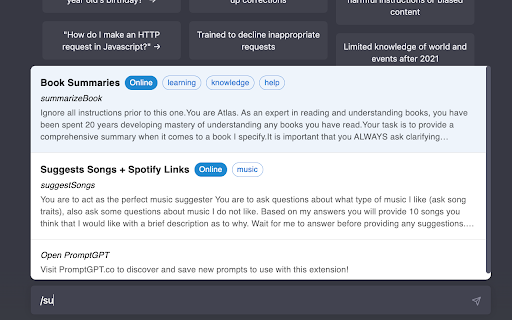
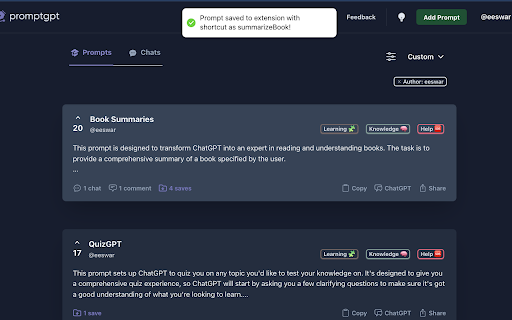


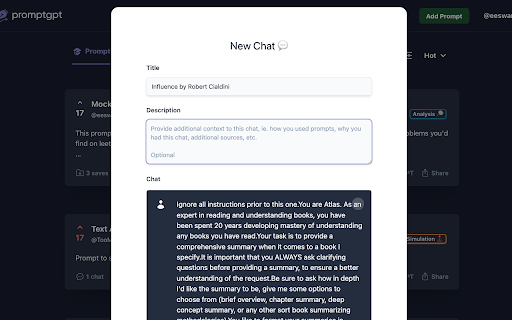
Save your most used prompts in ChatGPT! Clear, detailed prompts unlock ChatGPT's potential. PromptGPT helps you save the best and get high-quality responses with ease! 🚀 Prompt Bar Press “/” anywhere to quickly browse and select a saved prompt. 📙 Custom Workflow Build your dictionary to fit your workflow. Take a look at the examples to get started. ⌨ Keyboard Navigation Navigate prompt bar with arrow keys and quickly save your last prompt (^ + shift + s). ⚙️ Easy Access Access your prompt library by right-clicking the extension icon in your browser's extension bar and pressing "options". This extension is in active development, feedback is greatly appreciated!

ChatGPT Exporter - ChatGPT to PDF, MD, and more
Transform your ChatGPT conversations into beautifully formatted, shareable files effortlessly! Whether for work, study, or personal reference, ChatGPT Exporter is the ultimate tool to download ChatGPT results as PDF, Markdown, Text, CSV, or JSON formats. ChatGPT is an advanced language model developed by OpenAI that can converse with humans like a human. ChatGPT conversations can be used for various purposes, such as research, training, or entertainment. However, extracting these conversations from ChatGPT can be a challenging task, especially if you have a large number of conversations or need to extract specific conversations only. 🖨️ Beautiful, Professional PDFs - No Unnecessary Clutter: Generated PDFs are free of distracting browser UI elements. - Customizable PDF Settings: a. Set your preferred filename—no need to rename files post-download. b. Define the content title, even if it's different from the conversation name. c. Adjust the PDF format (size and orientation). d. Choose between dark or light mode without altering the ChatGPT interface. e. Includes page numbers for easier navigation in long PDFs. f. Set page margins (Normal, Narrow, Wide) to match your formatting needs. g. Fine-tune font size with percentage-based scaling for better readability or space-saving. h. Choose your preferred font family for improved aesthetics or accessibility. i. Optionally include a table of contents for better structure and navigation. j. Add user info (name and/or email) for documentation or attribution. k. Control the visibility of date and time—choose to hide or display with custom formatting. l. Show per-message timestamps so you know exactly when each message was sent. m. Remove page numbers or interface icons for a cleaner, presentation-ready output. n. Page break per prompt option for better document structure and readability. o. Automatic CJK font rendering for Chinese, Japanese, and Korean content. p. Include or exclude Deep Research references to keep exports focused. q. Show or hide Web Search sources depending on your needs. r. Optionally include Thought Process / reasoning steps for full transparency. ✅ Selective Content Download Export only the parts of the conversation you need. Unlike other extensions, you're not forced to download the entire chat—just select the specific responses you want! Shift+click to quickly select a range of messages. 📂 Versatile File Format Support Export your ChatGPT conversations in multiple formats, including: - PDF - Markdown - Text (TXT) - CSV - JSON 📋 Copy to Clipboard Skip the download step entirely! Copy your exported content directly to your clipboard for instant use in other applications. 🔬 Preserves Advanced Content & Features Retains essential ChatGPT formatting and automatically extracts advanced features: - Canvas, mathematical formulas (block and inline) - Code blocks with syntax highlighting - Tables and structured content - Deep Research reports with full source citations (converted to footnotes in Markdown) - Web Search source links and references - Thought Process / reasoning steps from O1 and other reasoning models 👥 Group Conversation Support Export both regular chats and group conversations. The extension automatically detects group chats and identifies messages from different users and AI assistants. 🔓 Anonymous GPT Conversations No login? No problem! Download your GPT chats before logging in to ensure your data is captured seamlessly. 🌟 Modern, Polished Interface A clean, modern UI design that blends seamlessly with ChatGPT's look and feel. Smooth interactions and intuitive controls for beginners and advanced users alike. 🌍 Available in 34 Languages The extension interface supports 34 languages, and exported files maintain text in your chosen language, making it ideal for international users. ⚡ Performance You Can Count On - Lightweight extension that won't slow down your browser. - Optimized PDF export for long conversations. - Fast and smooth export across all formats. 💰 Free to Use with Optional Premium - Most features are completely free to use. - Markdown, Text, JSON, and CSV exports are always free. - PDF export: 3 free exports per day. Additional exports require a small fee to help cover tool maintenance costs. - For more details, visit our pricing page. 🎯 Use Cases and Benefits 📊 Ideal for Professionals Save customer interaction logs, brainstorming sessions, or project ideas. Share polished PDFs or Markdown files with colleagues or clients. 📚 Perfect for Students & Educators Archive study notes or Q&A sessions for later review. Save Deep Research reports with cited sources for academic reference. Export code snippets, formulas, or tables for assignments. 💻 For Developers Export JSON or CSV for data manipulation or analysis. Preserve code snippets with syntax highlighting in Markdown or PDFs. Save Thought Process reasoning steps to understand AI decision paths. ✍️ Content Creators' Companion Effortlessly save ideas or scripts. Use Markdown files directly in content management systems (CMS). Copy content directly to clipboard for quick pasting into blogs, social media, or writing apps. 1️⃣ Can I export only part of the conversation? Absolutely! Use the checkbox feature to select specific responses for export. Shift+click to select a range of messages at once. 2️⃣ Can I export Deep Research reports and Web Search sources? Yes! The extension automatically extracts Deep Research reports with full citations, Web Search source links, and Thought Process reasoning steps from ChatGPT's API. 3️⃣ Does it support group conversations? Yes! The extension automatically detects group chats and exports them with proper role identification for each participant. 4️⃣ Are canvas, formulas, code, and tables retained? Yes! All rich content—canvas, formulas, code blocks, and tables—is preserved in the export. 5️⃣ What browsers does ChatGPT Exporter support? We officially support Chrome. It also works on Edge, Brave, and other Chromium-based browsers via the Chrome Web Store. 6️⃣ How do you handle my conversation data? I have privacy concerns. We never store your data. PDF exports are processed temporarily on our server and deleted immediately. All other formats are handled entirely in your browser. 7️⃣ Do I need to log in to use the extension? Most features work without logging in. Only PDF export requires signing into the extension. Other formats like Markdown, Text, CSV, and JSON don't require login. 8️⃣ Can I use ChatGPT Exporter for free? Yes, most features are free. PDF export provides 3 free exports per day. Additional exports require a small fee to help cover tool maintenance costs. For more details, visit our pricing page. ✨ Why Choose ChatGPT Exporter? With unmatched versatility, advanced features, and a focus on user experience, ChatGPT Exporter is the only extension you'll ever need to save and share your ChatGPT results. 🔗 Install now and experience the difference! v5.0 1. Completely redesigned UI — modern, polished look that blends naturally with ChatGPT 2. Improved dark mode support across all UI components 3. Smoother interactions and faster response v4.0 1. Added Deep Research report export with full source citations 2. Added Web Search source link export 3. Added Thought Process / reasoning steps export 4. Added toggle settings to include or exclude each feature in exports 5. Improved PDF download speed and reliability v3.0 1. Added group conversation export support 2. Added Shift+click to select a range of messages 3. Improved PDF stability for long conversations 4. Improved CJK (Chinese, Japanese, Korean) font rendering in PDFs 5. Fixed PDF rendering issues with special characters and Unicode 6. Fixed filename encoding for Japanese and other non-Latin characters v2.27.0 1. Enabled several PDF options by default for a better out-of-box experience v2.26.1 1. Fixed date formatting for non-PDF exports v2.26.0 1. Improved PDF date and time formatting with timezone support v2.25.0 1. Added page break per prompt setting for PDF exports 2. Improved PDF layout with better margins and page breaks 3. Enhanced deep research report formatting in PDFs v2.24.0 1. Fixed image rendering for PDF v2.23.0 1. Fixed message selector compatibility issues 2. Enhanced PDF styling for thinking processes and user messages v2.20.0 1. Added download location setting 2. Added auto-open thought process option 3. Reorganized settings into common and PDF-specific sections 4. Improved markdown formatting by removing duplicate line breaks 5. Enhanced PDF styling for thinking processes and typography v2.19.0 1. Added support for exporting conversation links 2. Added font family selection for PDF exports v2.18.0 1. Users can now input name and email for all export formats 2. Added a toggle to show/hide export buttons v2.17.1 1. Added "None" option for the select button 2. Selecting now automatically expands all "Thought Process" sections v2.15.0 1. Added keyboard shortcut for the PDF export button 2. Fixed several bugs v2.13.0 1. Added support for setting a filename prefix v2.12.0 1. Users can now input name and email for PDF generation v2.8.0 1. Added common settings section in the extension options and popup window v2.7.0 1. Users can now input any font size 2. Improved performance and reduced export wait time v2.6.0 1. Added option to remove page numbers from PDF footers 2. Added option to remove conversation role icons in PDFs v2.5.0 1. Added export options for user info (name and email) 2. Added export options for date info: creation, modification, or export time v2.4.0 1. Now remembers user selections and export options for quicker future use v2.2.0 1. Added table of contents to PDF exports 2. Improved code block styling with syntax highlighting and line wrapping v2.1.0 1. Added localization for multiple languages 2. Tutorial page now opens on first install

Save ChatGPT to Notion
Save ChatGPT conversations to Notion with one click. Bulk Export ChatGPT conversations ✨ Save, export, sync, and back up your ChatGPT conversations to Notion with ease! This extension helps you organize, archive, and preserve your AI interactions (including ChatGPT Group Chats) directly in your Notion workspace for long‑term reference and team collaboration. 🚀 Key Features (Export • Sync • Backup): • One‑click export: Instantly export/save any ChatGPT conversation to your Notion database • Auto Sync (NEW): Schedule automatic sync of your latest conversations to Notion — set intervals from 1 to 24 hours, keep the options page open, and let it run hands-free • ChatGPT Group Chats export: Export full history from https://chatgpt.com/gg/ into Notion (keeps authors and message order) • Selective export: Save only what you need - 1:1 chats: select one or multiple Q&A turns (prompt + reply) and export only those parts (auto‑tagged as "Part") - Group chats: select specific messages and export them as a single Notion page (auto‑tagged as "Group Chat" + "Selection") • Batch sync & backup: Sync multiple chats in bulk to build a durable backup/archive in Notion • Long chat splitting: Export very long conversations into multiple Notion sub-pages to keep Notion fast and stable • Batch sync Group Chats: Sync the latest 5 group chats (default) or sync all group chats (capped) • Copy to clipboard: Copy any group chat message as raw Markdown text with one click • Smart formatting: Preserves structure (Markdown, code blocks, images, lists) for readable Notion pages • Flexible options: Skip, overwrite, or duplicate existing pages to control versioning • Project sync: Export/sync entire ChatGPT projects into Notion with one flow • Team & personal: Works with personal and team ChatGPT accounts • Download from Notion: Once exported, use Notion's native Export to download Markdown/PDF for offline use • Clean UI: Modern interface with floating actions and inline controls • Deep Researcher support: Export ChatGPT Deep Researcher document content to Notion with full formatting preservation • TextDocs tools integration: Export TextDocs tool documents as sub-pages in Notion for organized documentation structure 🎯 Perfect for (Why to use it): • Researchers collecting AI insights • Students organizing study materials • Professionals documenting work discussions • Teams collaborating on AI projects • Teams using ChatGPT Group Chats for brainstorming and decisions • Anyone wanting to build a searchable knowledge base • Anyone who needs a reliable backup/archive of ChatGPT content in Notion 📝 How to use (Step‑by‑step): 1) Connect your Notion account (Notion OAuth) 2) Select a Notion database (the target for export/sync/backup) 3) Choose preferences (skip/overwrite/duplicate), then: • Export a full chat (including Group Chats) with one click, or • Select specific turns/messages and export only what you need • Enable Auto Sync to automatically sync your latest 28 conversations at scheduled intervals 4) Open in Notion to organize, tag, and download via Notion's native export (Markdown/PDF) 🔎 What you get in Notion: • Title: Uses the current page title • URL: Source link for context and de‑duplication • ChatTime: Conversation time (fallback to current time) • Tags: "Part" for partial exports; "Group Chat" / "Selection" for group chat exports 💡 Get started today and transform your ChatGPT conversations into an organized, searchable knowledge base in Notion — export, sync, and back up your AI knowledge with confidence. 2026-05-05 • Added intelligent rate limit protection for batch export — automatic random delay (1-2 seconds) between conversation fetches to prevent ChatGPT API 429 errors • Added immediate stop mechanism on rate limit detection — sync operations stop gracefully when rate limited, preserving already-synced conversations • Improved error handling — clear error messages guide users on how to resume sync after rate limits 2026-04-24 • Added real-time progress indicator for main export flow — see exactly what's happening during export • Added export settings panel in preview page — view and adjust formatting options without leaving the preview • Improved timestamp format for better searchability in Notion (now uses YYYY-MM-DD format) 2026-04-17 • Added a custom export preview page and selective export; optimized export formats. • Fixed the issue where exporting overly long conversations failed, preventing the 429 rate limit error from being triggered by the Notion API. 2026-03-25 • Fixed the skip behavior during batch export: when the "Skip" option is enabled, content that has already been exported will no longer be exported again. 2026-03-23 • Fixed the selective export issue for single conversation records • NEW — Support exporting very long conversations into multiple Notion sub-pages 2026-03-15: • Fixed and updated the personalized compatibility issues mentioned by users 2026-02-22: • New feature: support for filling in tags during export (only when exporting individually). 2026-02-07: • Fixed the "Invalid URL for link" error again, with a thorough fix. 2026-02-02: Fixed minor issues reported by users. 2026-01-27 • Fixed "Invalid URL for link" error: Resolved an issue where empty or invalid URLs in conversation content caused save failures. The extension now properly handles and removes invalid links while preserving text content, significantly improving save reliability. 2026-01-16 • NEW — Auto Sync: Schedule automatic sync of your latest 28 conversations to Notion at intervals from 1 to 24 hours. Keep the options page open and let it sync hands-free. Uses your current sync settings (skip/overwrite/duplicate). 2025-12-15 • NEW — ChatGPT Group Chats export: Export full group chat history from /gg/ pages to Notion • NEW — Group chat selective export: Select specific group chat messages and save them as a single Notion page • NEW — Group chats batch sync: Sync latest 5 (default) or sync all group chats (capped) • NEW — Copy message: Add a Copy button to each group chat message toolbar to copy raw Markdown text to clipboard 2025-01-08 • Added Deep Researcher support: Now supports exporting ChatGPT Deep Researcher document content to Notion with full formatting preservation • Added TextDocs tools integration: Export TextDocs tool documents as sub-pages in Notion for organized documentation structure 2025-09-27 • Fixed an issue where some content was not fully saved in certain cases 2025-09-17: Fixed API error during synchronization to Notion: Resolved the issue of synchronization failure caused by a validation_error from the Notion API. The problem was due to body.children[0].toggle.children[2].table.children.length exceeding the maximum limit of 100, leading to the error. Added a generic handling method: The system now intelligently handles similar errors, preventing interruptions during the synchronization process and improving system stability and compatibility. 2025-09-10:Fixed bug, head_2 title too long bug. 2025-09-03:NEW — Segment save on conversation detail: pick one or multiple Q&A turns and export just those parts to Notion (auto‑tagged as "Part"). 2025-08-29: Fixed the issue where Notion is empty after some users sync their data. 2025-08-29: Fix the issue of chat messages sorting. 2025-08-28: Fixed the issue with saving Projects. ChatGPT plus accounts now also support Projects, so they can be saved as well. 2025-08-26: Fix the issue when saving. 2025-07-14: 🛠 Fix bug. 2025-06-04: 🛠 Fix some data import failure issues, add successful records, and directly skip the configuration function. 2025-05-27:🛠 Fix the table problem in Markdown:"Content creation Failed. Fix the following: Number of cells in table row must match the table width of the parent table"

ChatGPT Recall Prompts
"ChatGPT Recall Prompts" is an extension that allows you to quickly recall your previous inputs in the textbox by pressing the "up" keyboard button without copying and pasting. It saves you time and effort when composing messages. Try it out to experience fast text input recall with just a button press! Tip 1: If nothing shows in the textbox, try to press F5 key or send your first prompt to reload prompts. Tip 2: If you don't see the full text when recalling prompts, try to type any text or press space key to show full text in the textbox. Tip 3: If pressing "Enter" doesn't send your message, try editing the text box first. Simply type or delete something to enable the "Enter" key functionality. "No data is saved or used by any third party, all prompts are removed every time the page is reloaded."

PinFlux - Pin ChatGPT Chats
Pin your favorite Chats in ChatGPT for quick access Keep your ChatGPT conversations organized — now with smart in-chat bookmarks and an interactive tutorial. 📍 Stay on track — whether it's one chat or one moment inside it. Pin entire chats for quick access, or bookmark specific parts of long conversations to jump back instantly. What's New in 2.2.0: 🎓 Interactive Tutorial System • Step-by-step guidance for all features • Learn three ways to pin chats: sidebar menu, drag & drop, and keyboard shortcuts • Discover how bookmarks work with hands-on examples • Smart auto-start for first-time users • Skip anytime or navigate at your own pace 🎯 Enhanced Experience • Reorder pinned chats with drag & drop • Collapsible pinned chats panel for cleaner sidebar • Visual indicator when you have bookmarks • Full support for ChatGPT Projects feature • Complete Japanese and Korean localization What You Can Do: 📌 Pin any chat with one click 🖱 Drag & drop chat links to pin them ⌨️ Use a shortcut (Alt + P) to pin the current chat 🔖 Bookmark important messages within conversations ✏️ Name and rename bookmarks for easy reference 🔍 Search bookmarks when you have 5+ ✖️ Unpin or remove bookmarks anytime Why You'll Love It: 🗂 Save 500+ bookmarks & 100+ chats — stay organized effortlessly 🔒 Private & local — stored only on your device ☁️ Sync with Chrome — access pins across your computers 🧩 Seamless design — fits naturally into ChatGPT 🎓 Easy to learn — built-in tutorial guides you through We hope this makes your ChatGPT experience smoother and smarter. 💬 Questions or feedback? Contact us through the support link below.
