
pjppbcnlnfjabomiiefjmihiefbpfbdn

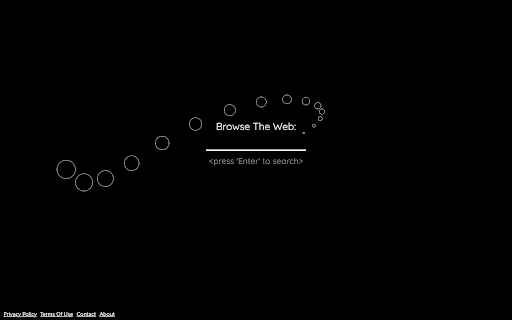
a simple cursor animation whenever you open a new tab Browse the web with a simple simple cursor follower animation, every new tab! By clicking "Add to chrome", I accept and agree to installing the Mini Cursor Follower Chrome extension and setting Chrome™ New Tab search to that provided by the service and the Terms of Use and Privacy Policy. The extension will update your search settings and will change your New Tab search services provided by Bing.

Laser Cat
Shoot laser at things you want to remove from the internet This extension adds a laser cat to your internet. Use the laser to zap things you want to remove! If you like cats and lasers you are going to LOVE this extension. == Here's how to use the extension == 🌍 Step 1: Go to a website 😺 Step 2: Click on the activate button 🌈 Step 3: Click on the page to shoot laser! This permission is needed for adding a laser cat to the website. Laser Cat **DOES NOT** collect any of your data or your browsing activity on any websites. As a privacy advocate myself, I prioritise your privacy above all. If you want to read the privacy policy and terms of service you can find it at my website https://lasercat.app#privacy == Feedback and bug reports == If you find a bug or are having issues please don't post your bug report here - contact me directly at hello@lasercat.app so I can fix it asap. If you like Laser Cat, please help spread the word by giving it a 5 star rating here or share it with your friends 😄 If you are not fully satisfied, please contact me at hello@lasercat.app and I'll make sure to help. I'm currently in the process of creating brand new characters. The long term idea is to create a lot of cute/funny characters with unique looks and feels. You can unlock all characters with a one-tome support or alternatively unlock them with points based on how long time you have used the extension. If you have some good ideas for new characters, feel free to throw me a message! If you want to learn more about my extension you can go to my website https://lasercat.app. Here you can read the privacy policy, terms of service and FAQ. I will keep improving Laser Cat! Stay tuned for updates in the future 👍

Mouse click effects (๑•́ ∀ •̀๑)
(๑•́ ∀ •̀๑) Funny mouse click effects (๑•́ ∀ •̀๑) Funny mouse click effects ** Update 1.2.8 (Nov 2018) ** 1. Add random color. ** Update 1.2 (Nov 2018) ** 1. Add settings.

GLITCH.ext
GLITCH.ext enables you to glitch the virtual façade of any website! Images, texts, and nearly every HTML element forming the… GLITCH.ext enables you to glitch the virtual façade of any website! Images, texts, and nearly every HTML element forming the website's structure can be glitched with the click of a mouse. By moving the mouse over a glitched element, you continue to influence it in real-time. In the settings, one can adjust the file format used, having an aesthetic influence on the way things glitch. Optionally you can even download the glitched images by clicking, for introducing back into a website or compiling into animations. This extension builds upon "p5.glitch" - a byte-level glitching library for p5.js. GLITCH.ext accompanies the March 2021 Net Works for the House of Electronic Arts Basel (HeK), https://www.hek.ch/en/program/events-en/event/hek-net-works-ted-davis-glitchext.html After installing, be sure to 'pin' GLITCH.ext to your toolbar, so you can easily turn it off and on. Clicking on the glitched finger icon, enables to you adjust these settings: - GLITCH off/on, toggles extension - REFRESH, clears glitches - FORMAT, set the image type of glitches - LINKS, turn OFF to glitch EVERYTHING - SAVE, toggles 2nd mouse click from un-glitch / download Glitches to page are only temporary. Simply refresh it to return things to 'normal'.

Pets Chrome
🐾 Pets for Chrome is an application that adds cute and cuddly pets right into your browser. 😻 Pets for Chrome is an application that adds cute and cuddly pets right into your browser. With our plugin, you can now own a pet. Get your very own funny chrome pet today and brighten up your day! 🐈🐈🐈 Our plugin offers a variety of cute pets to choose from, each with their own unique personality and quirks. You can easily switch between pets to keep things interesting and even interact with them by petting, playing, and dragging them around your screen. 🐾 Whether you're looking for a quick distraction during a busy workday or just want to add some fun and personality to your browser, Pets for Chrome has got you covered. Our plugin is user-friendly and easy to use, and you can display or hide your pet whenever you want. Say goodbye to boring and uninspired workspaces and hello to your new furry friend with Pets for Chrome. Download our plugin today and discover a whole new world of virtual pet ownership! 🐾 With this plugin you can: - Interact with it ! - Drag it when you want on the screen ! - You can display or hide it when you want ! - Add size for pets in the icon menu - Add reset position button in the icon menu
