
pjocnagifodkmmbkncggoccmgmpcfloe
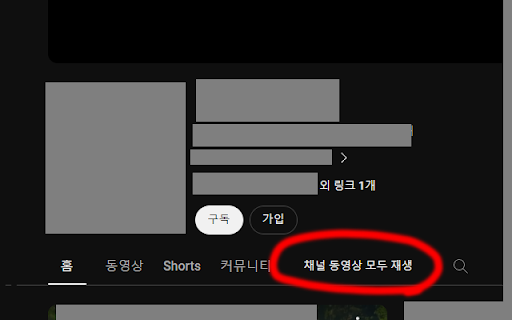
Add play all button channel main pages 유튜브 채널의 영상을 모두 재생하는 버튼 추가

Youtube Shorts Autoplay
If autoplay stalls, refresh Youtube or restart Chrome, and you're back to hands-free enjoyment! Introducing the YouTube Shorts AutoPlay Chrome Extension! Tired of manually starting each YouTube Shorts video? Discover our solution - the YouTube Shorts AutoPlay Chrome Extension. It automates video playback, offering you a seamless, uninterrupted experience. AutoPlay: Enjoy YouTube Shorts videos effortlessly as the extension queues up and plays the next video automatically. Easy Setup: Just install to dive into YouTube Shorts. If you find "YouTube Shorts Autoplay On" message, you can use this extension. If not, just refresh(F5 at window, command + r at Mac) on "Shorts page". Refresh: Click the refresh button on "Shorts Page" to ensure all elements load correctly. Elevate your YouTube Shorts experience. Download the AutoPlay Extension now to enjoy endless captivating content without any touch!

Cheese Knife - CHZZK Toolkit
Adds useful features and tools to CHZZK. This extension adds various useful features and tools to CHZZK, NAVER's streaming platform. [Explore] - Live Preview: Preview live by hovering over the channel. - Refresh Sidebar: Refresh the sidebar every 30 seconds. - Popup Player: View multiple lives in one window. [Player] - Stats Menu: Select Stats from the right-click menu to view resolution, bitrate, FPS, latency, and codec. - Seek with Arrow Keys: Use the arrow keys to rewind a short amount of time. - Video Filters: Adjust video brightness, contrast, and gamma, and apply a sharpen filter. - Audio Compressor: Reduce loud sounds to adjust the dynamic range to make the sound more comfortable. [Chat] - Hide Donation Messages: Hide Cheese messages in the chat. - Adjust chat panel and font size It also adds many other useful features and allows to customize styles. ==== This extension is not affiliated with CHZZK, and related trademarks are the property of their respective owners. This extension is provided "as-is" without any warranties, and the developer assumes no responsibility for any issues, damages, or data loss resulting from its use.

K-Twitch-Bypass
Extension to bypass Twitch quality restrictions

YouTube Play All Button
A browser extension that adds a “Play All” button in the “Videos”, “Shorts”, and “Live” tabs of a YouTube channel. The extension creates the ability to binge-watch a channel’s content in a single click. The added button will play all a channel’s videos, shorts, or live streams one after another automatically. The order of the content is sorted through the selected tab, either by "latest" or "popular" (descending order). YouTube does not have a feature for sorting by "oldest", so it is not supported. The button waits for all other content to finish loading before it appears (this should take maximum 1-2 seconds).
