
pjnkabicgidoflkilpobciceedcamkpo

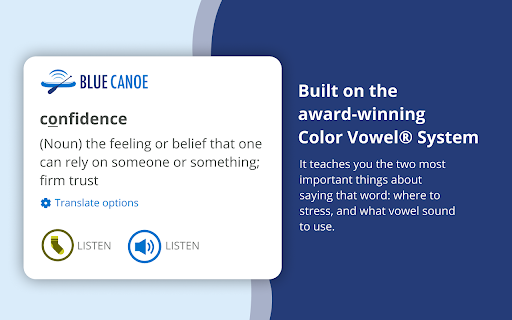
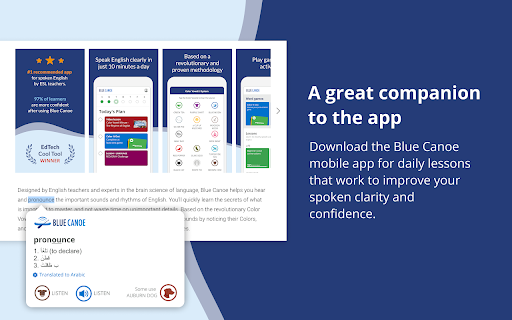

Learn how to say any English word and be instantly understood, using the award-winning Color Vowel®️ System. Double-click and then right-click on any word to see its stress and vowel. Once you've granted us permission to the web page from the extensions button on your header bar, Simply select a word and get a pop-up that teaches you the two most important things about saying that word: where to put the stress, and what vowel sound (color) you should use. This dictionary is built on the award-winning Color Vowel® System, used by more than 10,000+ ESL teachers around the world, and now you can use it, for free, on your computer. Frustrated by all the complexities and “exceptions” of English pronunciation? Tired of not being able to listen and then accurately repeat a word? You are not alone! Blue Canoe and the Color Vowel System will help! Visit www.bluecanoelearning.com for more information. Download the Blue Canoe mobile app for daily lessons that work to improve your spoken clarity and confidence. Watch this 3-minute video to learn more about the most successful way to improve your spoken English. https://youtu.be/21XNGIefcR8 * Move from just knowing what a word means, to confidently using a word when you talk. * Double-click to select, and then right-click on any word to get a pop-up that tells you which syllable to stress (make longer), and what vowel sound (color) you should use, as you say the word out loud. * Listen to the vowel sound recording and then the word recording, and the visual and musical parts of your brain will help you to “hear” it in a way that is not possible with just your language brain. * Go to the Options in Blue Canoe icon in the browser extension bar to change how you call up the pop up, if desired. * Use the Blue Canoe mobile AI app to learn and practice so much more about speaking English with clarity and confidence. Get it from your mobile App Store. NOTE: After installing this extension, refresh any previously opened tabs to use it on those tabs. According to the rules of the Chrome Web Store, it will also not work on the store pages.

Pronounce Words
Speak English better with Pronounce Words. Hear the correct way to say any English word. Improve your pronunciation. Are you eager to master the art of English pronunciation? Pronounce Words is the Chrome extension designed to enhance your speaking skills with precision and confidence. Whether you are a language learner, a professional seeking to perfect your accent, or simply someone curious about correct pronunciation, this tool is tailored to meet your needs. 🔺 Instant Audio Pronunciation 1) Hear It Right: Instantly listen to how any English word is pronounced on any webpage. 2) Choose Your Accent: Access pronunciations in both British and American accents. 3) Answer Your Questions: Ever wondered, "How do you pronounce this word?" or "How is this word pronounced?" Our tool provides immediate answers. 🔺 Practice and Record Your Speech 1) Record Your Voice: Use the Record button to capture your speech. 2) Compare and Improve: Compare your recording with the standard. 🔺 Progress Tracking and Vocabulary Building 1) Track Improvement: Monitor your pronunciation progress over time. 2) Build Your Vocabulary: Save records to your personal list for future review and practice. 3) Contextual Learning: Learn to pronounce words as you see them online, improving your overall language comprehension. 💡 Installation and Setup - Click the “Add to Chrome” button to install the extension. - Choose “Pronounce Words” icon on the right side of the browser. 💡 Usage - Browse and Select: Go to any English-language website and use your mouse to select the word you want to hear. - Play and Record: On the sidebar, click the Play button to hear the correct articulation or use the Record button to practice your speaking. - Review and Improve: Listen to your recording, compare it with the benchmark pronunciation, and refine your skills. 💡 Learning Options - Accent Choices: Select between British and American accents to suit your learning preferences. - Save and Review: Keep track of the records you’re learning by saving them for later practice. 🌍 Benefits for Different Users 🔹 Language Learners • Improve Confidence: Instantly hear and practice the correct pronunciation of new vocabulary with our pronunciation audio feature. • Enhance Speaking Skills: Develop better speech and confidence in speaking English by learning how to pronounce words correctly. 🔹 Professionals • Refine Communication: Perfect your articulation of industry-specific terms for clearer business communication, ensuring you know how to pronounce the word accurately. • Speak Clearly: Enhance your presentation and meeting skills with precise pronunciation using our word pronouncer. 🔹 General Users • Curiosity Satisfied: Discover how words are pronounced and expand your vocabulary by learning how to say them correctly. • Contextual Learning: Understand how terms are used in real-life contexts to improve overall comprehension and know how do you pronounce specific words. 🌐 Audio Pronunciation ➤ Immediate Access: Get instant audio feedback for any word you highlight with your mouse on the site with our pronunciation tool. ➤ Accent Switching: Easily switch between accents for a comprehensive learning experience, ensuring you know how to pronounce words in both styles. 🌐 Recording and Comparison ➤ Voice Recording: Record yourself pronouncing words and compare it with the standard pronunciation to improve your English pronunciation. 🌐 Progress Tracking ➤ Save Records: Maintain a personal list of records for future practice and review to keep track of how you pronounce each word. 🌐 Contextual Learning ➤ Learn As You Browse: Hear and practice pronunciations as you read online content, answering questions like "how do I pronounce this word?". ➤ Understand Usage: See how words are used in context to deepen your understanding and learn how do you say them correctly. 🎓 Conclusion Pronounce Words is more than just a checker - it's your personal speech coach. By providing features like instant audio pronunciations, recording capabilities, it addresses common questions such as "How do I pronounce this word?" and "How is this word pronounced?" Whether you are a language learner, a professional, or simply curious about English pronunciation, Pronounce Words helps you speak clearly and confidently. Experience the power of precise articulation and elevate your English speaking skills today.

English Wikipedia IPA Respeller
Inserts plain-English approximations of fancy IPA-formatted words on English-language Wikipedia and Wiktionary. Allows users to learn new words while browsing the world's favorite free encyclopedia or dictionary. For example, /ɪˌpɪstɪˈmɒlədʒi/ is rendered as \ih•p•ih•s•t•ih•M•o•l•uh•j•ee\.

English Pronouncer Extension
Pronounce English words with a click of a button Powered by learnenglishmentor.com, the AI platform to learn English online, English Pronouncer is a browser extension that enhances your English language experience by providing instant access to accurate pronunciation and translations. Whether you're learning English, traveling, or just want to understand the language better, this extension is here to assist you. ❗Note: As English Pronouncer is a newly published extension, you might see a warning that it is not yet trusted by Enhanced Safe Browsing. This is a standard message for new extensions and will disappear once our extension has gained enough positive feedback and trust from the community. We assure you that English Pronouncer is safe and secure to use. ❗ With English Pronouncer, you can: 🔊 Listen to Pronunciation: Simply select a word or phrase and click the icon that appears, and you'll hear the correct English pronunciation. 📖 Translate Text: Choose a language, and the extension will translate the selected English text for you, bridging language barriers effortlessly. ⚙️ Customize Your Experience: Now available in 8 different languages, the settings menu allows you to tailor the extension to fit your needs. The extension is intuitive, reliable, and an invaluable tool for anyone engaging with the English language. Speak and understand English with confidence, thanks to English Pronouncer.

ChatTube
ChatTube enables you to chat with any YouTube video - ask questions, get summaries, pinpoint key points and so much more! **ChatTube version 1.7.0 introduces support for transcript-free videos** 🎓 Online Learning 📖 Instant Summaries 🖥️ Product Reviews 🗺️ Travel Planning 🍕 Food Recommendations and more! How to use: 1. Install this extension 2. Open a YouTube video 3. Sign in and chat! If you need help, feel free to contact: support@chattube.io
