
pjgjdmehkhpdhlpdgfbbpgekfajlhhgn
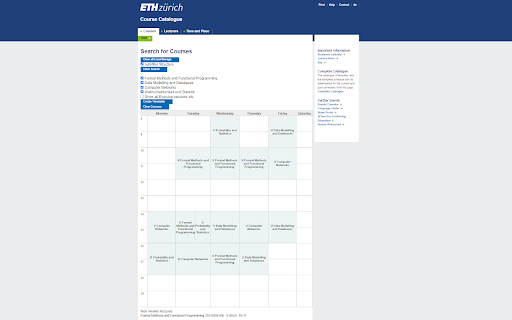
Browser extension for a better user experience when using https://vvz.ethz.ch. Timetable Creator: You can add courses while browsing through VVZ and then display a timetable like you would see in MyStudies. Helpful to check for any overlaps for your upcoming semester or if you just wanna see how your timetable will look like somewhat. Keep Structure in VVZ Search Menu: Whenever you switch semester vvz removes any selections you already made under Structure. This feature allows you to keep them and easily search through different semesters. Filter for type of grading: While searching you can filter for Session examination, End of semester examination and (un)graded Semester performance. Easier Search: Just press enter in the search menu instead of having to click the search the button. Have all the information you want in the search results instead of having to click through each course. All old versions of a course can be quickly found. CourseReview: Adds Star ratings from CourseReview to VVZ while searching for courses. Replaces all course_ids with links to the course on https://n.ethz.ch/~lteufelbe/coursereview/ to easily check out reviews of a course.

Zendesk Link Collector
Summarize links and attachments This is a browser extension that aggregates links from a Zendesk ticket according to custom RegEx values. This tool's purpose is to help Zendesk users more easily handle long tickets where links and/or attachments are key information. PLEASE NOTE: this extension requires that you specify patterns in RegEx. If you are unfamiliar with RegEx, this extension is likely not for you. For a full list of features or to report an issue, please see the GitHub repo: https://github.com/BagToad/Zendesk-Link-Collector

Helper Extension for Gridiron Dynasty
This extension is for coaches who play Gridiron Dynasty on Whatifsports.com (WIS). When you search for recruits, the web page displays the recruits hometown (City, ST). This extension modifies the hometown to be a URL that opens the The Next Guess website (www.thenextguess.com) and leverages its mapping capability to show you where the recruit is located compared to all human coaches in that world and division. The extension will also highlight a recruit's row BLUE if you are watching the recruit, YELLOW if you are in a battle for the recruit with other schools, and GREEN if the recruit is considering only your school. In addition, in the active team's schedule page, as well as the team's profile schedule tab, the extension will insert a link to the active team's schedule/game analysis page on The Next Guess website. Finally, next to each boxscore link, the extension will insert a small green plus icon that is hyperlinked to The Next Guess game analysis. Clicking the green plus icon will open The Next Guess in a new tab and instantly analyze the boxscore. Release Notes: v2.0.0.3 Fixed broken location link in recruit profile page due to space between city and state. v2.0.0.0 Migrated all of the links to use The Next Guess website as the full replacement for the GDAnalyst website which will be deprecated soon. v1.0.0.2 Fixes a minor issue that may or may not appear depending on the browser. v1.0.0.1 Fixes issue where links were not getting inserted for the upcoming scheduled game. Adds GDAnalyst Schedule page and GUESS page links for the previous game's opponent. v1.0.0.0 Added links to GDAnalyst Schedule Page and GUESS page for the Active Team. Added GDAnalyst Analyze link for the previous game's box score. Added GDAnalyst Schedule Page and GUESS page links for the current game's Home and Away teams. Added GDAnalyst Analyze link for the current game's box score. (Only visible at half-time of current game). On the Recruit Profile page, GDAnalyst link to the recruit's Hometown will now show on every tab of the Recruit Profile page. v0.0.2.3 Fixed an issue with 8-digit gameId's. v0.0.2.2 Renamed the extension to Helper Extension for Gridiron Dynasty. Release Notes: v0.0.2.1 Corrects GDAnalyst link on the Team Profile page's Schedule tab. v0.0.2.0 1. In the active team's schedule page, as well as the team's profile schedule tab, the extension will insert a link to the active team's schedule/game analysis page on GDAnalyst website. 2. Next to each boxscore link, the extension will insert a small green plus icon that is hyperlinked to GDAnalyst game analysis. Clicking the green plus icon will open GDAnalyst in a new tab and analyze the boxscore. v0.0.1.2 Resolves an issue where the page updates made by the extension may disappear if certain actions are taken on the page (e.g. clicking check box to add a recruit to your watchlist or changing some of the search filter options at the top).

Urban Abodes Posting Tool
Extension that allows for an effortless and rapid method to post apartments to various websites. This extension allows Urban Abodes Agents to rapidly post attractive apartment ads complete with pictures.

CX Enable Vim
The JavaScript IDE (https://ace.c9.io/) used by Code Expert (https://expert.ethz.ch/) supports vim keybindings. This add-on enables them. The add-on can be disabled by clicking on its icon in the toolbar.
