
pjajamhfahfgjmfdoikclnagbknngomb
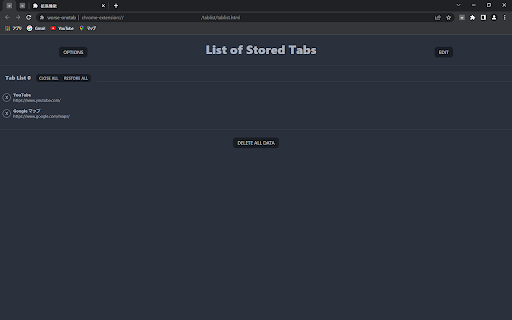
opensource and simplist alternative to [OneTab](https://www.one-tab.com/). Inspired by [better-onetab](https://github.com/cnwangjie/better-onetab), which seems to be no-longer maintained, but is worse in every way except for performance.

ManageX
ManageX — Smarter Chrome Extension Control Based on URL Rules. ManageX gives you full control over your Chrome extensions by letting you enable or disable them automatically based on the websites you visit. Whether you want to reduce clutter, improve performance, or isolate tools per site — ManageX adapts your extensions to match your browsing. Perfect for developers, testers, and power users, it’s a lightweight, intuitive way to stay organized without manually switching extensions on and off. 🔑 Key Features: Enable/Disable by URL – Define custom URL rules to control when each extension should run. Group Extensions – Organize extensions into groups and apply rules to multiple tools at once. Conflict Handling – Extension-specific rules override group defaults for precise control. Instant Feedback – See real-time rule status on the active tab via the toolbar icon. Clean UI – Manage all your rules, extensions, and groups from a fast, minimal dashboard. Export & Backup – Safely back up or share your rule sets. Whether you're debugging, working, or just browsing — ManageX keeps your Chrome environment clean, fast, and tailored to each site.

Supatabs - Tab Manager
Supatabs - Declutter your browser tabs in seconds and speed up your computer. If you found this extension you probably have a lot of tabs open right now and Chrome is using a significant amount of memory. Don't worry, we had the same problem. 🔎 Search through your tabs in Supatabs 👌 Simple by design - no overwhelming UI 📈 Can massively reduce your Chrome RAM usage ⌨️ Customizable keyboard shortcuts for extra productivity ▶️ Pause and resume work by saving and switching through tab groups 🔗 Share a list of tabs via Whatsapp and Telegram, or copy the list to your Clipboard ✨ Remove duplicates with a single click 🌚 Pick between dark or light mode 🌕 ✅ Does not replace your default tab ✅ Supports Chrome tab groups 🔎 SEARCHABLE TABS Effortlessly filter your saved tabs with the Supatabs search bar. Supatabs reduces the amount of memory your Chrome browser takes up on your computer. Keeping your tabs in Supatabs can drastically improve your computer's performance! ▶️ PAUSE AND RESUME WORK - Save each session to a group of links. (all tabs or left/right from active tab) - Easily swap open tabs with a saved group with the click of a button. - Reorder tabs and groups with intuitive drag and drop. - Remove duplicates with a single click 10x your productivity with keyboard shortcuts. Supatabs provides customizable keyboard shortcuts to collect open tabs in any direction (left from active tab, right from active tab, all tabs, or a single tab). You can also open/focus Supatabs with a shortcut. Have you ever needed to share multiple links with a colleague or a friend? With Supatabs you can share all links in a group via Whatsapp or Telegram with the click of a button. If that's not enough you can also copy the list of links to your clipboard and send them anywhere you want! ★ BEAUTIFUL AND NON-INTRUSIVE Sleek design with dark- and light mode at your fingertips. Ok... to be fair we are a bit biased here. You can either have Supatabs pinned, or unpinned. It will NOT replace your "New Tab" (for most people this would be the Google start page) The OneTab replacement you didn't know you have been looking for.

TheTab - OneTab Alternative | Tab Manager
Frustrated with OneTab changes? Save all tabs with one click, undo mistakes, stay private. Free forever. No account. Works offline. Save all tabs instantly with one click. The modern OneTab alternative with undo, dark mode, side panel, and privacy-first design. Free forever, no account needed. Frustrated with OneTab's recent changes? TheTab brings back the simplicity you loved: the classic one-click tab saving experience without the bloat. Turn tab management into an achievement-hunting adventure. Earn XP, unlock 19 achievements, track streaks, and level up through 10 progression tiers while freeing up gigabytes of RAM. The only tab manager that makes productivity rewarding. - Save all open tabs with one click (Ctrl+Shift+1) - Automatic grouping by date and browser tab groups - Undo tab deletion instantly (feature OneTab still doesn't have!) - Restore tabs individually or all at once - Quick access without leaving your current page (Ctrl+Shift+2) - View and manage saved tabs in a convenient sidebar - Drag-and-drop organization while browsing - Toggle open/close instantly with keyboard shortcut - Powerful search across all saved tabs and history - Find any tab in seconds with keyword filtering - Type "tt" in the address bar to search without leaving your page - Unlimited storage: save thousands of tabs without errors - Export/import tab lists as JSON backup - See how your browsing connects pages together - Track which websites you use most with domain analytics - Activity charts and heatmaps show productivity patterns - See exactly how much RAM you've saved (real calculations) - Automatic tracking of recently closed tabs - Restore tabs closed weeks ago with one click - Choose retention period (1–30 days) - Visual timeline shows your browsing path - Earn XP points every time you save tabs - Unlock 10 levels and 19 achievements - Build daily streaks to stay consistent - Track your tab-saving milestones - 100% local storage: all tab data stays on your device - No cloud sync, no account required - Anonymous analytics only (PostHog) — no personal data, no tab URLs, no browsing history is ever collected - GDPR-friendly: your tabs, your business - Lightweight and fast: works even with 100+ tabs - Works 100% offline: no internet required - Side panel for quick tab access (Ctrl+Shift+2) - Dark mode support with instant toggle - Clean, intuitive interface with multi-page navigation - Statistics dashboard with 30-day activity charts and weekly heatmaps - Domain analytics: track browsing patterns across unique websites - Folders, tags, and starred favorites for advanced organization - Available in 27 languages: Arabic, Bengali, Czech, Danish, German, English, Spanish, Finnish, French, Hebrew, Hindi, Indonesian, Italian, Japanese, Korean, Dutch, Norwegian, Polish, Portuguese, Romanian, Russian, Swedish, Thai, Turkish, Ukrainian, Vietnamese, Chinese Chrome may warn that TheTab can "read your browsing history." Here's why: The "tabs" permission lets TheTab read tab titles and URLs so it can save them — this is the core function. Chrome categorizes any access to tab URLs as "browsing history," but TheTab only reads your tabs when you click Save. It does not monitor or record your browsing activity. - tabs — Read tab titles/URLs to save them, close tabs after saving - activeTab — Access only the focused tab during right-click actions - storage — Persist saved tab groups in local browser storage - unlimitedStorage — Save thousands of tabs without hitting the 10 MB limit - tabGroups — Preserve tab group names and colors when saving/restoring - sidePanel — Provide the side panel interface (Ctrl+Shift+2) - contextMenus — Add 7 right-click save options - alarms — Schedule background tasks (auto-cleanup, statistics) - notifications — Notify when tabs are saved successfully - bookmarks — Enable "Save as bookmarks" export feature Anonymous analytics: TheTab uses PostHog to track anonymous feature usage (button clicks, extension version, browser language). No tab URLs, no personal information, no session recordings, no cookies. Full details: [thetabextension.com/privacy-policy](http://thetabextension.com/privacy-policy) 🆚 Better Than the Competition - Modern UI with dark mode - Undo button (OneTab still doesn't have this!) - Side panel for quick access - Gamification: 10 levels, 19 achievements, streaks - Statistics dashboard with domain analytics - Recently closed tab tracking (1–30 day retention) - 27 languages (vs 5) - Unlimited storage - Active development - Free forever (no $60/year paywall) - Side panel access - Unlimited storage - Gamification system - Advanced search with address bar integration - Domain analytics - 27 languages - Recently closed tab tracking - Faster and cleaner interface - More intuitive navigation - Side panel - Gamification (10 levels, 19 achievements) - Streak tracking - Tab history visualization - Browsing insights 🎯 Perfect For - Researchers managing dozens of reference tabs - Developers juggling documentation and Stack Overflow - Students organizing study materials and research - Professionals managing multiple projects - Anyone overwhelmed by tab clutter - Former OneTab users seeking a better alternative - Data enthusiasts who love tracking productivity metrics - Users who need tab recovery beyond browser's basic "recently closed" - Privacy advocates seeking full offline functionality - Multilingual users needing native support (27 languages) - Power users who want quick side panel access while working Works seamlessly on Chrome, Brave, Edge, Opera, and other Chromium browsers. Also available on Firefox with dedicated builds and native sidebar support. 1. Install TheTab 2. Click the icon (or press Ctrl+Shift+1) 3. All tabs saved instantly 4. Open side panel anytime (Ctrl+Shift+2) 5. Restore anytime with one click Unlock achievements, track statistics, and level up your productivity. All features available immediately — no premium upgrade, no setup, no account, no hassle.

TabTrum
Save & Launch your Browser Tab Combinations in a blink. We built TabTrum to address one key problem. There are multiple instances when we have quite a few tabs open on our browser, and that causes our devices to stutter. TabTrum is a tool that let's you take snapshots of open tabs so that you can sometimes close the Browser and free up RAM on your machine. When you need the tabs next, simply click on "Launch Tabs" from the Snapshot and voila! You have your tabs ready to go. With TabTrum, you can - ➡️ Open n tabs (duh), ➡️ Save them as a Snapshot when you're taking off, ➡️ Close the browser in peace, ➡️ Come back and launch all tabs at once !
