
pikdcobajohdjlhcohgkenhkjedgdcpo
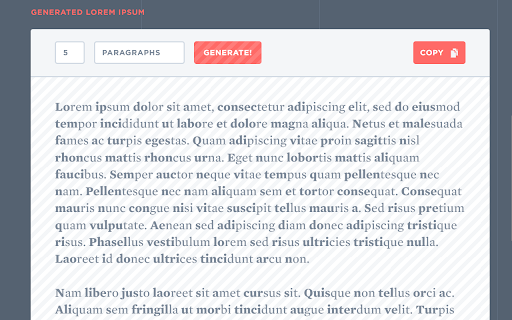
Improves readability and reading time of online text Lexia is a simple extension which improves readability of online text by bolding the first syllable(s) of each word in a paragraph (denoted with tags in HTML). Initially geared towards those with dyslexia, this extension decreases reading time for all users. The extension can be activated by clicking it's icon in the top right corner of your browser (indicated by a "1"), and deactivated by clicking it again (indicated by a "0"). Be wary that in version 1.0, the extension simply reloads your webpage to deactivate the highlighting, so be sure to back up content in progress.

PJe✚R
Extensão com melhorias na utilização do PJe Visão Geral Extensão de navegador com melhorias ao "microsistema PJe". A extensão `PJe+R` ou `pjemaisr` busca aumentar a racionalidade, a rapidez e a relevância do sistema PJe e sistemas satélites, de forma a assegurar mais acessibilidade, eficiência e melhoria da experiência do usuário além de provê automações e integração entre esses sistemas. É um projeto colaborativo, com a atuação de diversos desenvolvedores voluntários, inspirado pelo uso de scripts de usuário (como os utilizados pelo `GreaseMonkey` e assemelhados) e pela extensão `SEI++`. O projeto inspira-se também na experiência da extensão `AVJT - Assistente Virtual da Justiça do Trabalho`, de Sisenando Silva. Entenda melhor assistindo ao vídeo [O que é o PJe+R](https://www.youtube.com/watch?v=PiHVuQOabGc). ## Tutoriais Verifique nossos tutoriais no youtube: [Onde encontrar os tutoriais?](https://www.youtube.com/watch?v=HaMofA3Q

Gympass ScreenSaver
Gympass, the ultimate chrome extension that keeps you on track and energized! Stay active with the "Gympass" Chrome extension! With Gympass, you'll receive friendly reminders to take short breaks and engage in exercise every hour. Let Gympass be your wellness companion while you work. Stay healthy, stay productive!

Chat raid blocker
Disable Twitch chat raids by clicking on the ON/OFF switch on the bar at the top right corner.

Ctrl+N/P unix navigation for dropdowns
Use Ctrl+N and Ctrl+P to navigate up and down in dropdowns Streamline your web browsing with CtrlNP! Perfect for Vim users who prefer to stay in the keyboard flow while navigating. No more reaching for the arrow keys, our extension allows you to move up and down dropdown menus with the simple keyboard shortcuts Ctrl+P and Ctrl+N. Experience seamless navigation, just like on Unix systems. Download now and make your web browsing experience more efficient and enjoyable! Check the code on Github: https://github.com/justalemming/ctrlnp
