
pienbadkpboeajbopcjmopidbmckfjmb

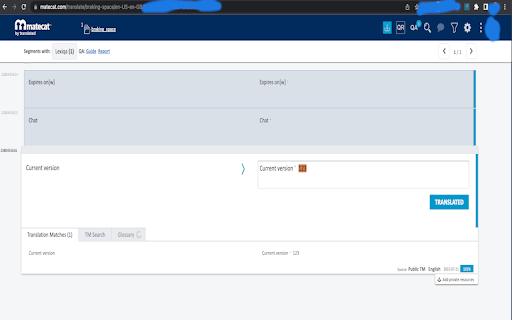
Reuses existing Chrome tabs for LexiQA jobs within MateCat Use this extension in order to control the number of open tabs in Chrome when using the LexiQA on-line quality assurance tool in MateCat projects. This one-tab-per-job extension allows you to reuse the open LexiQA and MateCat tabs by eliminating the need to open new ones every time you run a new check.

Same Tab for Xbench
Reuses Chrome tab for existing Matecat, Smartcat, Lingotek or Crowdin job when called from ApSIC Xbench The Same Tab extension ensures that the Matecat, Smartcat, Lingotek, or Crowdin job tab in Chrome is reused when you press Ctrl+E in ApSIC Xbench to open a segment right at the segment in the online editor. It greatly improves the user experience when using ApSIC Xbench to run QA on a web editor job because you do not have to manually close the tab created after pressing Ctrl+E in Xbench. However, to properly do its job, this extension requires "Read browsing history" permission because it has to search for the right tab among all tabs that are currently open in Chrome. This extension also works with self-hosted Matecat sites. The extension is open sourced by the ApSIC Xbench development team and you can find its source code at Github: https://github.com/xbench/one-tab-for-matecat

Smartcat Agent
Transform your multilingual content with Smartcat Agent. Transform your multilingual content with Smartcat Agent. Say goodbye to manual content translation processes! Smartcat Agent seamlessly integrates with your source content, enabling you to translate content, like entire e-learning courses in Articulate Rise and other sources, with just one click - including text, images, audio, video, and accompanying files. Smartcat leverages advanced AI translation technology combined with human expertise to deliver superior quality translations. The platform automatically selects the best translation engine for your language pair from industry leaders while incorporating your brand voice, terminology, and past translations for consistent results. How to use Smartcat Agent: 1. Install the Smartcat Agent extension and activate it in your browser 2. Log in to your Smartcat account 3. Navigate to any content you want to translate 4. Click "Translate in Smartcat" to automatically transfer the content to Smartcat for translation if using Articulate Rise, or paste text in from other sources 5. After translation is complete, download the translated content for use. That's it! Creating multilingual content has never been more efficient! Key Features: - Translate complete content from Articulate Rise including all assets (text, images, audio, video) - Paste in text from any source to create a project - Maintain brand consistency with custom glossaries and translation memory - Collaborate seamlessly with subject matter experts and language professionals - Track progress and manage review workflows - Access 280+ supported languages What is Smartcat? Smartcat is a comprehensive content generation and translation platform that enables transformation of enterprise multilingual content. With a built-in marketplace of 500,000+ expert suppliers and companies, Smartcat can help take your multilingual content strategy to the next level. For feedback or suggestions, please leave a review in the Reviews tab or contact our support team.

Language Weaver Instant Translation
Automatically translate selected text securely and accurately, using RWS's state-of-the-art neural machine translation This browser add-on allows for instant translation using RWS's state-of-the art neural net secure machine translation. Language Weaver Instant Translation works within your browser to deliver instant translation for some of the world's most challenging languages as you browse. Language Weaver delivers: * Speed – on demand instant translation for any language right in your browser on any device. * Accuracy – enabled through RWS's Neural Machine Translation and optimized by language experts. * Security – your content is never exposed or re-purposed. To use, simply select the text you want, and click the RWS Logo to translate the entire page. You can also enable automatic language detection and continuous translation for a truly seamless experience. It's that easy! This add-on is activated for those that have an enterprise Language Weaver or Language Weaver Edge account. If you do not have an account, be sure to visit: https://www.rws.com/language-weaver/ to learn more about RWS's Machine Translation software and the many ways you and your organization can take advantage of this powerful technology. Version 1.2.28.0 contains the following changes: - Users in the translator role could not access Language Weaver any more

TabPlus
The most feature-packed tab manager. Save & organize your tabs, sync across devices! Tab++ allows you to save your tabs for later. You can organize, categorize, and name them, then restore individual tabs or tab groups at any time. You can even sync them across devices! Tab++ is inspired by similar extensions like OneTab, only with WAY more features... Like folders, cloud-syncing, easy backup and restore, and more! # Note: Usage help can be found in the options page. # NEW IN v1.7.3 - Dark mode, woot! - Implemented more settings in the options page - Confirmation prompt before clearing all data - Don't save pinned tabs by default (configurable) - Bug fixes & improvements to automatic corruption recovery
