
pidieofeahkafomincoajpokolgdnbjo


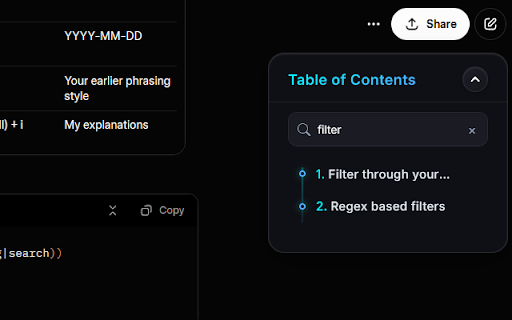
**🧭 AI Assistant TOC — Never Lose Your Place in a Long AI Conversation Again** AI Assistant TOC adds a beautiful, floating **Table of Contents panel** to your AI conversations, giving you instant access to every question you've asked — without endless scrolling. A single extension that supports: - **ChatGPT** (chatgpt.com) - **Google Gemini** (gemini.google.com) - **Perplexity AI** (perplexity.ai) - **Anthropic Claude** (claude.ai) - **Grok by xAI** (grok.com) 📋 **Live Table of Contents** — Automatically detects all your prompts and displays them as numbered, clickable entries. Click any entry to instantly scroll to that message. Updates every 5 seconds and immediately after each new prompt. ✏️ **Inline Renaming** — Hover over any entry to reveal an edit icon. Give your prompts meaningful custom labels that persist across page refreshes. 🔍 **Live Search & Filter** — Type to instantly filter your TOC entries in real time. Non-matching items hide immediately; a one-click clear button resets the filter. 🖱️ **Drag to Reposition** — Move the TOC panel anywhere on screen by dragging the header. The panel stays within viewport bounds and remembers its position between sessions. ↔️ **Fully Resizable** — Resize the panel from any edge or corner using 8 resize handles. Panel size is saved and restored automatically. 🔘 **Collapsible to a Floating Button** — Minimize the panel to a compact 32 px floating circle when you don't need it. Expands back to full size with a single click. Starts collapsed on smaller screens. 💾 **Persistent State** — Your panel position, size, and custom entry names are all saved to `localStorage` per platform and restored on your next visit. 🎨 **Premium Glassmorphism UI** — Features a frosted glass background, a vibrant cyan-to-blue gradient accent, glowing node markers, smooth hover animations, and a custom scrollbar. Hides automatically when printing. This extension runs entirely in your browser. No data is collected, sent, or stored on any server. All preferences are saved locally on your device.

Clinical Notes AI
Clinical Notes AI Browser Extension The Clinical Notes AI Chrome extension streamlines the clinical documentation process by recording conversations during patient sessions and converting them into text, which is then automatically integrated into Electronic Health Record (EHR) system forms. This real-time transcription eliminates the need for manual note-taking, allowing clinicians to focus on patient care. The AI processes spoken words into structured clinical notes, providing a seamless copy-paste function into the appropriate EHR fields. The system supports both live transcriptions during sessions and post-session dictations, and all data is handled in a HIPAA-compliant manner, ensuring confidentiality and security. This integration significantly reduces documentation time, accelerates insurance reimbursement processes, and supports clinician well-being by alleviating administrative burdens.

AI Browsing Assistant ✨
AI Browsing Assistant — Intelligent Browsing for professionals! 🤓 Unlock the capabilities of AI, with Google’s advanced AI system, directly within your browser. AI Browsing Assistant enhances productivity, accelerates research, and brings intelligent, context-aware assistance to every page you visit. AI Browsing Assistant provides fast, accurate responses tailored to your needs. Whether answering quick inquiries or supporting deeper exploration, this extension delivers responsive, adaptable assistance across a wide range of topics. Smart Page Analysis: • Generate concise, reliable summaries of the pages you visit • Ask questions about on-screen content for deeper clarity • Extract key insights and produce structured summaries within seconds • Turn complex material into accessible, actionable information using Gemini™ Google's latest AI. • Engage in fluid, context-preserving interactions powered by AI. • Transition seamlessly between casual, technical, and analytical topics • Receive responses matched to your expertise level • Maintain long-form conversations across tasks and subjects • Benefit from Gemini™’s deep comprehension of complex concepts Enhanced Creativity and Productivity: • Draft compelling writing with support from AI • Generate ideas, outlines, and content refinements • Receive immediate feedback and actionable suggestions • Accelerate everyday tasks such as writing, coding, and planning • Enrich creative workflows with AI-driven insights Learning and Discovery: • Access clear, concise explanations of difficult concepts • Explore new subjects with guided support. • Strengthen research with organized, verifiable information • Transform any webpage into a dynamic learning environment • Communicate effortlessly in multiple languages • Use translation capabilities powered by Artificial intelligence • Receive culturally informed and linguistically accurate responses • Break down language barriers across the web • Explore content in real time with integrated translation tools • High-quality page analysis and summarizations • Advanced file understanding and interaction • Context-aware conversational capabilities • Support for creative, analytical, and technical tasks • Customisable experience aligned to your workflow • Strong privacy protections and secure processing • Transform your browser into an intelligent, productivity-focused workspace • Access personalised, AI-driven insights • Streamline research, writing, and analysis • Stay current with continuous improvement relays on Google's latest AI model. • Benefit from an experience shaped by user feedback and ethical AI principles Ideal for Students, Professionals, Creators, and Everyday Users Students: learning assistance, research support, summarization, study preparation Professionals: advanced writing, research acceleration, file analysis, productivity optimization Creators: idea generation, content refinement, style feedback, inspiration Everyday Users: quick answers, page summaries, translation, browsing enhancement • Advanced natural language understanding. • Modern machine learning capabilities. • Low-latency response delivery. • Seamless integration with Chrome. • Continuous refinement and learning. • ✅ Expanded integrations with productivity platforms. • ✅ Advanced multimedia and image understanding. • ✅ Additional customization tools and collaboration features. • ✅ Enhanced file processing and analytical capabilities. • ✅ Upload Documents, PDFs & images. • Generate images from a text Prompt. Experience the next generation of intelligent browsing. Install AI Browsing Assistant and bring the power of AI to your daily workflow. Current version: 2.0.4 For support or inquiries: kessawy.dev@gmail.com Please leave us a comment with the ideas you would like to have included.

AI Checker for Teachers
Leverage AI Checker for Teachers — featuring an AI detector for essays. Teachers ensure originality with our ai paper checker tool. Students today have access to sophisticated text-generation platforms, which can make it difficult to determine whether an essay or paper is original, ai check for teachers is becoming essential. An ai essay checker for teachers is required to quickly and reliably identify even the most natural-sounding machine-produced writing. The ai checker for teachers is an easy-to-use Chrome extension created to help educators detect Machine-generated text and ensure authentic student work. Here are the benefits of using the ai checker for teachers: 1️⃣ Real-time analysis with accurate detection results. 2️⃣ Combined ai and plagiarism checker for teachers to verify originality. 3️⃣ Works as a browser extension with no need for separate platforms. 4️⃣ Detailed scoring to indicate machine generated content. 5️⃣ Easy-to-use interface designed for busy educators. No setup required – AI generator checker for teachers offers use directly within any modern browser. The ai checker tool for teachers makes detection simple: 1. Paste or Upload – Paste your text directly or upload a complete document in all supported formats. 2. Run Dual Analysis – Our tool thoroughly checks writing patterns and performs plagiarism scan. 3. Get Instant Results – View detection score, plagiarism check, and matched sources in one report. 🚀 Equip yourself with the ultimate artificial intelligence checker and maintain integrity in every classroom.

SIDE INDEXER
Generates a dynamic table of contents for AI chats and offers optional indexing helpers. Struggle with messy AI chats? Imagine opening your AI chat history and instantly seeing it transformed into a clean, structured document — complete with a table of contents, quick-search index, templates for your workflow, and one-click export to JSON. Automatic TOC & headings – Generate a clear outline of your AI conversation with a single click. Preset templates & layout controls – Choose or create templates (e.g., Meeting Notes, Research Brief, Learning Log) to keep your results consistent and ready-to-share. Export to JSON/Markdown – Save and reuse your structured content in Notion, Obsidian, Docs or your own systems. Cross-device sync (optional) – Sign in to keep your outlines, templates and exports available on every device. Why you’ll love it: • Say goodbye to scrolling through endless conversation history — your insights are surfaced, organized and accessible. • Reuse and share prepared content effortlessly. • Works silently in the background of your AI chat window; no clutter, no extra tabs. Install the extension. Open your AI chat session. Click the icon to generate the TOC & index. Choose a template (or use the default). Privacy & Data Use: We respect your privacy. The extension only processes your conversation data for the purpose of outlining, indexing and exporting. Your data is stored only if you opt-in for sync, and it is never sold or shared with third parties. Unlock your AI conversations for real reuse. Install now and turn chatter into documentation.
