
phpgakpokidfdngbcfipndjcdgaoipna


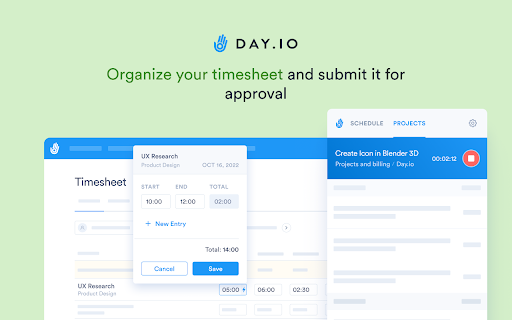


Track time and Clock in/out from anywhere on the web. Day.io is integrated with Trello, Asana, Todoist, Jira, Notion, and over 100+ project management tools. Start tracking time within your favorite platform! With Day.io, you will be able to: - Clock in/out from anywhere, across different devices, all synced online - Organize your timesheet and submit it for approval - Manage your absences and vacation requests - Track your time using our real-time reports - Get notifications in real time - Integrates with other web apps - Use mass action functionality to save time - Clock in management individually and per group - Use advanced and hourly schedule rules Day.io is a time-tracking & management tool for individuals, teams, and groups. Day.io’s platform allows you to save time and money by introducing full transparency to your workforce. It allows you to track time and record and manage clock-ins. All data is synchronized in real time across all platforms and devices, making it easy to use from anywhere at any time.

Magical: Text Expander & Autofill
Magical is a text expander and autofill automation app used by over 100K companies. Expand text like magic and auto-fill forms. Magical is a text expander and autofill automation app used by over 100K companies. Expand your text like magic and auto-fill forms, spreadsheets, and messages. ✍️ Automate writing & messaging: Use Magical’s text expander to autofill messages with your contact’s personal information. 🔢 Automate any data entry task: With a single click, autofill contacts, leads, patient details, or job candidates into any database, form, or spreadsheet. 📍**Works where you do**: Boost your productivity on 10,000,000+ apps where you already work, like Salesforce, Zendesk, Gmail, LinkedIn, Greenhouse, or any other website. ⏱ **Set up in seconds:** Magical doesn't rely on integrations, APIs, or complex workflow builders. Just download and start saving time with simple automations. 👆 **Automation at your fingertips**: Call up Magical anywhere, anytime. The app speeds up repetitive tasks like messaging, data entry, and more as you work. Top Use Cases for Magical **👋 Customer service & support** • Communicate fast and close more customer tickets. • Call up template responses without taking your hands off the keyboard. • Automatically fill in your customer's details to personalize your comms. • Magical has official integrations with customer support tools like Zendesk, Intercom, Freshdesk, Gmail, and more. **🎯 Sourcing workflows for Recruiting:** • Close more candidates by sending personalized outreach messages 10X faster. • Source candidates to sheets with one click to track the recruitment pipeline. • Add candidates to your applicant tracking system directly from sources like LinkedIn. • Magical has official integrations with ATS recruiting tools like Greenhouse, Lever, WorkDay, and more. **💰 Prospecting workflows for Sales** • Make more money by speeding through repetitive prospecting tasks. • Send perfectly personalized sales messages 10X faster. • Autofill lead contact info, tags, and records into your CRM—instantly. • Magical has official integrations with sales tools like Salesforce, HubSpot, Zoho, and more. 🏥 **Healthcare professionals:** • Reduce burnout by speeding through repetitive typing tasks. • Add notes to your electronic medical record (EMR) in record time. • Automatically move patient info into forms for insurance claims, prescriptions, and more. • Magical has official integrations with healthcare tools like Epic, Medhost, Allscripts, and more. 👩🏫 **Educators** • Save time on admin work by automating your everyday tasks. • Add notes and grades to your learning management system (LMS) in an instant. • Send personalized messages to students and parents using pre-baked templates. • Magical has official integrations with education tools like Canvas, Brightspace, and Google Classroom. 👩💼 **Operations & Admins** • Speed through your repetitive tasks to get more done in the day. • Personalize and send repetitive internal or external messages 10X faster. • Move data between different websites and web apps to ensure accuracy—every time. • Automate tasks for your finance, admin, project management, and other teams. **🌱 Small Business and Entrepreneurs:** -Build brand consistency and allow anyone to answer frequently asked questions from customers via email, chat, or social media channels. - Manage your customer contacts in your CRM, or candidates in your ATS. ✈️ **Personal use:** • Get more done in the day by automating your busywork. • Send repetitive messages with personal details in an instant. • Fill out forms and spreadsheets in the blink of an eye. • Use Magical on any website or web app—anywhere, anytime. **💬 Text-expansion & messaging:** Tired of remembering Zoom links, email addresses, phrases about your company, FAQs and/or frequent email templates that you type repeatedly? Magical allows you to save time and increase accuracy by creating shortcuts of text you commonly use. Save time, typos, and the satisfaction of going back to things you love the most in your day. 📰 Critical Acclaim: - Recognized by several sources, including TechCrunch, LifeHacker, PCMag, Fast Company, and Business Insider. The app name was formerly Auto Text Expander For Google Chrome and is also known as GetMagical, Magical AI, or simply Magical. TextExpander® is a registered trademark of SmileOnMyMac, LLC. Google Chrome is a trademark of Google Inc. Use of this trademark is subject to Google permissions. All other trademarks are conveyed to you as customers, reference on compatibility, or alternatives.

55PBX Web Softphone Grátis para PABX Virtual
Extensão do Webphone da plataforma de telefonia 55PBX (softphone web) para Google Chrome PABX Virtual Voip Barato e Completo com DDDs, 4003 e 0800 para Empresas Softphone na Web (Webphone) do 55PBX integrado a mais de 300 sistemas diferentes entre Zendesk, Salesforce, Freshdesk, Zapier, Google, Dropbox e mais. 55PBX oferece soluções completas de central de atendimento telefônico para sua empresa! Configure já sua central de PABX completa e tenha atendimento eletrônico, números de todo o Brasil e 0800 e 4020 de forma rápida, simples e com preço baixo. Registre-se Grátis! http://www.55pbx.com

Glean
Unlocks your company's knowledge and enables powerful work AI for everyone. The Glean browser extension unlocks your company’s knowledge and enables powerful work AI for everyone. Just hit Command + J or Alt + J on Windows to instantly access Glean from anywhere: 💡 Know what your company knows, instantly with the Glean sidebar * Discover: Glean delivers personalized content recommendations tailored to your current work context, surfacing relevant insights without you having to search. * Chat: Ask questions and get instant answers from an AI Assistant that understand both your current content and your entire company knowledge base. * Search: Find exactly what you need with intelligent search that understands context, connects related information, and identifies relevant experts. * With a simple Command + J on Mac or Alt + J on Windows - instantly summarize information from any work application ⚡️ Get quick access to the work resources you need. * Glean’s new tab page puts all of your company’s knowledge at your fingertips * See recommended documents, notifications from across applications, access calendar events, and more. * Use Glean’s Go Links feature to instantly access even the most complex URLs Glean connects with dozens of popular workplace apps like Google Drive, Jira, Confluence, Slack, and more. Use this extension if you have an account created by your company admin. Learn more about the permissions we ask for: https://help.glean.com/en/articles/3643260-why-does-the-chrome-extension-ask-for-those-permissions

Clockify Time Tracker
Track time from anywhere on the web and improve productivity. Track time from anywhere on the web with one click. Later, analyze and export time at https://clockify.me/reports/summary • Integrates with 50+ web apps • Idle detection • Reminders • Pomodoro timer • Automatically start/stop timer • Start a timer from selected text • Start/stop timer shortcut (Ctrl+Shift+U) • Default project for new time entries Q: Why does the extension need access to "read and change all your data on the websites you visit"? A: We use the "Read and change all your data on the websites you visit" permission only for putting a timer button on other websites and taking the task's names as a description for the timer. If you don't wish to see the button on other websites, you can disable it in extension's Settings>Integrations. The code for this extension is open source. Feel free to examine it and contribute on Github: https://github.com/clockify/browser-extension For more information on how Clockify works, check out our help article https://clockify.me/help/apps/chrome-extension If you have any issues or feedback, send us an email at support@clockify.com Clockify is a time tracker that allows you to track the time you spend on projects and analyze your productivity. You can use Clockify on the web, desktop, and mobile – all your tracked data is synced in real time so you can seamlessly switch between devices. - Free and simple online timer - Analyze time in reports and export data - Invite team and track time together - Manage projects and monitor progress
