
phnpkdodpgbinnhgjpalnefponojgjpl
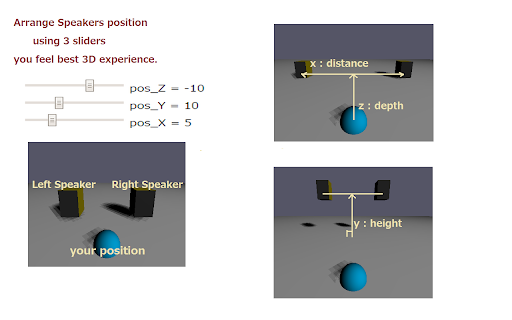

Virtual Audio Speaker for youtube Virtual Audio Speakers System for youtube / youtube music Using headphones or earphones, you feel the sound comes from just close to your ears or from the center of the head. It's quite different from the sound in the audio room with speakers. This extension converts youtube music to WebAudio 3-D spacial sound and plays in natural audio space with wall reflection with headphones ( or earphones / audio speakers ). You can listen Youtube music in back-ground or Picture-in-Picture mode. See also https://virtualsp.github.io/VSHome/ to playback local music files ( flac,mp3,wav,...) 1. Go to the your favorite youtube site, click VSP extension icon. 2. 3D virtual speakers view will appear when connected youtube audio then Click the CheckBox. 3. Moving the position of the speakers, you can enjoy your favorite youtube music with suitable spatial sound just like you. The function of each slider are as follows. x : distance between the speakers y/z: height / depth of the speakers

Equalizer for YouTube™
Audio equalizer for YouTube and embedded videos. Equalizer for YouTube™ is an extension that lets you easily adjust audio settings (the balance between frequency components in an audio file) for YouTube videos. Important note: Equalizer for YouTube™ extension does NOT belong or relate to YouTube and has NO affiliations with Google Inc. or YouTube website at all. It is an unofficial extension that is developed and maintained independently by its author. Note, YouTube™ is a registered trademark of Google Inc. Note #1: this add-on is a simplified version of Audio Equalizer add-on and specifically designed for the YouTube website only. It is very lite and has no toolbar button (the equalizer button is placed on YouTube page). The add-on works for both YouTube website and all other YouTube embedded videos. There are 18 audio presets available to choose from in the preset drop-down list. For example, you can choose, pop, club, party, soft rock dance, or any other preset format for the audio stream. Please note that the equalizer button is placed below the video title on the YouTube website. Simply click on the equalizer button to view the drop-down list. Note #2: If you want a comprehensive Equalizer add-on that works for all websites and media (audio and video), please install my other extension: Audio Equalizer (https://chrome.google.com/webstore/detail/audio-equalizer/cjadmgobonfhilogbdgkkhnoojpgenfg). Note #3: if you have a feature request, or found a bug to report, please fill the bug report form in the add-on's homepage (https://mybrowseraddon.com/equalizer-for-youtube.html).

Audio Equalizer and Amplifier
Globally control audio equalization, genres presets, volume and bass boosting of all video and audio elements on all web pages A tool for boosting or reducing (attenuating) the levels of different frequencies of media elements in web pages. The most basic type of equalization is the bass control on the old home audio equipment to control low frequencies and the treble control to adjust high frequencies. Since there are only two controls, the adjustment is for a fairly wide range of frequencies. In this extension, however, you can adjust a wide set of frequency ranges (60, 170, 310, 600, 1K, 3K, 6K, 12K, 14K, 16K) similar to the well-known VLC player. The extension adds a toolbar button to your browser to control audio equalization simply from its popup window. There are about 12 presets to select from or you can adjust your frequency levels. The extension offers profiling to keep user selections in different profiles. This extension supports pre-amplification for each profile as well. You have a global volume control to adjust the level of each profile too. For more info please read the FAQs page. You can submit bug reports on the GitHub page.

toMono
Updates 0.2.3 - Chrome manifest v3 0.2.2 - Added different icons for when extension is toggled If you think this is useful, you can buy me a coffee here: https://www.buymeacoffee.com/nJ5VOUy When viewing a YouTube video you may have audio on just one channel(mono). This extension can fake stereo by doubling the mono channel. Basic flow When you first click the extension button, mono(fake stereo) is toggled. On second click, your maximum number of channels per device destination is restored to its initial value.

Tab Equalizer
6-band equalizer for tab audio. A simple 6-band equalizer that allows you to alter frequency specific volumes from all audio of each tab. Allows for multiple tabs to be EQ'd simultaneously.
