
phmegkneckbcmikpnjemgchhmmccdhpo


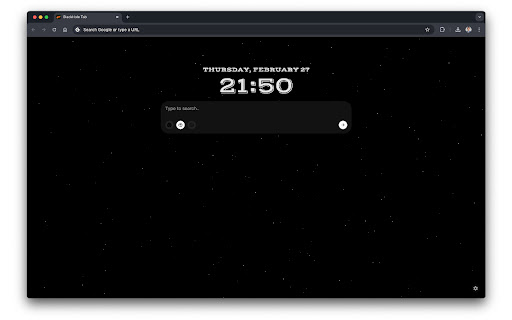
An immersive 3D dynamic black hole new tab, offering beautiful clocks, AI search and custom options. Immerse yourself in a captivating 3D black hole experience with every new tab. Find a moment of tranquility of your busy workday with this dynamic tab page. You can even easily lose yourself in the cosmic spectacle by simply dragging the view or scrolling your mouse wheel to truly feel in deep space and appreciate the details of this awe-inspiring celestial object. Plus, BlackHole Tab can also boost your productivity with a quick search bar that lets you seamlessly switch between your default browser, Perplexity, and Google AI search options.

The Big Gift List
Easily add items to your 'The Big Gift List' lists Help friends and family take the guesswork out of buying you gifts with The Big Gift List. When it comes to a birthday, Christmas, wedding or any other special occasion, with your gift list you can show your friends and family what you really want, so they don't need to guess. Use the official browser extension to add items to your gift lists directly from any website.

InfoSE
Quickly access relevant information for selected word Introducing "InfoSE," the ultimate extension for lightning-fast access to relevant information right at your fingertips. With InfoSE, effortlessly explore top relevant results for selected word, neatly organized within accordion-style panels, each offering a concise summary for quick insights. Key Features: Effortless Access: Simply highlight any word or phrase on your browser, and InfoSE springs into action, fetching relevant information instantaneously. Accordion Interface: InfoSE presents search results in a sleek accordion format, allowing you to expand and collapse each panel effortlessly. This intuitive design enables efficient browsing without cluttering your screen. Comprehensive Summaries: Dive into succinct summaries within each accordion panel, providing essential details without overwhelming you with excessive information. Whether it's definitions, explanations, or background context, InfoSE delivers the highlights at a glance. Wikipedia Integration: Seamlessly explore Wikipedia entries directly within InfoSE. With a single click, delve into comprehensive articles, gaining in-depth understanding on your chosen topic without leaving your browsing session.

Black Hole
Turn your workspace into a playground. Annoying content? Let the black hole swallow it all! Click the icon and move your mouse. Black Hole brings a black hole right into your browser. How to use: 1. Click the toolbar icon to activate the black hole 2. Move your mouse — text, images, videos, and everything nearby gets sucked in 3. Right-click to restore everything back to normal Great for: - Taking a fun break during work - Hiding annoying ads and banners - Cleaning up a page before taking a screenshot - Pure entertainment Features: - Works on all web elements: text, images, videos, SVG, Canvas, 3D content, and more - The black hole grows bigger as it absorbs more content - Right-click to instantly restore all absorbed elements - No data collection whatsoever — your privacy is fully respected

Kreativespace | AI Writing Tools Suite
AI Writing companion for productivity and authenticity Overview Kreativespace is a powerful AI writing assistant offering features like paraphrasing, translation, citation, summarization and AI detector. All in a single Chrome extension. Designed for productivity and authenticity. To use this extension, simply install and click on the puzzle icon in your browser toolbar. After that click on the Kreativespace extension. Your AI writing tools will open in a convenient side panel, allowing you to browse and use them alongside your current webpage. Your Privacy Comes First : Your words belong to you. This extension follows strict data protection protocols and does not store, sell, or misuse your writing. All tools are developed with enterprise-grade security and a privacy first mindset. Your content stays private, secure, and under your control at all times. Core Features That Empower Every Writer Paraphrasing Tool: Paraphrase improves your writing without losing your message meaning, it helps to rewrite sentences to enhance clarity, avoid repetition and elevate tone. Summarizer: It helps to extract main points and instantly condenses lengthy sentences into clear and concise summaries. Citation Generator: Citation generator allows you to create accurate, properly formatted citations in various styles, no need to memorize citation everything is integrated for ease and speed. Translation Tool: This tool translates content across major languages while maintaining the meaning of the content. AI Content Detector: AI content detector can verify the originality of the content and ensure that it is free from unintentional duplication. Built for Every Writer, in Every Field Students and Academics: Rewrite essays, summarize readings, generate citations, and ensure originality with ease. Writers and Content Creators: Craft compelling content, rephrase ideas creatively, and translate for global audiences. Business Professionals and Freelancers: Send clear, confident messages and polish proposals or reports instantly. Multilingual Teams: Translate communications and documents accurately without losing meaning. Researchers and Analysts: Summarize studies and cite sources properly while maintaining credibility. Why Choose Kreativespace Extension? All-in-one writing solution with paraphrasing, summarizing, citation, translation and AI detector. Clean, user-friendly interface with no distractions. Designed for productivity, professionalism, and peace of mind. Ready to Write with Confidence? Install this powerful browser extension today and take control of your writing. Your best starts here.
