
phakgikefkamhimnnbjkejjhgdbimacd
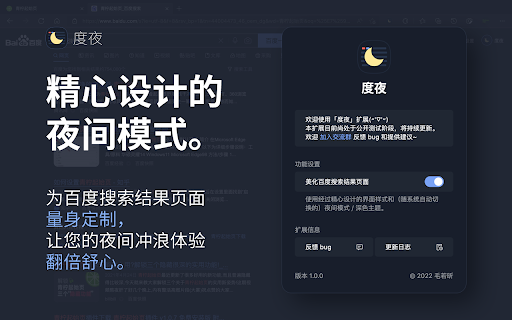


Beautifully designed night mode / dark theme for Baidu. This extension improves the UI of the Baidu search results pages, and offers you a beautifully designed night mode / dark theme for Baidu. Different from most other night mode / dark theme extensions, this extension is specially developed for Baidu search results pages, being carefully designed to achieve the best visual experience that other similar extensions cannot compare. /// IMPORTANT /// After installing this extension: 1. Please disable other similar extensions to avoid any compatibility issues. 2. Make sure the dark mode / night theme of YOUR OPERATION SYSTEM & YOUR BROWSER is turned ON. 3. Open a Baidu search results page (the page's url MUST begins with https://www.baidu.com/s?, for example, https://www.baidu.com/s?word=test). Other pages of Baidu (including its home page, www.baidu.com) will NOT see the effect. 4. You will see that the Baidu search results page now has a dark appearance. If nothing changes, please recheck the step 1 to 3, and refresh the Baidu search results page. The night mode / dark theme of Baidu search results pages which is added by this extension will be turned on / off automatically synchronized with the dark theme settings of YOUR BROWSER (subsequent versions will support more detailed customization). - storage: used to save your customized settings for this extension, such as whether to turn the main function on / off. - tabs: when you submit bug feedback through the popup page of this extension, it is used to judge whether the current tab is a Baidu search results page, so that you can copy the URL of the page in which bug exists with one click. - This extension does not store or upload any of your personal information.

Pinterest Dark Mode & Theme
Enjoy Pinterest with a stylish dark mode. Protect your eyes and browse comfortably at night. Transform your Pinterest browsing experience with the ultimate Dark Mode & Theme extension! Pinterest Dark Mode & Theme is a meticulously designed extension that brings a sleek, modern, and eye-friendly dark interface to Pinterest. Whether you are a late-night pinner, a designer looking for better contrast, or simply someone who prefers a darker aesthetic, this extension is the perfect companion for your creative journey. We have engineered this extension to be lightweight, fast, and incredibly stylish. It doesn't just invert colors; it intelligently applies a custom dark theme to every element of the page, ensuring that images remain vibrant while the background stays comfortably dark. 🌙 True Dark Mode Say goodbye to blinding white screens. Our advanced dark mode engine forces a deep, restful dark background across the entire Pinterest experience, including the home feed, pin details, boards, and settings pages. 🎨 Modern Design & Icons Enjoy a user interface that feels premium and up-to-date. The extension features a beautifully crafted popup menu with modern icons, smooth animations, and a clean layout that matches the aesthetics of 2025. 🎛️ Advanced Customization Take control of your viewing experience with our built-in control panel: - **Brightness Control**: Adjust the brightness level to suit your room's lighting. - **Contrast Adjustment**: Fine-tune the contrast to make text pop or soften the look for reading. - **One-Click Toggle**: Instantly switch between Light and Dark modes with a single click. ⚡ Blazing Fast Performance Optimized for speed, this extension adds zero lag to your browsing. It loads instantly and works seamlessly with Pinterest's dynamic layout. 👁️ Eye Protection Reduce eye strain and fatigue, especially when browsing at night. The dark palette reduces blue light emission and screen glare, allowing you to pin for hours without discomfort. 🌍 Global Support Works perfectly on all regional versions of Pinterest (pinterest.com, pinterest.co.uk, pinterest.fr, pinterest.de, pinterest.jp, and more). 🔒 Privacy Focused We respect your privacy. This extension does not collect any personal data, browsing history, or login information. It runs entirely locally on your browser.

Dark Mode - Night Eye
Dark Mode: Switch to dark reading for night & day browsing. More than dark theme style, it ensures optimal eye protection. Night Eye brings dark mode to almost any website, helping you browse, read, work, and study more comfortably in low-light environments. Instead of simply inverting colors, Night Eye analyzes each page and converts bright interfaces into a smooth dark theme while preserving important images, videos, and media. You can also fine-tune the look of each website with brightness, contrast, saturation, warmth, dimming, and other visual controls. Night Eye is used by over 1,000,000 users across major browsers and has been actively maintained since 2018. ➤ Dark mode for websites that do not offer one ➤ Custom brightness, contrast, saturation, warmth, and dim controls ➤ Blue light reduction for late-night browsing ➤ Schedule dark mode to turn on and off automatically ➤ Support for PDFs ➤ Integration with websites that already have built-in dark themes ➤ Sync with your operating system or browser color scheme ➤ Import and export settings between browsers ➤ Per-website and global customization ➤ No ads ➤ No selling of user data Dark Mode Converts website colors, icons, and small visual elements to create a comfortable dark browsing experience. Filtered Mode Keeps the original website colors while allowing you to adjust brightness, contrast, warmth, and other visual settings. Normal Mode Turns Night Eye off for the current website and restores the original page appearance. Night Eye gives you control over how each website looks. You can apply settings globally or customize individual websites. Images Night Eye focuses on converting small images, icons, and interface elements. Larger media such as photos, videos, and social media posts are preserved so websites remain usable and natural. Brightness, Contrast, and Saturation Adjust the visual intensity of websites to match your personal preference and reduce discomfort during long browsing sessions. Blue Light / Warmth Reduce cold screen light during evening or late-night browsing by increasing warmth. Dim Lower overall page brightness when browsing in a dark room or when your screen feels too bright. Some websites already include their own dark themes. Night Eye can work with supported built-in dark themes, giving you easier control from one place. Night Eye Lite is the forever-free version of Night Eye. It allows dark mode on up to 5 websites of your choice, with no ads and no hidden charges. New users can try Night Eye Pro for 3 months with no credit card required. Paid plans are available for users who want more websites and additional usage options: • Night Eye Pro • Night Eye Pro Max • Night Eye Ultimate - one-time purchase option For the latest pricing and plan details, visit: https://nighteye.app/how-to-start/ Night Eye needs permission to read and change website content so it can detect page colors and apply dark mode. This is how the extension changes bright pages into darker, more comfortable versions. Night Eye does not sell your data and does not use third-party analytics such as Google Analytics inside the extension. Your visual preferences, such as website-specific color settings, brightness, contrast, saturation, warmth, and dim level, are stored locally on your device. These settings are used to remember how you want each website to look. For more information, see our privacy policy: https://nighteye.app/privacy-policy/ Need help or found a website that does not look right? Contact our support team and we will help you resolve the issue. You can also follow product updates and release notes here: https://nighteye.app/changelog

Dark Mode — Night Theme for All Sites
Dark mode for any site. Reduce glare, boost focus, read comfortably at night. Dark Mode — Universal Dark Theme & Smart Reading Instantly switch any website to a comfortable dark theme. Reduce eye strain, increase focus, and enjoy reading at night with a lightweight, privacy-first extension. Why Dark Mode? Bright pages cause eye fatigue — especially at night. Dark Mode applies a carefully tuned dark color palette to websites while keeping contrast and readability. Key features: ✔Universal dark mode — works on most websites (Google, Wikipedia, YouTube and more). ✔Reading Mode — distraction-free layout (large type, soft background, width control). ✔One-click toggle & per-site settings — save preferences per domain. ✔Lightweight & fast — minimal CPU/memory impact. 1. Install → click the toolbar icon. 2. Toggle global dark mode or enable per-site. 3. Enter Reading Mode for long articles (adjust font size and margins). Who it’s for? Night readers, students, devs, people with light sensitivity. Permissions & Privacy: We only request the minimal permissions needed (e.g., content script for page styling, storage for settings). No user data is collected. Full privacy policy linked on the listing. Pro tip If a page looks off, open settings → disable images inversion or add a site-specific override. FAQ ✔Will it break websites? — Rarely; use per-site exceptions. ✔Does it slow my browser? — No — it’s optimized to be lightweight. ✔Is it free? — Core features are free. (If you have paid features, mention them here.)

Dark Mode
Dark Mode, read at night. Bluelight filter for every website. Relax your eyes at night and day. The Dark Mode Extension. Works with all websites! ⭐️ Dark Mode: ( Night Mode / Smart dark reader / dark night reading) ✓ Blue Light Filter + Darkness for every Website AND / OR specific ones! Avoid eye strain. Relax your eyes at night & day. ✓ Invert colors, improve brightness & contrast. Mild / faint colors, Bright colors, greyscale, sepia, ... ✓ Schedule dark to manage your day-night-cycle. Blue light makes us awake and prevents sleep. Care for your eyes. (dark mode is not only for night shifts) ✓ Style (css) editor. Delete elements/logos/ads/notifcations. Soon: Visual Picker/Selector, Drag & Drop. customize any Website beyond stylus / stylish / userstyles To come: ✓ Reduce brightness of colors only - not color-tone (compare with samsung browser dark mode) ✓ Smart dark mode / invert: Only if page is very light or blue ✓ We are working on a smart Theme-Engine to exceed the results you get from other extensions (dark reader depends on crowdsourced styles) "When the night (night night night) has come, and the land is dark (dark dark dark)", note: - If you use multiple night / dark reader extensions / screen shader at once, then color-Inverting or other effects can invert each other. Dark Mode is your extension offline on your computer. https://github.com/code-charity/night-mode. We can not track you. We are developing distraction-free extensions transparently (Open-Source) since 2012 for 300000 people: https://github.com/ImprovedTube/YouTube super-amoled / oled screens: 100% dark (black) backgrounds save electricity & screen wear-down Permission explained: "Read and change...all websites you visit" to modify Colors (Dark Mode) on any website.
