
pgojhlciioemcalndpjlnffkpmogfbgl
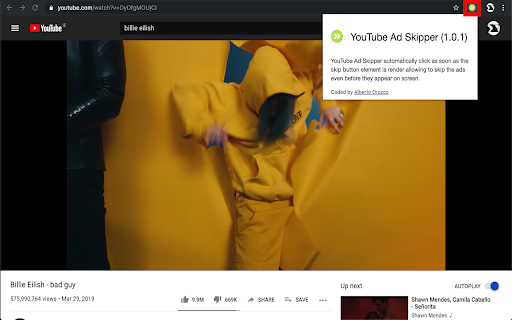


YouTube Ad Skipper automatically click as soon as the skip button is render allowing to skip the ads even before they appear! YouTube Ad Skipper (1.6) it is NOT an ad blocker, but rather click programatically to the skip button. The extension is a basic use of selectors and dispatch events that are triggered when elements are render in the page. The click event is automatically dispatch on the skip button element as soon as it is render, it is basic project but are useful, hope would be same for you, any bug, feedback or suggesting let me know. .

instantly Youtube Ad Skipper
Skips all Youtube ads | removes banner and sidebar ads | skips ads instantly Skips all Youtube ads | removes banner and sidebar ads | skips ads instantly. - Works on sites with embedded Youtube videos 😁 - This skips all types of ads & It skips instantly!! 😲 - This removes ads that come on the side and removes the incoming ad alert. 🙌 - This skips unskippable ads by speeding up the video to a maximum playback rate of 16, (default 1) 😎

Ad Skipper
Automatic ad skipping extension Ad Skipper - Enhance Your Video-Watching Experience Across Websites! Are you tired of being interrupted by ads while enjoying online videos? Ad Skipper is the ultimate Chrome extension designed to revolutionize your video-watching experience on multiple websites. With its powerful features and user-friendly design, Ad Skipper ensures a seamless and uninterrupted journey through your favorite content. Say goodbye to ads and hello to an immersive video-watching experience. 1. Automatic Ad Skipping: Ad Skipper identifies and skips ads across various websites automatically. Enjoy your favorite content without the hassle of interruptions. 2. Customizable Preferences: Tailor your ad-skipping preferences to match your viewing habits. Adjust settings to suit your needs and take control of your online video experience. 3. Multi-Website Support: Ad Skipper isn't limited to a single platform. It works seamlessly across various websites, making it your go-to extension for ad-free content consumption. 4. Hide YouTube Shorts: Customize your YouTube experience by hiding shorts on the home page, profile page, and navigation links. Enjoy a cleaner and more focused YouTube interface. Ad Skipper operates in the background, intelligently identifying and bypassing ads on supported platforms. The extension provides a hassle-free solution for users who want to skip ads without manual intervention. Support the Project: If you appreciate the benefits Ad Skipper brings to your online video experience, consider supporting the project. Your contributions help in maintaining and improving the extension. Take Control of Your Video Journey: Ad Skipper empowers you to take control of your online video journey. Whether you're watching tutorials, entertainment, or educational content, Ad Skipper ensures a distraction-free environment. Download Now and Enjoy Ad-Free Viewing! Don't let ads disrupt your online video experience. Download Ad Skipper now and transform the way you watch videos across various websites. Enjoy a seamless, ad-free journey tailored to your preferences. Take control, skip the ads, and immerse yourself in your favorite content! Visit the project on GitHub https://github.com/M1ck0/adskipper-extension

Ad Skip Master for Youtube
Ad Skip Master for Youtube allows you to skip ads while watching YouTube. This extension detects ads and clicks the skip button instantly, instead of completely blocking ads preventing YouTube channels from earning any ad revenue. The features are: 🔹Skip ads 🔹Super easy to use 🔹Low CPU/Memory consumption Download now and forget about annoying ads.

Multi Skipper: Skip ads, intros & recaps [QVI]
Automatically skip ads on your favorite streaming platforms. Automatically skip ads on your favorite streaming platforms. Are you looking for AdSkipper for Netflix? You are in the right place! Skip ads like a pro without a single click. Multi Skipper will take care of all the Skip buttons, giving you the pleasure of uninterrupted binge-watching. In the latest update, we expanded the skipping options to all major streaming platforms. Now you can disable ads on Netflix, Disney+, Prime Video and more of your favorite streaming platforms. [Works also with MAX in US] How does it work? Multi Skipper will detect the skip button as soon as it appears on the screen and jump straight to the video. It is up to you to decide what to skip: ⏭️ Skip Ads ⏭️ Skip Intros ⏭️ Skip Recaps ⏭️ Automatically go to the Next Episode ⏭️ Continue watching All the options are on by default. To change the settings go to the extension’s control panel: Open Chrome → Go to Extensions (small puzzle piece icon) → Click on Multi Skipper icon → Use the toggles to customize Skipper’s options. You’re all set! One extension to save you time, muscles, and keyboard buttons. ❗ Please note that this extension was developed and tested for the English version only. It may not work for other languages or if the "skip" button is not available by default. This extension is part of the Quality Viewership Initiative, a collaborative effort to enhance the understanding of audience engagement. It collects anonymous, aggregated viewing insights to support creators and studios in improving the quality of their content. You can stop sharing your information at any time by switching the toggle on the options page. ***Disclaimer: All product and company names are trademarks or registered trademarks of their respective holders. This website & extensions hold no association or affiliation with them or any third-party companies.***
