
pghheioicappnlibejncaolgjicphhmi
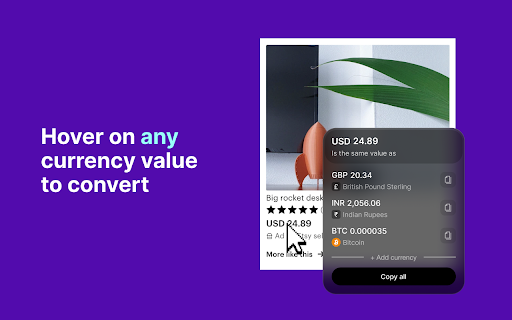


Kompare is a powerful Chrome extension for viewing conversion rates for multiple fiat and crypto currencies. Introducing Kompare - the ultimate currency conversion tool you've been waiting for! With just one click, Kompare brings you real-time conversion rates for more than 160 fiat currencies and up to 500 different cryptocurrencies. No more endless googling for accurate conversion rates - everything you need is now right at your fingertips. But that's not all! Kompare also allows you to convert a range of currency values at once with its batch convert feature. It's a must-have tool for financial analysts, digital nomads, crypto enthusiasts, or anyone who deals with multiple currencies regularly. Kompare is designed to be user-friendly and efficient. Once installed, the extension integrates perfectly with your browsing experience. Whether you're planning your next international trip or making crucial investment decisions, Kompare is your reliable partner that provides up-to-date and accurate currency information. Join the community of smart users who have made their life easier with Kompare. Download now and explore the world of currencies like never before! Experience the convenience and accuracy that Kompare has to offer. Your financial decisions just got a lot easier with Kompare. Don't wait, make Kompare your personal currency expert today! *Use of this extension implies agreement to our Privacy Policy and Terms of Use which can be found at https://kompare.me/privacy-policy

NovuloTraceFormatter
Enables collapsing and expanding of rows in a Novulo trace and highlights slow process actions With the add-on enabled you can analyse a Novulo trace file more easily by using the buttons on the top right corner of the screen and the expand/collapse buttons on some rows. Furthermore, you can inspect elements in a Novulo application, like fields, buttons and grids to learn more about their origin and their data base field name, if applicable. Visit the following website to view a demo "Novulo Trace" and to test the add-on. Successful Trace: https://joachimbatzke.com/addons/DemoTrace.axd.htm Error Trace: https://joachimbatzke.com/addons/Demo2Trace.axd.htm

DIG This Deal
Finding you the best price for the product you're purchasing. Are you tired of switching between multiple tabs to find the best price? Look no further! DIG This Deal – Your Ultimate Price Comparison Tool helps you save time and money by bringing the best deals directly to your browser. Key Features: Seamless Price Comparisons: Compare prices on new and pre-loved products from multiple online retailers in real time. Cashback Rewards: Earn cashback on eligible purchases when shopping through partnered retailers. Terms and conditions apply. Enhanced Shopping Experience: Save time by viewing all available deals and prices in one place without the hassle of manual searches. Support for Pre-Loved Items: Discover refurbished and second-hand options to save even more and shop sustainably. Personalized Recommendations: Receive tailored suggestions based on your browsing and shopping habits. Real-Time Updates: Stay informed with the latest deals, discounts, and price drops across your favorite online stores. Install the DIG This Deal Extension: Add the extension to your browser for a seamless price-checking experience. Browse Your Favorite Retailers: Shop as usual, and the extension will automatically display price comparisons and cashback opportunities. Earn Rewards: Qualify for cashback by completing purchases through our partnered retailers. Access prices for both brand-new and pre-loved products. Join a growing community of savvy shoppers who prioritize smart and sustainable shopping. Download DIG This Deal now and start saving today!

PromptEasily ChatGPT - HDTeam
PromptEasily ChatGPT - HDTeam adds a list of curated prompt templates for SEO, SaaS and more to ChatGPT. Try today. PromptEasily ChatGPT - HDTeam adds a list of curated prompt templates for SEO, SaaS and more to ChatGPT. Try today.

gpt2pdf
Convert your chats into a pdf. Use 𝗖𝗧𝗥𝗟 + 𝗤 to use gpt2pdf or press that ''𝙋𝘿𝙁⬇'' button on the side of "share link to chat" button, it will appear only when you have prompted something and chatgpt has replied to it. The ChatGPT to PDF extension allows you to easily convert your chat conversations with ChatGPT to PDF files. With just a few clicks, you can save your conversations for later reference, sharing, or printing. Upon using the extension it will open the content to be downloaded in a new tab and execute print command, you'll just have to hit that save button in print dialouge box. It's free as of now. Contact me if you want to build any kind of extension.
