
pgegaeceldjfbhockhhlfnhiilopfkil
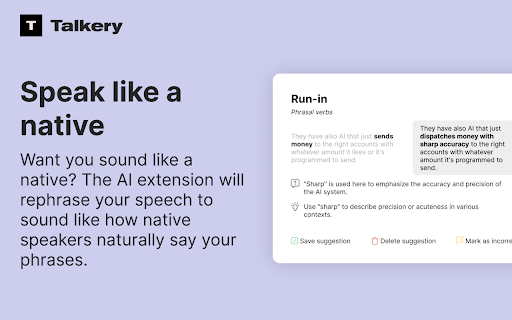


An extension that captures audio from the microphone and rephrases your speech the way a native speaker would express it. The AI-powered tool accesses your microphone, suggests idioms, and rephrases your speech to sound like a fluent English speaker.

Sample
Sample and edit audio directly from your browser Record, trim, and export audio directly from any browser tab. Clean, fast, and fully local. Features - One-click recording from any tab - Waveform editor with precision trimming down to the millisecond - Loop and reverse playback - Export as WAV or MP3 - Sample rates up to 96kHz - Stereo or mono recording - Recording library - all your recordings saved locally for playback, editing, and download - Fully offline - nothing is uploaded, all processing happens on your machine

AI speaker - Text to speech
Text can be converted into voice audio, and can be downloaded as audio. It supports configuration voice speed, pitch, volume, etc 5. Support automatic online storage of your text to speech project until you uninstall it 6. Support adding images, merging audio and exporting to video format

Audio Transcriber
Try audio transcriber – easily transcribe audio to text in seconds. Fast, accurate transcription right from your browser. 🚀 Transform your productivity and workflow with the Audio transcriber Chrome extension – your go-to solution to transcribe audio to text with ease, speed, and accuracy. Whether you're a student, journalist, content creator, researcher, or just someone looking to transcribe audio recordings to text, this extension is built for you. Say goodbye to manual note-taking and the hassle of pausing and rewinding recordings. With our smart, AI-powered transcription tool, you can transcribe from audio to text in seconds. 🧠 With one simple click, transcribe audio files directly from your browser. Upload or drag-and-drop your audio file to text converter, and let our transcription software do the rest. You can finally focus on what matters – understanding, analyzing, and sharing insights from your recordings. ❤️ Why You’ll Love This Audio Transcriber Extension: 1️⃣ Fast and Accurate – Get high-quality audio transcription with AI-backed precision 2️⃣ User-Friendly Interface – No technical skills required to transcribe an audio file 3️⃣ Multiple Formats Supported – Convert to text from MP3, WAV, M4A, and more 4️⃣ Secure and Private – Your data is encrypted and never shared Whether you're handling interviews, podcasts, meetings, or lectures, this tool is your ideal audio to transcript assistant. Discover how effortless it is to transcribe recorded audio to text using AI. 🔝Features at a Glance: ➤ AI-powered audio transcriber engine ➤ Timestamps for easy navigation ➤ One-click convert sound to text ➤ Support for multiple languages ✨ Ever wondered how to transcribe an audio file without expensive transcription services? Now you can. This Chrome extension brings industry-grade ai transcription directly to your browser. No downloads, no external tools, just seamless transcribing audio anytime, anywhere. Need to translate audio to text for a report or an article? Done. Want to transcribe from audio recordings for research? Easy. Trying to figure out how can I transcribe an audio file for your team meeting? We've got you covered. 👀 Who Is This Audio Transcriber For? • Journalists transcribing interviews • Students recording lectures • Podcasters creating show notes • UX-researchers converting field recordings Whatever your role, if you need to convert audio to text, our extension simplifies the process with an intuitive interface and powerful engine. 🎁 Benefits of AI Transcription in Your Workflow ▸ Save hours of manual work ▸ Improve accessibility for your content ▸ Boost content creation with ready-to-use transcripts ▸ Quickly convert sound to text for blogs or reports ▸ Enhance productivity through automation Using this audio transcriber, you can transcribe audio up to 5x faster than manual typing. Perfect for tight deadlines.. ⛏️ How to Use the Extension 1. Add the extension to Chrome 2. Upload or drag your audio file to text converter 3. Click "Transcribe" 4. Done! 🎉 It's that simple. You'll never need to ask how to transcribe audio again. No more stress. Just results. 🔉 Supported Audio File Types • MP3 • WAV • M4A • WebM • mpeg ❓ Frequently Asked Questions Q: How can I transcribe an audio file from my phone or desktop? A: Use our extension to easily transcribe audio file formats directly from Chrome, without switching apps. Q: Is this an automatic or manual tool? A: It’s fully automatic audio transcriber, powered by advanced AI transcription algorithms for speedy results. Q: Can I translate audio to text in multiple languages? A: Yes! Our audio to text converter supports various languages. 🧠 The Smarter Way to Convert Audio to Text Never lose key insights again. Whether you're capturing a fleeting thought or archiving an entire conversation, our converter sound to text tool is built to perform. From small clips to full-length recordings, this audio to transcript extension scales with your needs. Use it to: - Take notes from meetings - Generate subtitles for videos - Archive audio messages - Prepare for presentations - Build searchable text databases 💡 The future of audio to text transcription is here – fast, affordable, and within reach. It’s the perfect blend of automation and accuracy for anyone who works with sound. 😊 Join Happy Users Professionals around the world trust our transcriber audio to text tool. From bloggers to ux-researchers, people are finding smarter ways to transcribe audio recording to text with just one click. Experience it for yourself and see how to transcribe audio faster than ever before. All from your browser. ✅ Install the extension now and start transcribing smarter, not harder.

Transkriptor Transcribe Audio to Text
Convert audio to text. Automatically record and transcribe your meetings, and other conversations with Transkriptor. Transkriptor: AI-Powered Chrome Extension that Converts Speech to Text Transkriptor provides the best automatic transcription experience for your meetings. Transkriptor takes automatic notes for you in more than 100 languages and dialects, including English, French, German, Spanish, Chinese, and Portuguese. Transkriptor Chrome extension is easy to use. Press record before any virtual meeting, and let Transkriptor work its magic. You can use Transkriptor for any meeting in Google Meet, Microsoft Teams, and Cisco Webex. Transkriptor is also available across Web, iOS, and Android. How to Use Transkriptor? 1. 📥 Download the Transkriptor Chrome Extension 2. 🔕 Turn off all other sounds and notifications on your computer 3. 🎧 Use a headset with a boom to speak directly into the mic and avoid sound echo 4. 🎙️ Test your microphone by talking and ensuring it picks up sound 5. ▶️ Press the record screen button in the extension 6. 📑 After the meeting, press "Transcribe" and get your transcript 7. ✍️ Edit your transcription by fixing punctuation and grammar mistakes Use Transkriptor For: ★ 📄 Taking Automatic Notes for Remote Meetings ★ 🎓 Online Classes/Lectures ★ 📜 Transcribing Video Calls into Google Docs ★ 📊 Summarizing a Speech File ★ ⚡ Running Effective Scrum Meetings Transkriptor is a transcription service that provides secure transcriptions. All transcriptions are securely stored in your browser or Google Drive. Transkriptor is the best transcription software and also offers a subtitle generator and voice-to-text online. 🎥 Transkriptor Extension Transcribes Your Audio and Video Recordings Transkriptor is an AI-powered Chrome extension that converts speech to text files. It's a free online tool developed to make transcription faster and more efficient. The goal was to create something easy-to-use, affordable, reliable, and, most importantly - quick. Transkriptor does not require additional software or hardware for audio conversion; it can be used as soon as you install the extension in your browser. 📝 How to Record Meetings and Transcribe with Transkriptor Chrome Extension? 1. Download and install the Transkriptor Chrome Extension 2. Press the record button before starting your meeting 3. After the meeting ends, press “Transcribe” 4. Edit the transcription for punctuation and grammar 5. Export your transcription in your preferred format ❓ Why Should You Transcribe Your Recordings? Transcriptions are often required by those who are deaf or have difficulty hearing. Manual transcription can be time-consuming, especially for lengthy recordings. Transkriptor simplifies the process by providing an automated solution that requires no human effort, making it faster and more efficient. Transkriptor saves you time by providing an automatic solution that generates transcripts instantly. It eliminates the need to wait for a human transcriptionist and reduces the manual effort required to convert speech into text. It's a cost-effective option for individuals and businesses. 💼 Best Features of Transkriptor ★ 99% transcription accuracy ★ Supports all file formats (.mp3, .wav, .aiff) ★ Voice commands and keyboard shortcuts for faster editing ★ Works with any microphone; no additional hardware needed ★ Online transcription, no installation required 🧠 How to Make the Most of Transkriptor’s Intelligent Features Make sure your recordings are clear and crisp for the best transcription accuracy. Transkriptor’s intelligent word detection automatically detects pauses and breaks in the recording, making the transcription easier to edit. Transkriptor is ideal for students, meeting participants, journalists, and anyone who needs an accurate and fast way to transcribe audio to text. It helps users convert their presentations, interviews, and lectures into text effortlessly. Transkriptor allows you to transcribe audio or video files, making it an invaluable tool for content creators. It offers a highly accurate solution for generating written content from spoken words, even for users with different accents or speaking speeds. 📋 The Full List of Features of Transkriptor ★ Speech-to-text transcription for meetings, classes, and interviews ★ Supports over 100 languages ★ Convert audio and video files to text ★ 99% transcription accuracy ★ Integrated note-taking and in-line commenting ★ Subtitle generation and export options ★ Zapier integration for automated workflows ★ Secure storage in-browser or in the cloud ★ Available across Web, iOS, and Android ★ Collaborative editing for team projects ★ Free trial with 90 minutes of transcription ★ Export to TXT, SRT, and Word formats
