
pgdapfpejilpaadfgbhnfnnjggmogogn

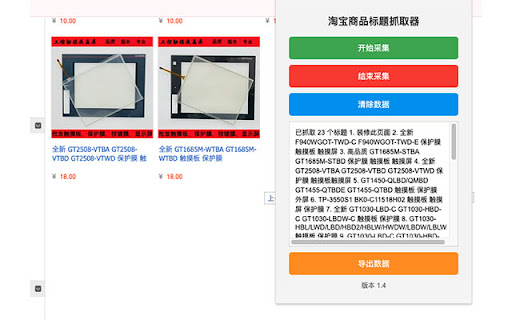
自动采集淘宝和天猫商品标题,支持多页面采集。 # 淘宝商品信息抓取器 ## 简介 淘宝信息抓取器是一款强大的浏览器扩展,专为淘宝和天猫购物爱好者、市场研究人员和电商从业者设计。它能够快速、高效地抓取店铺名称和商品信息,帮助您更好地管理和分析购物数据。 ### 版本 1.4 - 添加了"清除数据"功能,允许用户在结束采集后删除所有已采集的数据 - 优化了用户界面,改进了按钮状态管理 - 增强了数据管理功能,提供更灵活的数据控制选项 - 更新了版本号显示,确保与实际版本保持一致 ## 主要功能 1. 一键抓取:轻松获取当前浏览页面的店铺名称和商品列表。 2. 智能识别:自动识别淘宝和天猫页面,适用于商品列表和详情页。 3. 数据导出:将抓取的信息导出为文本文件,方便后续处理和分析。 4. 价格信息过滤:自动移除可能导致混淆的价格信息,保留纯净的商品名称。 5. 页面自动滚动:智能模拟页面滚动,确保获取所有可见商品信息。 ## 使用场景 - 比价:快速收集多个店铺的同类商品信息,便于价格对比。 - 市场调研:轻松获取大量商品数据,助力市场趋势分析。 - 批量采购:高效整理大量商品信息,简化采购流程。 - 收藏管理:快速保存感兴趣的商品信息,方便日后查阅。 ## 为什么选择我们的插件 1. 用户友好:简洁直观的界面设计,无需复杂操作即可上手。 2. 高效可靠:优化的抓取算法,确保快速准确地获取信息。 3. 隐私保护:本地处理所有数据,不会上传或存储您的个人信息。 4. 持续更新:我们会定期更新插件,以适应淘宝和天猫网站的变化。 5. 免费使用:提供全部功能,无需付费,无广告干扰。 ## 注意事项 - 本插件仅供个人学习和研究使用,请勿用于商业用途。 - 使用本插件时,请遵守淘宝和天猫的使用条款和政策。 - 如遇到任何问题或有改进建议,欢迎随时与我们联系。 立即安装淘宝信息抓取器,让您的网上购物体验更加智能和高效!

Webutler.AI - AI powered web scraper
Webutler.AI uses AI to predict which data is most relevant on a HTML page and allows saving it to Excel. Webutler.AI is an automated data extraction tool for any website. It is based on artificial intelligence to analyze the most relevant structured data on a web page and allows it to be downloaded and saved to Excel. The tool does not require site-specific scripts, but instead uses the HTML structure to detect associated data and select the most appropriate list. Because it doesn't require complex user-defined rules, it means our crawling method works just as well for small and lesser-known sites as those of global giants like Amazon. Plus, our users don't need any coding skills! Web data collection and downloading is easy with our tool. Plus, you have data security and privacy as the collected data never leaves your browser. Some Common Use Cases: * E-commerce sellers, distributors and review analysts collect product prices and reviews * Sales staff automatically and regularly collect sales leads through professional social profiles * Freelancers automatically collect emails, addresses and phone numbers from public directories * Marketing professionals analyze social media sites * Collect ratings and comments on posts * Recruiters looking for qualified candidates * Job seekers looking for the best jobs * Data scientists collect more clean data * Students study data science and data mining ADDITIONAL INFO: Following Chrome extension permissions are required to run the Webutler.AI: activeTab: to track active tab for the creating of recipe storage: to store scraped data and configuration unlimitedStorage: to store scraped data on local for exporting later This tool refers to the automatic identification function of Instant Data Scraper and MiniRPA, which can analyze the most relevant structured data on the webpage with one click, and provide paging function. If you need more advanced and complex collection functions, you can use the MiniRPA. if you have any feedback or feature requests: webutler.ai@hotmail.com. If you have collection needs that you cannot solve by yourself, you can also send them to webutler.ai@hotmail.com, and we will use this tool or the MiniRPA to answer the questions.

1688 Purchasing Assistant Plugin
Official 1688 Plugin for screenshots, product searches, sales trends, downloads, and Wangwang notifications. The 1688 Procurement Assistant Plugin is a free extension developed by the official 1688 platform, aimed at helping users improve their e-commerce purchasing and operational efficiency. It supports one-click screenshot search for similar products across the web, sales and price trend queries, downloading of product materials from 1688, notifications for Wangwang messages and order updates, AI-powered keyword splitting and combination, downloading and analysis of reviews, exporting of entire store products, and more. We hope it becomes your trusted business partner. 🥳 Current plugin features include: 1. One-Click Screenshot Search for Similar Products – Take screenshots on any website to search for similar products via image, such as 1688, Taobao, Douyin Shop, Amazon, OZON, JD.com, Pinduoduo, etc. Multiple convenient screenshot methods are supported, including right-click with mouse or using keyboard shortcuts. 2. Multi-Platform Price Comparison – Image-based price comparison supports 1688, Taobao, Amazon, AliExpress, Alibaba, and will continue to expand to more platforms, making it easy to compare prices across platforms and find the best sourcing options. 3. Image Search Result Filtering & Sorting – Image search results support various filtering conditions, such as “Show Factories Only”, “Supports Sample Orders”, “Free Shipping”, “Private Delivery”, etc. You can also sort results based on your needs by price, sales volume, fulfillment quantity, and more, to efficiently locate the desired 1688 products. 4. Export Product Images & Materials – Batch download images and video materials for comparing similar products. Customize filtering of 1688 product information and export to Excel files, facilitating procurement and inventory operations. 5. View Sales / Price Trends – On 1688 product detail pages, view data such as listing date, update date, transaction trends, price trends, and quantity vs. price relationships. Help with business decisions and insights, powered directly by official 1688 data—efficient, accurate, and real. 6. Distribute Products – Distribution users can switch to distribution mode from image search results, view more 1688 product distribution data and information, select multiple items, and distribute with one click. 7. Wangwang & Order Notifications – Receive push notifications for 1688 Wangwang messages and logistics/order updates to avoid missing business opportunities. 8. Search for Suppliers Across the Web – By searching product titles across the web, quickly find similar products for comprehensive comparisons, making it easier to choose the most cost-effective suppliers and maximize procurement efficiency. 9. Keyword Splitting & Combination – On 1688 product detail pages, easily split and combine any title into new product titles. Our AI assistant will help you select the best titles to increase exposure in search engines and boost product visibility and appeal! 10. Freight Cost Inquiry – Easily check shipping costs directly on 1688 product detail pages to assist in accurate cost estimation and help develop more reasonable procurement strategies. 11. Review Analysis – On 1688 product detail pages, gain deep insights from user feedback through review analysis. The AI system summarizes comment content and provides multi-dimensional evaluations to help identify issues and opportunities. 12. Export Entire Store Products – One-click export of all product information within a 1688 store, enabling centralized management and follow-up data analysis to improve operational efficiency. 13. Order Logistics Tracking – On the 1688 order list page, directly view detailed logistics status for all orders, allowing efficient order management and improved operational performance. 👉 We are continuously improving the official 1688 Procurement Assistant Plugin to meet the needs of professional buyers, including AI-powered product comparison, AI-driven business opportunity analytics, cross-border procurement, and more. If you have any questions or suggestions, please feel free to contact us. 💬 Visit: https://chajian.1688.com Scan the QR code at the top right corner to join the official Alibaba DingTalk group 📨 Email: 1688extension@alibaba-inc.com

Taobor - 淘宝商品信息抓取
淘宝电商平台商品详情页数据及图片下载等功能 (item.taobao.com) 支持下载淘宝电商平台详情页的商品数据及图片,数据如下: ```typescript interface Item { id: string; title: string; cover: string; altas: Array; price: string; prices: any, descImgs: Array; descSize?: Array; skus: Array; } ``` v0.1.2 Update: 1. 支持所有图片类型 2. 图片集名称 hash 随机 3. 自动重合重复图片

电商信息导出助手
1688、淘宝、天猫、京东、速卖通等国内外电商平台详情页图片下载等功能 使用1688、淘宝、天猫、京东、速卖通采集商品过程中,下载图片较为繁琐,开发一个工具,直接一键下载商品详情页上的橱窗、子sku以及描述的所有图片,非常的方便 使用方法: 1、安装插件 2、打开1688、淘宝、天猫、京东、速卖通任意商品详情页,右下角会多出一个【电商商品助手】的功能框 3、点击【下载图片】按钮,直接下载到浏览器设置的默认下载文件夹下,以1688商品编号为文件夹,所有图片都保存在该文件夹下 4、有需要其他功能开发,欢迎评论或者邮件给小开 5、有需要的可以加我微信【Changyong_Tiankong】沟通 适用平台: 1688、淘宝、天猫、京东、速卖通 实现功能: 1、下载橱窗、子sku、描述所有图片 2、下载橱窗、描述视频
