
pgcmkchcmigpjoboochaikoknoimjike
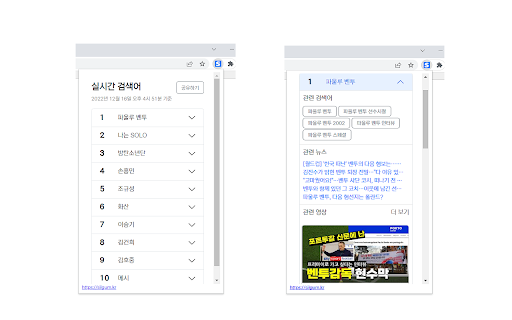
실시간 검색어 순위을 제공하는 크롬 확장 프로그램입니다. 실시간 검색어 순위, 실검, 관련 검색어, 관련 영상, 관련 뉴스 등 이슈 및 트렌드를 손쉽게 파악할 수 있는 크롬 익스텐션입니다. 팝업 형식으로 제공되며 관련 검색어를 클릭할 경우 네이버 검색으로 연결됩니다.

실시간 검색어
네이버에서 실시간 검색어 보기 - 실시간 검색어는 네이트의 실시간 검색어를 통해 제공합니다. 한국에서 가장 많이 사용되는 검색 포털 서비스 NAVER에는 과거 실시간 검색어라는 서비스를 제공하였습니다. 이제는 볼수없는 실시간 검색어를 chrome extensions로 만나보세요!

트렌딩나우
네이버/다음/구글에 실시간검색어 달기 네이버/다음/구글의 홈 화면에서 바로 실시간 검색어를 확인해보세요.

네이버 가격추적기 및 이미지 검색
자세한 내용은 개인 정보 보호 정책 - https://www.aiprice.com/information/index?page=privacy를 참조하십시오. 문제나 조언이 있으면 언제든지 알려주십시오. https://www.aiprice.com/information/index?page=contact

DragFree (Mouse Unblock+Char Count+Image Save+Capture)
Restores mouse drag, right-click, and image save on blocked sites. Adds bulk image save, char counter, and page capture. If you've ever felt frustrated by being unable to select text or right-click on news articles, blogs, study materials, or shopping pages, try **DragFree**. * **Unblock Restrictions:** Enable mouse dragging, right-clicking, text selection, copying, and pasting. * **"Auto" Mode:** Automatically unlocks restrictions on every website you visit. * **"Manual" Mode:** Unlock only when needed by clicking the [Unlock] button or using a shortcut. * **View Text:** View the page's HTML/text in a new tab (extracts content even within iframes). * **Batch Image Save:** Download all images from a page at once. * **4 Capture Modes:** Current screen, Select area, Select element, and Full scroll page. * **Built-in Word Counter:** Easily check the character count of any text. * **"Manual" Mode (Recommended)** Click the [Unlock] button on the desired page or press the shortcut (**Alt+1**) to instantly remove restrictions. * **"Auto" Mode** Automatically removes restrictions on all sites. If a specific site does not function correctly, use the "Register Current Domain" button to add it to the **Exceptions List**. * **Text View Pro-Tip** For sites with advanced protection where right-click cannot be enabled, use **[View Text]** to extract and view the content in a new tab. * **Image Saving / Screen Capture** requires "Download" permission. Please refresh the page once after granting permission. * You can manage or revoke granted permissions at any time via the `chrome://extensions` page.
