
pfcikkcgjmkajmladjaalbcheeakeiap
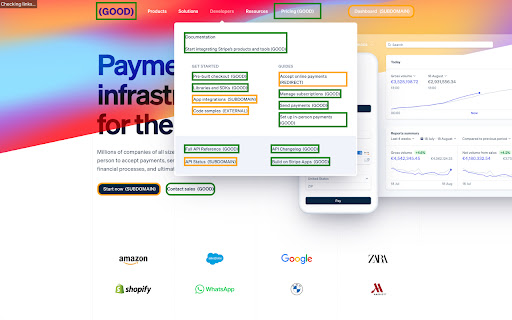
Check for broken links on the current page. Easily find and resolve broken internal links on web pages. External, redirect, and subdomain links are clearly labeled for comprehensive link analysis. Improve website quality and user experience with this handy tool.

Broken Link Checker
Broken Link Checker finds dead links, 404 errors & redirects on any page. One-click scan with color coding. Export results to CSV. Broken Link Checker scans every URL on the current page and shows the result with color codes: green for valid links, red for broken ones (404 and other errors), blue for redirects. Click the icon, wait a few seconds, and see the full picture — no setup, no account, no external service. All checks run locally in your browser. No data is sent anywhere. 1. Open any webpage in Chrome 2. Click the Broken Link Checker icon in the toolbar 3. Watch as each link gets highlighted with a color-coded status 4. Use filters to narrow down by status: Valid, Redirect, or Broken 5. Click "Export" to download a CSV file with all results What you get in the CSV report Each row includes the link text, URL, HTTP status code, and status description. Use it for SEO audits, client reports, QA checklists, or internal documentation. SEO specialists — check for broken links on any page before or after publishing. Spot dead URLs that hurt rankings and user experience. Developers — validate navigation elements, internal links, and API endpoints during development and staging reviews. QA testers — run a quick link check as part of pre-release testing. No need to set up a separate crawling tool for page-level validation. Content editors — find outdated references and dead links in articles, landing pages, and documentation. Marketing teams — make sure every CTA, banner, and campaign link actually works. Q: Does it scan every link on the page? A: Yes — anchor tags, navigation menus, area maps, meta links, data attributes, and onclick handlers are all checked. Q: Can it detect redirects? A: Yes. Redirected URLs (301, 307, 308) are highlighted separately so you can decide whether to update them. Q: Is there a limit on the number of links? A: No hard limit. It handles pages with hundreds of links. For full-site crawls, use a dedicated crawler — this tool is built for fast page-level checks. Q: Is my data safe? A: The extension runs entirely in your browser. No data is collected, stored, or sent to any server.

SEO META in 1 CLICK
Displays all meta data and main SEO information for the best SEO SEO META in 1 CLICK is a tool that displays all meta tags/data and main seo information clearly. By using this tool, we hope you can better manage and improve your SEO and visibility on Internet We focus on displaying: ✔ title and its length, ✔ description and its length, ✔ URL (and meta-canonical url too), ✔ meta-robots, ✔ displaying headers in order of their appearance in HTML (H1, H2, H3, H4, H5 and H6), ✔ number of images with and without ALT, ✔ the number of links (internal, unique, ...) ✔ Open Graph and twitter social data ✔ Robots.txt and sitemap.xml ✔ and much more... (See printscreens) You can also via ETERNAL TOOLS analyse your site and know how improve it (html, css, Google Rich Snippet, PageSpeed...)

Check Broken Links
Use check broken links app to run url check on your website. Quick highlight urls with an easy-to-use broken link checker. 🚀 Keep your website healthy with the app Are you tired of dead urls on your website? They not only create a bad user experience, they can also impact your SEO ranking. That’s why it’s good to have broken link checker on your site 🚀 How does check broken links work? Here's how it works: Scan your webpage– the app is running to find any bad link. It also works as 404 checker Scanning – the program will show a report of all urls found across your website Fix the issue – after check broken links you can fix hrefs by updating or removing them With our tool, you can easily scan on your website and ensure all your “a” tags are well 🚀 Features of check broken links ⚙️ Comprehensive scanning: the extension scans your page to see which urls are inactive ⚙️ Multiple urls detection: the app can detect internal and external urls ⚙️ Reports: get reports showing how many inactive urls in the site ⚙️ Friendly interface: click on the icon, and you’re good to go ⚙️ Colors: check broken links app paints the targets so you can address them fast ⚙️ Updates: the tool stays updated with to keep your hrefs working well ⚙️ Find everything: the tool will find hidden “a” tags even in small images 🚀 Why use the check broken links? ⭐️ Improved SEO: when you look after urls, you improve SEO performance ⭐️ User experience: url issues frustrate users, leading to high bounce rates ⭐️ Time: searching for non-working “a” tags can be tedious ⭐️ Trust: if a site contains invalid adresses, it appears outdated and unreliable This powerful extension helps to find dead links website. This tool saves you time and effort. 🚀 Key benefits of the check broken links tool Here are some of the key benefits of using this app: Efficient: the broke link checker scans in a fraction of the time it would take manually Find hidden: it works even in the smallest details Platforms: the app is browser extension so it can work on every os properly If you don’t have a good broken link checker tool - it can low ui experience and search engine rankings. That is why using a linkchecker is crucial 🚀 How to use the check broken links Start the scan: click on the extension, and you are ready to go Color: during the scan all hrefs will be colored so you can test hyperlink Report: after the app is done you will get an full detailed report Fix the issues: now you can quickly fix them Whether you have a blog, an e-commerce platform, or a corporate page, using broken links checker will help you keep your site free of hrefs which is not working, so your visitors can have a seamless experience 🚀 Find issues and fix them across your site The problem is “a” tags on your page. From blog posts to product pages, by using our check webpage for errors app, you can go across your site. The tool looks for external and internal href data. The site link checker functionality ensures that all hyperlinks lead to the right pages, preventing 404 errors 🚀 The importance of regular testing With the check broken links you are scanning for hrefs regularly which is crucial for website maintenance. You can periodically run tests to catch any new dead url’s data that may have appeared in the link anaylzer reports. The check broken links saves you from letting minor issues snowball into bigger problems. In the other hand, simple caring about your site's data can show that your content is actively maintained and earns user's trust. Whether you’re a beginner or an experienced web developer, using a broken link checker helps keep your site running optimally 🚀 Frequently asked questions ❓ Why is it important to run to use web url checker on website? 💡 Scanning is essential for user experience. Avoiding damaging your SEO. Inactive hrefs can lead to high bounce rates and make your website appear outdated ❓ How does the tool work? 💡 The check broken links scans your website, detects internal and external “a” tags, images, and resources, and generates a report showing which urls are broken ❓ What features does the tool have? 💡 The tool offers comprehensive search for broken links, multiple detection, real-time reports, a user-friendly interface, and regular updates ❓ Why is using this important for my website? 💡 It helps to site’s SEO, provide a better experience and save time ❓ How do I use the check broken links tool? 💡 Click on the icon, and it will scan website. Once it's done, a report'll show with all urls. Now you can update or remove them ❓ What types of urls the tool detect? 💡 The tool can see internal, external and images ❓ Why is regular testing important for my website? 💡 Testing using check broken links helps to see new hyperlinks appearing. Prevent emerging issues

Check My Links
Check My Links is a link checker that crawls through your webpage and looks for broken links. Check My Links is a powerful link checker that scans any webpage, Google Sheet, Docs and instantly identifies broken or invalid links. Whether you're editing a webpage, auditing content, or managing SEO, Check My Links helps you verify every link on the page with a single click. New Feature: Now it can detect the link from Google Doc and Excel sheet too and verify them. ✅ How it works 1. Open the webpage you want to validate. 2. Click the Check My Links icon in your toolbar. 3. The extension will scan all links on the page, highlight the valid ones, and clearly mark any broken or problematic links. 4. View results instantly on the page. 🎁 Features * One-click scan for all webpage links * Highlights valid, broken, and redirected links * Download or view detailed reports for broken and invalid links * Customize highlight colors * Option to disable color highlighting * Faster, accurate link validation - perfect for developers, content editors, and SEO teams 🔐 Advanced Features After a fresh install, the extension will not show product information or tutorials. After a few days, it may display helpful product tips as info. If you prefer a clean interface, you can hide these info using the Advanced Feature Key available here: https://selectorshub.com/how-to-get-check-my-links-advanced-features-key/ 🚫 Default Excluded URLs To prevent unnecessary noise during scanning, the following URLs are excluded by default. If needed, you can remove these exclusions from the extension’s settings: 1. doubleclick.net 2. appliedsemantics.com 🔗 More Details Learn more about the tool here: https://selectorshub.com/checkmylinks/ 💬 Need Help? If you face any issues or have questions, reach out anytime at support@selectorshub.com
