
pfbenbknnmnppacheleigdmlhgllhlpa

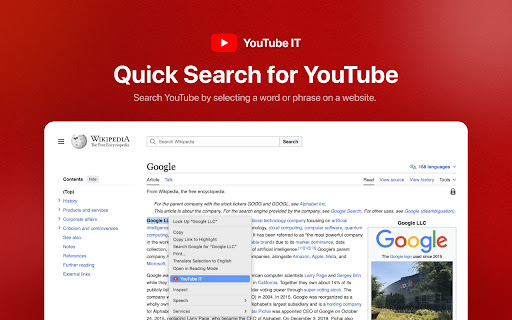
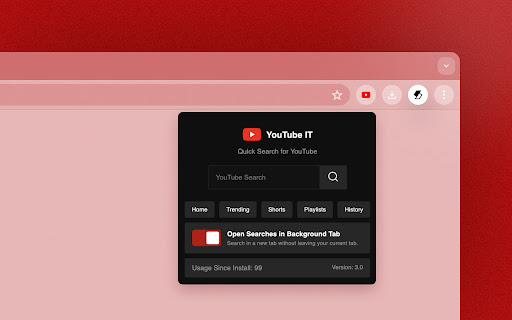
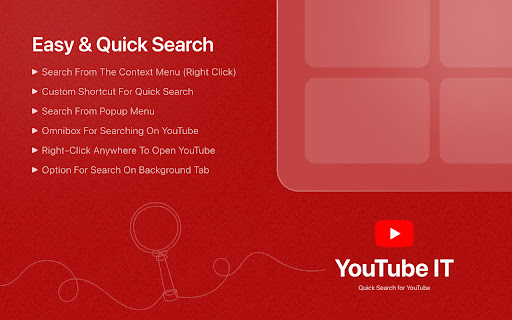

Quick Search for YouTube with Shortcuts, Right-Click, & Omnibox - Instantly search from anywhere on the web. YouTube IT - Quick Search for YouTube Simple extension that allows you to quickly search selected text on YouTube or launch the site with ease. Here's how to use it: • Select any word or phrase on a website, right-click, and choose 'Youtube IT' to perform a quick search on YouTube. • Or, right-click anywhere on the page and choose 'Youtube IT' to instantly open the YouTube page. • You can also create a custom shortcut to search on YouTube more efficiently. • Start searching directly on YouTube by typing "youtube" followed by a space or tab key in your browser's address bar. • With this extension, you can also search a YouTube tab in the background and access different shortcut links to YouTube from the popup.

YouTube Dubbing – Translate & Dub
YouTube Dubbing is a browser extension that translates and dubs online videos in real time. No need to read subtitles—just listen in your native language and understand foreign videos instantly, as naturally as watching local content. Open any video on YouTube, Bilibili, Udemy, or Coursera—YouTube Dubbing automatically translates the subtitles and plays AI dubbing with no extra steps. Just hit play to start. ★ Free — Dub up to 5 videos per day for free, perfect for everyday watching and language learners. ★ Premium — Unlimited videos, AI subtitle enhancement (GPT / Claude), preserve background audio, smart multi-speaker detection, and priority customer support. Core features: - One-click translation & dubbing — Press play to automatically translate subtitles and start dubbing, saving time and effort. - AI subtitle enhancement (Premium) — Even if a video has no subtitles (YouTube & Bilibili), AI can generate subtitles automatically and then translate and dub them. - Multi-model translation (Premium) — Supports leading LLMs like GPT and Claude for more natural and accurate translations. - Rich voice library — Male and female voices, multiple regional accents, automatically matched to the best voice for the target language. - Adaptive playback speed — Dubbing stays in sync at 0.5× to 2× speed. - Preserve background audio (Premium) — Keep original music and sound effects for a more immersive experience. - Smart multi-speaker detection (Premium) — Distinguish different speakers and assign different voices for richer, more natural dialogue. - Cross-platform support — Available on Chrome, Firefox, and Android. - Multi-site support — Works with major platforms like YouTube, Bilibili, Udemy, Coursera, and more. - Universal video dubbing — Even when a video is not covered by the extension’s built-in one-click support, YouTube Dubbing can intelligently detect the media source and guide you to download the video and upload it to our server for subtitle recognition. You will receive an email when processing is complete, then come back and watch. - Subtitle Summary — Subtitle Summary is not limited to YouTube; any website supported by the extension can summarize subtitle content. - Subtitle Editor — If the translation or dubbing still is not satisfactory, copy subtitles from Subtitle Editor to your preferred AI model for translation, then paste them back and save. After manually enabling “skip translation for same-language subtitles,” the extension can dub with your custom subtitles.

YouShort - AI Chat & Summary for YouTube
Chat with any YouTube video. Get instant summaries with clickable timestamps. In any language. YouShort lets you chat with any YouTube video directly on the page — ask questions, get summaries, and jump to the exact moment you need. No more scrubbing through hour-long videos. HOW IT WORKS: Open any YouTube video → YouShort appears as a sidebar → Ask anything or generate a summary → Get precise answers with clickable timestamps that jump to the right moment. ✅ Chat with any YouTube video — Ask questions and get direct answers from the video content ✅ Instant summaries — Get the key points of any video in seconds ✅ Clickable timestamps — Every answer links to the exact moment in the video ✅ Any language — Summaries and answers in your language (French, English, Spanish, German, Italian and more) ✅ Built into YouTube — No tab switching, the panel appears directly on the video page PERFECT FOR: - Business & finance professionals doing market research - Anyone learning from educational content - People who need to extract info fast without watching full videos - Podcast listeners who want the key takeaways FREE & PREMIUM: YouShort offers a free plan with usage limits and a premium plan for unlimited use. Install YouShort and get the information you need — without watching the whole video.

SummaryTube - YouTube Video Summarizer
Get instant AI-powered summaries of any YouTube video with key moments and Q&A SummaryTube is the best Youtube Video Summarizer on the internet that helps you instantly Summarize YouTube Videos with AI. 🎯 Save time on long Youtube Videos. Get valuable insights and key moments analysis on every video. Watch Youtube Videos smarter. As a content creator it also helps you promote your youtube video by summarizing your video and share across social media platforms. ➡️ Latest v2.4.0 & v2.5.0 Updates (April 2026) ===== 1. Faster Summary Generation with better quality & user experience. 2. Show video interesting stats & facts while being summarized. SummaryTube is your personal AI assistant for YouTube. With one click, generate clear, concise accurate summaries of any video. Whether you're a student, professional, researcher, or just curious, SummaryTube will help you understand long videos in seconds, right inside your browser. SummaryTube turns long YouTube videos into short, smart takeaways — right when you need them. ✅ AI-Powered Summaries – Get accurate, structured summaries of YouTube video instantly. ✅ Key Moments & Timestamps – Jump to the most important parts of the video with clickable highlights. ✅ Ask Questions (AI Q&A) – Get common questions and answers about the video. ✅ Full Transcript Viewer – Read & explore the full video transcript, split into easy sections. ✅ Supports Long Videos – Works for tutorials, podcasts, lectures, interviews, and more. ✅ Multi-Language Support – Summarize content in several languages. ✅ Clean UI – Beautiful, distraction-free design with dark mode and easy navigation. ✅ Export & Share – Copy or download summaries for notes, blogs, or social posts. 💡 Perfect For: ➡️ Students revising lectures ➡️ Professionals skimming tutorials or webinars ➡️ Researchers analyzing interviews ➡️ Creators and marketers exploring trends ➡️ Anyone short on time but big on learning 🔧 How It Works: 1. Open any YouTube video after installing chrome extension. 2. Click the "Generate Summary" button 3. View summary, key points, transcripts and questions & answers 👉 Use for free with daily limits 👉 Upgrade for longer videos, more usage, and priority features 👉 Try now and let AI save your time!

DejaVocab - 得记单词
Learn English on YouTube with bilingual subtitles, one-click word & phrase lookup, and an AI sidebar for any webpage. DejaVocab — more than memorizing. Build your own language intuition network. 1️⃣ Immersive YouTube learning view ▸ A distraction-free fullscreen player replaces YouTube's default UI ▸ Bilingual subtitles (original + your native language) generated on demand ▸ Click any word for an instant dictionary card: definition, part of speech, examples ▸ Click a phrase for a natural-language explanation ▸ Built-in grammar panel breaks down tricky sentences ▸ Edit, copy or save a subtitle line with one click ▸ Re-play any line while you think, without losing your place 2️⃣ AI sidebar on any webpage ▸ Open the side panel from the toolbar on any site ▸ Translate the whole page — or just a selection ▸ Summarize long articles in seconds ▸ Explain a confusing sentence, idiom or jargon in plain English ▸ Rewrite selected text: simpler, more formal, shorter, longer ▸ Screenshot the screen and ask the AI about what's in it ▸ Full chat history so you can revisit older answers ▸ Organize saved items into Collections by topic or source 3️⃣ One vocabulary, across all your devices ▸ Words, phrases and saved sentences sync to your DejaVocab account ▸ Review the same vocabulary in the DejaVocab iOS and Android apps ▸ No more scattered notes in three different places 4️⃣ Intuition Network (Ultra & Lifetime) ▸ Semantic search across every phrase you've ever saved ▸ Find a phrase by the idea, not the exact wording ▸ Rediscover expressions you saved months ago when you need them today ▸ Runs privately on your own library — the model searches only your data 5️⃣ Built for real learners ▸ Works with any YouTube video that has a spoken track ▸ Works on articles, blogs, docs, forums — any webpage ▸ Clean English / Simplified Chinese UI, switchable at any time ▸ Free plan covers core lookup and daily AI usage ▸ Ultra / Lifetime plans unlock higher quotas, Intuition Network and priority support 🔒 Privacy ▸ The extension only runs when you trigger it (lookup, selection, screenshot, side panel) ▸ No page content is sent anywhere without an explicit action ▸ Saved vocabulary and AI chats are tied to your account and visible only to you ▸ We do not sell your data 🚀 Getting started 1. Install DejaVocab 2. Click the toolbar icon and sign in (or create a free account) 3. Open any YouTube video — it switches into the DejaVocab learning view automatically 4. On any other site, select text and open the side panel to translate, summarize, explain or rewrite
