
peohnbcnjfjodekofbgkfpjeeepfobaf
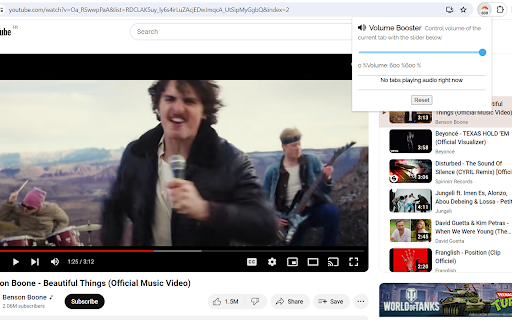
Enhance your audio experience with Volume Booster by AudioMax, the ultimate Chrome extension for boosting sound, enhancing bass, and managing volume with precision. This powerful tool allows you to amplify the volume of videos, music, and games in any tab by up to 600%, transforming your listening and viewing experience. Whether you're enjoying content on YouTube, Vimeo, Dailymotion, Spotify, or any other platform, our extension ensures that you never miss a beat with its advanced bass booster technology and versatile equalizer settings. Our user-friendly interface is designed for simplicity and efficiency, allowing you to easily control and customize your audio environment. With Volume Booster, you can fine-tune audio settings to your preference, ensuring brilliant sound quality for your favorite songs and videos. The stylish popup includes an interactive volume switch and a comprehensive list view, making it easier than ever to navigate and adjust audio across multiple tabs without the hassle of switching back and forth. Getting started with Volume Booster is quick and effortless: Install the extension and pin it to your toolbar for easy access. Click on the Volume Booster icon to enable volume boosting with a simple toggle button. Use the interactive slider to select your desired sound boost range. Enjoy enhanced sound quality tailored to the genre you're listening to or watching, with our equalizer settings optimized for the Chrome browser. But that's not all—Volume Booster is also a comprehensive audio management tool that allows you to set individual volume settings for each tab, giving you complete control over your audio landscape. Whether you're looking to increase volume, enhance bass, or achieve the perfect balance with our equalizer, Volume Booster by AudioMax is your go-to solution for a superior audio experience. We're committed to providing you with the best possible audio enhancement tool. Download Volume Booster by AudioMax now for free, and elevate your audio to new heights. We value your feedback and ratings and are always here to assist with any issues or to help optimize your listening experience. 1. What is Volume Booster? Volume Booster is an innovative app designed to enhance the audio volume of music, videos, and games on your device. It allows users to amplify sound up to 600%, improving the listening experience across various media platforms. 2. How does Volume Booster work? Volume Booster adjusts the system audio settings to increase the volume beyond the default maximum. It employs advanced algorithms to boost sound while striving to maintain audio quality, minimizing distortion. 3. Is Volume Booster free to use? Yes, Volume Booster is available as a free download. Some versions or additional features might offer in-app purchases for advanced functionalities. 4. Can Volume Booster enhance bass? Absolutely! Volume Booster includes a bass boost feature that enhances the depth and richness of bass sounds, providing a more immersive audio experience. 5. How can I install Volume Booster? Volume Booster can be easily installed from the app store or extension marketplace relevant to your device. Simply search for "Volume Booster," and click on the install button. 6. Is Volume Booster compatible with all devices? Volume Booster is compatible with a wide range of devices, including smartphones, tablets, and computers. However, compatibility may vary based on the operating system and version. Please check the app requirements before installing. 7. Will using Volume Booster damage my speakers? When used responsibly, Volume Booster is safe for most devices. However, consistently playing audio at extremely high volumes may put extra strain on your speakers. It is recommended to use the booster judiciously and avoid excessive volumes for prolonged periods. 8. How do I use Volume Booster? Once installed, open Volume Booster and adjust the slider to increase the volume as desired. For specific features like bass boost or equalizer settings, navigate through the app’s interface to customize your audio experience. 9. Can Volume Booster improve audio quality? Volume Booster primarily amplifies volume. While it includes features like bass boost and equalizer settings to enhance audio quality, the primary function is to increase volume levels. 10. What should I do if Volume Booster isn’t working as expected? First, ensure your app is updated to the latest version. Check your device's audio settings and permissions granted to Volume Booster. If issues persist, contact the support team for further assistance. 11. Is it legal to use Volume Booster? Yes, using Volume Booster is legal. It modifies your device's audio output settings within the scope of user permissions and does not infringe on any copyright laws. 12. How can I provide feedback or report a problem? Feedback and reports can usually be submitted through the app’s settings menu, where you may find an option to contact the developer or support team. Your input is valuable for improving Volume Booster. For any further questions or assistance, please reach out to our customer support. We're here to enhance your listening experience!

Sound Booster - increase volume up
Sound booster increase volume video or music on any tab! Bass booster and volume control in your browser. Sound Booster is an extension that will allow you to increase the sound of your system. It can raise volume level up to 600%. Provides volume-enhancing features for popular video platforms such as YouTube, Vimeo, Dailymotion, and others. This means that users can watch their favorite videos at a higher volume, and even improve the overall sound quality of the content. Volume Booster allows you to improve the sound quality in the Chrome browser to get more pleasure from listening to music and watching videos. Bass boost to the full. One of the most efficient and practical extensions for Chrome, which allows you to amplify the sound of any video or audio content played in the browser. Volume booster is an easy and convenient music tool for brilliant sounding of your favorite songs.Just try to take advantage of this Equalizer and enjoy its benefits. How to use Sound booster extension: 1. Install Volume Booster. 2. Pin it in the toolbar. 3. Click on the extension icon and enable the boosting with toggle button. 4. Then, click on the extension icon and choose the sound boost range. Volume Booster is an easy and convenient music tool for brilliant sounding of your favorite songs.Optimize the sound according to the genre which you listening with equalizer for chrome browser. Audio Equalizer is a lite extension that let you easily adjust audio settings (the balance between frequency components in an audio file) from a toolbar popup. Equalizer for Youtube. Just try to take advantage of this Equalizer and enjoy its benefits. Bass Booster Bass booster that help you to set a desired speaker volume degree for each individual tab in your browser. It have a simple interface of sound volume control switch as it just possible with keeping all of its power in a light design. Stylish popup Audio Enhancer with a volume switch with a list of tabs that a now playing audio content. Volume Control Take control over all that audio you need a power volume adjust tool with the ability to set individual volume settings for each tab. To solve that task we developed our audio volume control extension. What’s new (v1.0.11) - Added change of modes Floating window (stays on screen and you can move it) and Pop-up window (opens when you click the icon) - Fixing the issue in Full screen mode We hope you find our extension useful! We are waiting for your feedback and ratings!

Volume Booster - Sound & Bass boost
Volume booster that improve your sound system! Increase volume and bass booster, equalizer. Volume control for Chrome. Volume Booster feature allows you to enhance the audio quality while using the Chrome browser, enabling you to have a more enjoyable experience while listening to music on YouTube or watching videos. This booster can amplify the bass to its fullest and increase the volume by 600%. A Stylish Sound Booster pop-up appears on your screen with a volume switch, displaying a list of tabs currently playing audio content. You can adjust the sound levels in the current web tab using the slider. This extension can significantly enhance the sound quality of your browser, and you can use the volume booster on your preferred websites. Audio volume booster works great on all popular sites: FB, Twitch, Deezer and other sites. Use it as a flexible YouTube equalizer when watching videos, or adjust sound effect levels to bring out your favorite songs to the fullest. Sound Booster is a user-friendly and practical tool for enhancing the audio quality of your favorite songs. By utilizing the equalizer, you can enjoy the benefits of this tool and experience excellent sound quality. Volume Control Take control over all that audio you need a power volume adjust tool with the ability to set individual volume settings for each tab. To solve that task we developed our audio volume control extension. Equalizer Audio Equalizer is a lite extension that let you easily adjust audio settings (the balance between frequency components in an audio file) from a toolbar popup. Equalizer for Youtube. Bass Booster makes videos, songs, movies and more sound awesome by boosting your speakers or headphones. Bass Boost is a simple to use Audio Equalizer that's got several settings to make Videos, Music, Movies, Gameplay, Anime and more sound incredible at the click of a button. It's like having expensive headphones/speakers for completely free, so download it now! We hope you find our tool beneficial, and we eagerly await your feedback and ratings. If you encounter any issues or face any problems while using it, please contact us for assistance.

Extra Volume Booster. Increase sound
Boost volume, shape sound with equalizer, effects. Maximize audio loudness on tabs. Control and customize volume levels on your own Are you bothered that your PC doesn't have enough sound volume? Then I believe this Extra Volume Booster - Loud Speaker with Extra Sound is exactly what you need. Extra Volume Booster enhances your music quality in a way more convenient way. It has a simple UI, guaranteeing you can fast to master it just in a few seconds. Features: - Volume Booster is designed for music lovers and users who like loud and clear sound - Volume Booster has a neat, simple user interface - Boost sound for music, video, and game - Boost bass for music, video, and game - Support use with headphone, build-in speaker and Bluetooth speakers - One-swipe to set the volume to a specific level - Fast to adjust the volume to 200%, 300%, 400% and maximum level Various Boost Available: - Music, game, video, call volume boost - Bluetooth speaker, headphone volume amplifier - Control volume for various websites ...... Still finding a great volume booster to improve your music experience? Now you find our perfect Extra Volume Booster - Loud Speaker with Extra Sound and make any extra sound volume as you want. Volume Booster is a little tool that boosts big volume. Download Volume Booster now and increase party mood!

Music Equalizer & Bass Booster – Sound Enhancer for Chrome
Boost bass, enhance audio & customize sound with genre presets. Music equalizer and boost bass for a better listening experience. 🎧 Boost Your Browsing Audio with Music Equalizer & Bass Booster! 🎶 Take full control of your browser's audio! Our Chrome extension lets you fine-tune the sound of any website using genre-based presets, a powerful bass booster, and a sleek interface. ✅Bass booster for deeper, richer sound ✅Presets for genres like rock, jazz, dance, acoustic, Latin, and more ✅Volume control and 10-band equalizer sliders ✅One-click sound enhancement ✅Auto-disable in normal mode ⚙️ Whether you're listening to music, watching YouTube, or streaming a podcast — this equalizer transforms your sound experience. 🌐 Lightweight and secure, it works directly in your browser tab — no external apps or tools needed. 👉 Try it now and enjoy immersive audio with every click! 🛡️ Permissions explained: "Read and change all your data on the websites you visit" — needed to detect and control sound playing in any tab.
