
pecgnckollojbdbpklfjiojddlpmdgim
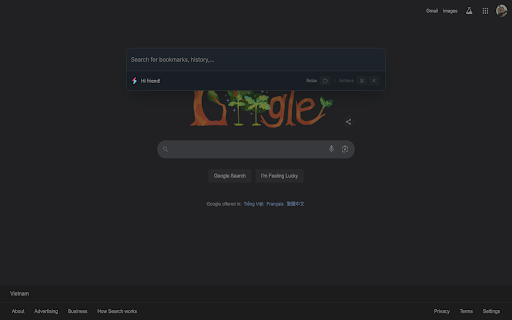


Explore Chrome effortlessly with a powerful command palette 🚀 Powerful Management Extension for Chrome: This extension empowers you to take complete control over your Chrome browsing experience by offering comprehensive management tools for bookmarks, extensions, history, tabs, and commands, etc. Inspired by VSCode command palette and Raycast. - Bookmarks: Quickly access, search, and manage your bookmarks. - Extensions: Easily enable, disable, and manage your installed extensions. - History: Search and navigate through your browsing history with ease. - Tabs: Manage your open tabs, switch between them, and close them effortlessly. - Commands: Execute commands to enhance your browsing experience (e.g., open new tabs, close current tab, detach windows, merge windows, etc.). - Navigation: Navigate to chrome:// pages quickly and efficiently. - Cookies: View and manage (create, update, delete) cookies. - Local Storage: Access and manipulate local storage data. - Internet query: Quickly search via Google, Youtube, Translate, Oxford, Cambridge. - Aliases: Create and manage aliases for quick access to frequently used commands. - Workspace: Launch your workspace with one click: open multiple Chrome tabs instantly.

Arc Search
Replaces the generic new tab page with a search engine similar to Arc. Looking for Arc's stunning command bar to use in Chrome? Download Arc Search today. How to use Arc Search? Step 1: Install the extension Install Arc Search from the Chrome Web Store Step 2: Navigate to extension keyboard shortcuts Go to chrome://extensions/shortcuts in your browser Step 3: Edit keyboard shortcut Edit the "Show search overlay" extension to your desired shortcut (default is Cmd/Ctrl + T) Key features: • Simple tab switcher with all open tabs • Indexes through all search history for quick, reliable results • Automatically recognizes URLs and navigates directly, or searches for queries • One-click shortcuts to ChatGPT and Perplexity with your search query

Chrome Palette
Command Palette for Chrome Open source tool to access all internal chrome commands without using the mouse or remembering hotkeys. Does not upload data to any server, and it will never do (not even telemetry) Start by setting up the shortcut: 1. Click on the extension icon 2. Click the cog icon at the right of the search field 3. The chrome hotkeys page will open, the pencil to edit the shortcut 4. Then set your key combination by pressing it (recommended: cmd+shift+p) - Search tabs - Search history - Search bookmarks - Search installed extensions - Add to bookmarks - Split screen - New Tab - New Window - Open History Page - Open Passwords Page - Open Downloads - Open Extensions - Open Extension Shortcuts - Open Bookmark Manager - Show/hide Bookmarks Bar - Open Settings - Close Current Tab - Terminate Current Tab - Reload Tab - Reload All Tabs - Clear Cache and Reload Tab - Toggle Pin - Duplicate Tab - New Incognito Window - Close Other Tabs - Close Tabs To Right - Close Tabs To Left - Mute/Unmute Tab - Move Tab To Start - Move Tab To End - Move Tab Left - Move Tab Right - Reopen/Unclose Tab - Deattach Tab (Move to New Window) - Reattach Tab (Move Tab to Previous Window) - Split screen (vertical or horizontal) - Toggle full screen - Clear browsing history, cookies and cache - Open Chrome SignIn internals - Open Chrome Apps - Configure Chrome internal flags - Configure Third-party Cookies - Configure Ad privacy - Configure Sync and Google Services - Configure Chrome Profile - Import Bookmarks & Settings - Configure Addresses - Configure Autofill & Passwords - Configure Payment Methods - Configure Site Settings & Permissions - Configure Security - Configure Privacy and security - Configure Search engine - Configure Default browser - Configure on Start-up - Configure Languages - Configure Accessibility - Configure System & Proxy - Reset chrome settings - About chrome - Print page - Reset command history # Changelog * v2.2.0 Added split screen * v2.1.0 Added search installed extensions * v2.0.0 Full rewrite, smaller, faster, new features and more modern look * v1.2.3 Improved search performance * v1.2.2 Added shortcuts for sub-palettes (edit from the shortcuts editor. The popup needs to be open before using the secondary shortcut) * v1.2.1 Reduced load time by 50% (ported to Preact) * v1.2.0 Added "Bookmark this tab" * v1.1.0 Added Bookmark, Audio Tabs and History search support

ArcThing - Window & Tab Manager
Beautifully organise & navigate your tabs & windows in your sidepanel. Inspired by the Arc browser sidebar. 🌟 Transform Your Chrome Experience - Inspired by Arc Browser's Innovation! Ever felt overwhelmed by endless tabs & windows? Arc Thing brings structure and clarity to your browsing experience, helping you work smarter, not harder. ⚡️ What Makes Arc Thing Special? Transform your browser chaos into organized, purpose-driven (work)spaces. Switch effortlessly between work, personal projects, and hobbies - all while maintaining perfect clarity about where everything is. ⚡️ Why Choose Arc Thing? We're convinced that arc-style organization boosts your efficiency, speeds up navigation, and makes browsing more fun. Our extension transforms Chrome into a powerhouse of organization while maintaining its familiar look & feel. 🏠 Spaces (Workspaces) Create dedicated spaces for different parts of your life Keep work separate from personal browsing Switch contexts instantly without losing focus 📑 Vertical Tabs See more tabs at once with our space-efficient vertical layout Leverage your screen's full potential Navigate between tabs faster than ever ⭐️ Favorites Pin your most-used sites for quick access across all spaces Access essential tools instantly Say goodbye to tab hunting 📚 Resource Groups Save important links and tools within their relevant spaces Stop hunting through generic bookmark folders Stop reopening bookmarks and instead use Arc Thing resources 🔒 Privacy First Works entirely in your browser No data collection Your browsing habits stay private 💻 System Requirements Works with Chrome version 88 and above Minimal memory footprint Compatible with Windows, Mac, and Linux ⚠️ Please Note: Arc Thing is inspired by Arc Browser's innovative features but is not affiliated with or endorsed by The Browser Company. We are an independent project aimed at bringing similar productivity benefits to Chrome users. ⁉️ Support / Help: Need help? Have suggestions? We're here to help! Contact us through the Chrome Web Store or visit our support page. Join thousands of users who have already transformed their browsing experience with Arc Thing. Download now and bring structure to your digital life!

Arc Peek: Link preview
"Arc Peek" allows users to preview links, similar to the functionality in the Arc browser. 1. Preview links in current sliding window. 2. Use shift + click link or drag link to open links for preview. 3. Click outside the preview window to close it. 4. Click the expand button to open in a new tab. Some websites may not function properly due to service workers' onfetch handlers, while others disable drag or Shift + Click events, limiting options for link previews. Additionally, links might fail when redirecting to sites with strict Content Security Policies (CSP).
