
pdobhpebaieggeagodjmocmfjjiomcok
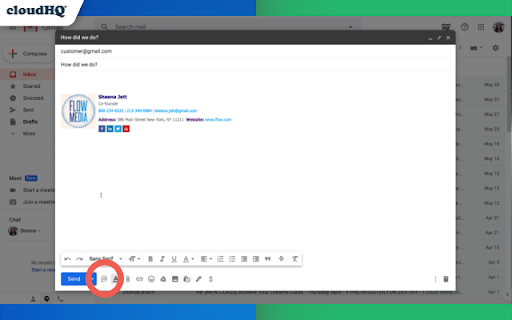


Easy and free online polls and surveys directly from your Gmail ❗Polls and surveys can increase email response rates by 20-25%❗ Use this Chrome extension to embed a poll or a survey right into your email. Top Features: - Polls and surveys have open-ended feedback - Save polls or surveys as your personal template to use again in 1 click - Receive multiple answers to your question - Export all your responses into an organized Google Sheet™, where you can easily share it with others and delegate responsibilities. - Customize the design of your polls and surveys (colors, button borders, etc.) - Embed your poll or survey into your email signature to make sure that you adequately answered someone's inquiry. Online polls are great for your business. Let's break down the top 7 ways you'll want to start using free online polls and surveys in your business emails: 1) Upgrade customer experience: Brand follow-up is a major part of a customer's experience, but it's often forgotten. Fortunately, when you round out your customer experience by explicitly allowing for customer feedback, you complete the sales cycle, which leaves your customers feeling complete, too. Consequently, you'll increase customer loyalty. 2) Identify areas for product/service growth/development: Do you want to speed along product development? Let your customers tell you what they want. You'll save time and money listening to them directly. Find out which products are most popular with your customers; how they're using those products; and what they want to see next. 3) Improve customer service: Polls are a streamlined, automated method for collecting feedback from your customers on their experience. Customer polls encourage your customers to engage with you honestly. You'll be able to tell what they really think, and when they express themselves, you'll have the chance to follow up with them or make them feel heard in a variety of ways. It's a massive first step toward superior customer service. 4) Troubleshooting: Polling your base, you'll learn faster what bugs and/or hassles exist in your product or service. Plus, you'll retain customers that would have simply deserted you because, when they experienced a snag, they didn't have an easy way to tell you. 5) Marketing Surveys: Looking for the next way to grab the attention of your consumer base? When you embed online polls and surveys within your email campaigns, you'll substantially raise your click-through rates, all the while gathering important data about your customers. Then, you can target your next campaign based on customer responses to your survey. Learn your customers' preferences, and then tailor your approach. 6) Validation of helpfulness: When you answer someone's question, ask if your response helped them. It always helps to understand if you've been helpful or not. If you haven't, you'll have a chance to redeem yourself. If you haven't, you'll be able to get validation so that when you need to have a question answered, that person is highly likely to help you in return. 7) RSVP Get confirmation of who's coming to your event! Simple and easy way to see who's a yay, nay, or maybe. Once you're done, you can even export all the responses you get into an organized Google Sheet, where you can share it and delegate responsibilities. cloudHQ. Helping your productivity, 1 click at a time. cloudHQ website: https://www.cloudhq.net/ App website: https://www.gmail-polls-surveys.com/ Pricing: https://www.gmail-polls-surveys.com/pricing Support page: https://support.cloudhq.net/category/browser-extensions/gmail-free-online-polls-and-surveys/ FAQ page: https://support.cloudhq.net/gmail-free-online-polls-surveys-faq-frequently-asked-questions/ Blog: https://blog.cloudhq.net

Sort Gmail Inbox by cloudHQ
Find an email in seconds with free preset filters Find an email in seconds with these free preset filters We know how much you hate having to spend time searching for email. We hate it too! No more searching for the emails you need to find quickly—have the most popular filters set up in your Gmail label area so that you can easily find what you need in seconds. With this free Chrome extension, you'll be able to sort your Gmail inbox by: ✅ Unread emails ✅ Contacts who you need to respond back to ✅ Contacts who need to respond back to you ✅ Received Date organized by year, month, or exact date ✅ A specific person ✅ A specific company, like anyone with emails that have the domain "@youtube.com" ✅ Attachment size, and attachment type, too (no more searching for your presentation when you're about to present!) You'll also be able to: ✅ Save your contacts' emails to a PDF doc for backing them up for safekeeping ✅ Save your contacts' emails in a Google Spreadsheet to view them easily as a report ✅ Set up SMS text alerts for when important contacts email you If you're looking for a way to methodically work through your emails, this is the most effective way to get through them in an organized way that will help you get your work done, lightening bolt fast. cloudHQ. Helping your productivity, 1 click at a time. cloudHQ website: https://www.cloudhq.net/ App website: https://www.sort-gmail-inbox.com/ Pricing: https://www.sort-gmail-inbox.com/pricing Support page: https://support.cloudhq.net/category/browser-extensions/sort-gmail-inbox/ Blog: https://blog.cloudhq.net Demo: https://www.cloudhq.net/demo Google Workspace, Google Sheets, Google Drive, Google Alerts and Gmail are trademarks of Google LLC. Use of this trademark is subject to Google Permissions.

Email Reply Status
Stop wasting time sorting through emails: Instantly know which of your emails needs a reply back. Never drop the ball again. Now you can know exactly which emails need a reply with Email Reply Status. You'll have an inbox indicator that will tell you: 1. Which emails you need to reply to 2. The emails that you already replied to 3. Those that you don't need to reply to at all *NOTE*: For best performances set Gmail page size to 50 emails or less. It's a perfect tool for: ✅ Small business owners ✅ Sales people ✅ Business people who are just too busy to keep track of emails ✅ Customer service representatives ✅ Customer support personnel With Email Reply Status, never miss another opportunity again! cloudHQ. Helping your productivity, 1 click at a time. cloudHQ website: https://www.cloudhq.net/ App website: https://www.email-reply-status.com/ Pricing: https://www.email-reply-status.com/pricing Support page: https://support.cloudhq.net/category/browser-extensions/gmail-reply-status/ Blog: https://blog.cloudhq.net

Email Tracker by cloudHQ
Know when your emails are opened in real-time Now you can find out when your emails are read! This email tracker software is extremely easy to use, and gives you all of the following features where you'll have: ✔️ An email tracking dashboard ✔️ Mobile text, desktop, and email notifications when your email is read ✔️ Reminders if your email goes unopened after 48 hours ✔️ Link tracking ✔️ Email tracking removal options for personal emails you don't want tracked You'll also get a Gmail label to show you: - Tracked emails that you sent, and were opened - Tracked emails that you sent, and were opened, with links that were clicked on (how many times, and which links were clicked on) - A list of all opened but unanswered emails where people need to respond back to you - A list all opened, but unanswered emails where you need to respond back - A list all unopened emails where people need to respond back to you - A list all unopened emails that are awaiting your reply ✔️ As an upgrade: You can export all of your tracked emails to Google Sheets for an up-to-date report on open rates, link clicks and more. This is ideal for salespeople, customer service reps, head hunters, and more! cloudHQ. Helping your productivity, 1 click at a time. NOTE: For easy access to your settings and other cloudHQ apps, look for the cloudHQ icon in the top right corner of your Gmail inbox. Click on it to get started! cloudHQ website: https://www.cloudhq.net/ cloudHQ app list: https://www.cloudhq.net/apps App website: https://www.mail-tracker.com/ Pricing: https://www.mail-tracker.com/pricing Support page: https://support.cloudhq.net/category/browser-extensions/email-tracker/ Blog: https://blog.cloudhq.net

Email List Builder by cloudHQ
Build a spreadsheet with all your Gmail contacts and emails Are you looking for an email list builder that will create an email list for you in a matter of seconds? Email List Builder by cloudHQ gets you a list all of the people that you've ever had contact with in your Gmail™, into a neat and organized Google Sheet™ for you. This is an excellent solution to use so that you can: ✅ Create an email list to send an email campaign (*tip: use mailking.io, another one of our services for free email campaigns) ✅ Monitor interactions with your customers or your suppliers ✅ Keep an updated list of your email contacts in Google Sheets™ You'll get every email merge tag identifier needed in order to build an impressive email list of all your contacts and their information. You can even set this service up so that it can continuously update the contact information from your Gmail™ emails, to be captured and updated for you in your Google Sheet™ spreadsheet. Here is a list of all the email merge tag identifiers that you'll get in separate columns in your Google Sheet™: 1) Email Address 2) First name 3) Last Name 4) Full Name 5) Bio 6) Location 7) Personal Website 8) Last Sent Email Date (Last email sent to the contact) 9) Last Sent Email (A link to the actual email you sent) 10) Total Number of Emails Sent 11) Awaiting for Reply? (Awaiting reply from the contact) 12) Last Received Email Date (Last email received from the contact) 13) Last Received Email (A link to the actual email you received) 14) Total Number of Emails Received 15) Not Replied? (Not replied to the contact) 16) Company Name 17) Role at Company 18) Company Website 19) Company Logo 20) LinkedIn (Link to profile) 21) Facebook (Link to profile) 22) Twitter (Link to profile) We hope you enjoy this simple solution to help you build your email list! Happy email campaigning from your friends at cloudHQ. This is an excellent solution for small businesses to improve communications with their customer or supplier relationships. Your spreadsheet will automatically be updated in real-time as new emails or new contacts come into your inbox, so you will always have full visibility of each business-related relationship in an organized report whenever you need it, in a shareable way via Google Sheets. cloudHQ. Helping your productivity, 1 click at a time. cloudHQ website: https://www.cloudhq.net/ App website: https://www.email-list-builder.com/ Pricing: https://www.email-list-builder.com/pricing Support page: https://support.cloudhq.net/category/browser-extensions/email-list-builder/ Blog: https://blog.cloudhq.net Google Gmail and Google Sheets are trademarks of Google LLC. Use of these trademark are subject to Google Permissions.
