
pdmeeionfnfkheblglbmdkhadlmggake
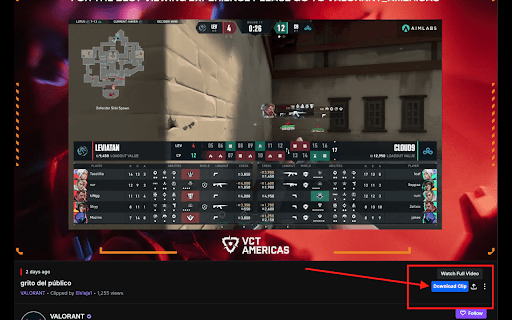

Download any Twitch Clips within Seconds!. Our extension allows you to download your favourite clips with just one click. Download your favourite Twitch Clips within Seconds ! Twitch Clip Downloader by Followerspanda is built in such way that the user can download clips hassle free with one click. ✅ User-Friendly Our interface offers a straightforward, efficient process that anyone can utilize. It's a Twitch clip download extension tool that doesn't require any technical knowledge to operate. ✅ Free to Use We believe in providing a quality service to all Twitch users without any hidden charges. Our tool is 100% free, with no need to provide credit card or personal information. ✅ Convenient Our Twitch Clip Downloader is not just about simplicity; it's also about convenience. The extension automatically recognizes the clip link on Twitch.tv and adds a download button to the page, helping you to quickly download videos. Unlike other competitors, the Twitch Clip Downloader by Followerspanda goes a step further to enhance your Twitch experience. We're committed to continuous improvement, striving to create a seamless download process that caters to your needs. 1. First Go to the any Twitch channel from which you want to download clips. then Click on 'Videos.' 2. After that filter the results by 'Clips.' 3. Then Click on the clip you want to download 4. You will see download button. Click on it and voila! The clip is now downloaded. Twitch Clip Downloader by Followerspanda prioritizes your privacy and ensures that no personal data is collected or transmitted. In specific scenarios, non-personalized data, such as the address of the Twitch clip or a portion thereof, may be transmitted, particularly under the following circumstances: ✅ When you manually input a Twitch clip's URL for download, a request is dispatched to the originating website to facilitate the clip's download. However, it's crucial to note that we do not store any clip URLs in our database. Here are a couple of additional assurances for your peace of mind: ✅ We do not collect any Twitch-related data or your personal data under any circumstance. ✅ We do not access any data from your Chrome browser. Our extension is designed solely to download Twitch clips and cannot perform any other operation. At Followerspanda, we are committed to creating an environment where you can safely and effortlessly download Twitch clips. We deeply value your trust and strive relentlessly to maintain it.

Video Downloader Professional
Download videos from web sites or just collect them in your video list without downloading them. - download and save videos playing on a website to hard disk - select between different resolutions if the site supports it ( e.g. at Vimeo) - play found MP4 videos via Google Chromecast on your TV or play it on your Google Home. - add videos easily to your video list. There you have quick access to the videos and you can play them at any time, without having to return to the orignial web page. You also have the option to play the videos in any size (currently available at selected video providers like Youtube and Vimeo) If you have problems or videos which cannot be downloaded please don't give a bad rating but write us an email to support@link64.com and help us to improve this software. Thank you! Important: We had to lock the download of YouTube, Instagram, Dailymotion, Vk and Tiktok videos because of restrictions of the Chrome Store. There are always videos which are protected by the sites and cannot be downloaded. If you still want to download these videos, we recommend our app at www.videodownloaderultimate.com for all browsers. Privacy Policy: Video Downloader professional does not collect or send any personal data. Non-personalized data (which is the address of the video or part of it) is sent in these cases: - When you manually add videos to the video list a request is sent to the origin website to get information about the video (like title, thumbnail) - When you play a video in the video list, then the playing code of the origin website is loaded and executed. - When opening the Video Downloader professional menu a request is send to the origin of the found videos to receive the video length. - On some supported video sites, we are loading additional information from these sites to get the addresses of the video files.

Twitter Downloader - Twitter Video Downloader
Download Twitter videos effortlessly with Twitter Downloader. Save your favorite clips, moments, and content in just a few clicks. Twitter Downloader - Twitter Video Download: Easily Save Your Memorable Moments This powerful tool allows you to easily download any video from Twitter, whether it's a funny clip, a memorable moment, or educational material, all with one click and save it locally for viewing anytime, anywhere. Through our plugin, you can freely save various content for personal or academic use. We recommend that users do not download copyrighted content without permission. ☑️ One-Click Download, Convenient and Fast: No complicated operations, just click the "Download" icon in the bottom right corner of the video to quickly save the video. ☑️ Support for Multiple Formats:Supports downloading videos in various formats such as MP4, WebM, etc., to meet your different needs. ☑️ High-Definition Quality, Original Taste: The downloaded videos retain the original quality, allowing you to enjoy the best viewing experience. ☑️ Safe and Reliable, Privacy Guaranteed: We are committed to protecting your privacy, all download operations are completed locally, and your personal information will not be leaked. ☑️ No Password or API Required: Simplifies the user experience, no additional information needs to be entered to start downloading. ☑️ 24/7 Support: Provides technical support 24/7 to solve your usage issues. 1. Open the Twitter website or app, find the video you want to download. 2. Click the "Download" icon in the bottom right corner of the video. 3. Select the save location, and the download will start. 📝Disclaimer: This plugin is independently developed and is not associated with the official Twitter app or website. Please ensure compliance with relevant laws and regulations before use.

Patreon Video Downloader
Save your favorite creator videos with one click. Download videos from Patreon for offline viewing, instantly and effortlessly. 🎬 Save Patreon videos with one click Transform how you manage your favorite creator videos with our powerful Chrome extension. Whether you're backing up your work or saving videos for offline viewing, this extension makes the process simple and efficient. Access your favorite materials anytime, even without internet connection. 🚀 Quick start guide 1️⃣ Install the extension from Chrome Web Store 2️⃣ Navigate to any Patreon post with videos you want to save 3️⃣ Click the download button that appears on the post 4️⃣ Files save directly to your device 📥 Powerful features Our extension offers comprehensive functionality designed specifically for managing your media library: ▸ Download videos in original quality ▸ Batch process multiple videos from the same creator ▸ Organize saved files by creator or campaign ▸ Fast processing without quality loss ▸ Clean interface that integrates naturally 🎯 Why choose this extension? 💠 Simple interface: No complicated settings or confusing menus. The extension integrates naturally into your browsing experience, adding buttons exactly where you need them. 💠 Fast processing: Downloads happen quickly without compression or quality degradation. Files process efficiently, saving you time. 💠 Privacy focused: All processing happens locally in your browser. We don't store or track your activity. 🌟 Perfect for Patreon creators and subscribers ➤ Creators can backup exclusive materials safely ➤ Archive important tutorials and educational materials ➤ Keep copies of time-limited posts and announcements 📚 Multiple use cases supported 🔹 Educational materials: Save tutorials and courses for repeated study sessions without buffering issues. 🔹 Exclusive releases: Keep limited-time materials that creators might remove later. 🔹 Research archives: Store interviews, talks, and documentary materials for reference. 🔹 Offline access: Watch your favorite creator work during travel or without internet. 🎓 Getting started 1. You don't need technical knowledge or additional software. Everything is handled automatically, detecting available formats and presenting clear options. 2. No registration required beyond Chrome installation 3. Works immediately after adding to browser 4. Supports both public and patron-only materials (with valid access) 🌐 Works seamlessly with your workflow No need to copy URLs to external websites or use suspicious third-party services. Everything happens directly on platform pages through simple, clearly marked buttons. ➤ Clean interface that doesn't clutter pages ➤ Automatic quality detection for optimal results ➤ Progress indicators for large files ➤ History tracking to manage saved items ➤ Quick access to saved files from extension popup ❓ Frequently asked questions Q: How does it work? A: The extension detects media on pages you visit, then provides direct save links. All processing happens in your browser for privacy and speed. Q: Do I need separate software? A: No, it's a Chrome extension that works entirely in your browser. No separate programs needed. Just install and start right away. Q: What file types are supported? A: The extension handles MP4 videos. Q: Are there limits on downloads? A: No artificial limits exist. Save as much as you have legitimate access to. The only limits are your subscription level and available storage space. Q: Does saving affect streaming quality? A: Not at all. The extension works independently of streaming. You can save in the background while continuing to browse normally. Q: What quality will I get? A: The extension downloads videos in the quality they were originally uploaded. The tool preserves the source quality without compression, so you get the best version available on the platform. 🎉 Start building your offline library

TikTok Video Downloader – Bulk Save
Download TikTok videos without watermark. Bulk save multiple videos with one click. Works directly on TikTok 🎬 Download TikTok Videos and Photos Without Watermark – One Click, Bulk Save Easily save videos and photos from TikTok directly to your device. This powerful extension adds a download button to every TikTok video or image, letting you download content instantly — without watermarks, external websites, or complicated steps. 🚀 Key Features • Download TikTok videos without watermark • Save video and photo content directly from TikTok • One-click download functionality • Bulk download: save multiple videos from user profiles • No redirects or third-party services 📦 Two Download Modes 1. Single Download Mode Click the download button next to any TikTok video or photo. The file will be saved instantly. 2. Bulk Download Mode Download multiple TikTok videos from a user’s profile: - Choose how many recent videos to download (e.g. last 5, 10, 20+) - Filter by date range to save only the content you need - Download as separate files or in a ZIP archive 🔧 Watermark Options By default, videos are saved without watermark. You can choose whether to download videos with or without watermark using a simple toggle in the extension settings. 📚 How to Use TikTok Bulk Downloader 1. Install the extension from Chrome Web Store 2. Open TikTok in your browser 3. Hover over any video or image to see the download button 4. Click to save — instantly 5. For bulk downloads, go to a user profile and click "Download All" 💡 Who Uses This Extension? This tool is ideal for: - TikTok creators backing up their own content - Social media managers collecting TikTok videos - Anyone who wants to save and reuse TikTok content offline 🔐 Simple, Secure, Reliable TikTok Bulk Downloader works inside your browser — no external apps, no logins, and no unnecessary steps. Install it once and start saving TikTok content the easy way. ✅ Start downloading TikTok videos today — with full control and zero hassle.
